
Participant
August 20, 2019
Question

TOC is Correct - Bookmarks are Wrong

  • August 20, 2019
  • 19 replies
  • 2594 views

I have a document with a TOC that is setup to also export the bookmarks to PDF.  The issue I am having is the TOC is using the levels established by my paragraph styles correctly, but the bookmarks are not.

For example:

Here is the TOC for Chapter 2:
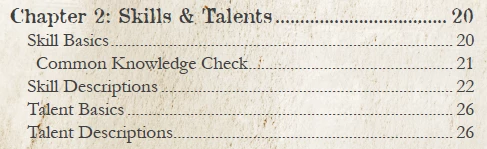
Common Knowledge Check is a subsection and it is indented correctly under the Section Skill Basics.

Now, here are the Bookmarks for Chapter 2:
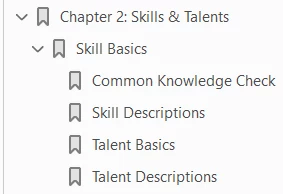
It has made the sections into subsections.  This is happening for every chapter. Basically, it is making all bookmark sin a chapter subordinate to the first bookmark of the chapter.  In the example above, it is making Skill Descriptions, Talent Basics and Talent Descriptions into subsection of Skill Basics. The styles are all working correctly because the TOC is correct.

I have removed the bookmarks and re-added them and I have fixed them annually, but as soon as I update the TOC, it goes back to broken...

    19 replies

    Participating Frequently
    April 14, 2025

    Naturally now I can't reproduce it. 🙄 If I see it again I'll come back here and attach a file.

    Participating Frequently
    April 8, 2025

    For what it's worth, I had something like this happen when I started with four TOC levels and then deleted the third—the new level-3 style was still set to "Level: 4" in the TOC configuration, and when there were two level-3 entries in a row, the second was being bookmarked as a child of the first:


    Expected bookmarks (& TOC appearance):

    • level 1 entry
      • level 2 entry
        • level 3 entry #1
        • level 3 entry #2


    Actual bookmarks:

    • level 1 entry
      • level 2 entry
        • level 3 entry #1
          • level 3 entry #2


    Changing "Level: 4" to "Level: 3" in the TOC configuration fixed the problem.


    Note also that you can check this in the Bookmarks window, you don't need to wait till after exporting to PDF.

    Dave Creamer of IDEAS
    Community Expert
    Community Expert
    April 8, 2025

    >>and when there were two level-3 entries in a row, the second was being bookmarked as a child of the first

    That's not how it works. Entries at the same level will be siblings. 

    I think you contraticted that statement by saying you changed Level 4 to Level 3. 


    David Creamer: Community Expert (ACI and ACE 1995-2023)
    Participating Frequently
    April 9, 2025

    Certainly that's the behavior I would have expected, but see screenshots below. (Apologies if I didn't explain myself well.) Note also I can reproduce the "Before" by setting the level back to 4.


    Before:

    "Level 3" heading is actually level 4

    Looks fine in the TOC on the page:

    But bookmarks are wrong:


    After:

    "Level 3" heading is properly level 3

    Still looks correct on the page:

    Bookmarks are now correct too:

    Dave Creamer of IDEAS
    Community Expert
    Community Expert
    November 25, 2021

    The TOC can be correct on screen since the look is determined by the TOC paragraph styles applied in the TOC styles. 

    The bookmarks are determined by the level settings in the TOC styles.


    My first suspicion is that "Skill Basics" using a different style from "Skill Descriptions" (and others) and the level settings is not the same. 

    David Creamer: Community Expert (ACI and ACE 1995-2023)
    James Gifford—NitroPress
    Legend
    November 25, 2021

    There are several branches at which this can go wrong. Note, though, that he has the same style assigned to both levels.

    Peter Kahrel
    Community Expert
    Community Expert
    August 21, 2019

    Are the levels set up correctly in the TOC style you used? Can you post a screen shot of the Table of Contents window. Make sure you click 'More Options'.

    P.

    Ben Lockwood
    Inspiring
    November 24, 2021

    I am having the same issue. My ToC looks correct, but once exported to PDF some bookmarks are nested under others for no reason I can determine.

    The ToC:


    The Bookmarks in the PDF:


    The ToC Settings:


    For reference, "Introduction" and "History" are both use the Hidden Header paragraph style, all others use the Not-Hidden Header paragraph style.

    Ben Lockwood
    Inspiring
    November 24, 2021

    I've managed to brute-force a solution for myself by opening Window>Interactive>Bookmarks, and editing the way they're arranged directly. My project is small, so it wasn't any trouble, but I'd love to figure out how to avoid this in the future.