Inspiring
March 20, 2023
Answered

TOC picking up styles from headings in body

  • March 20, 2023
  • 4 replies
  • 511 views

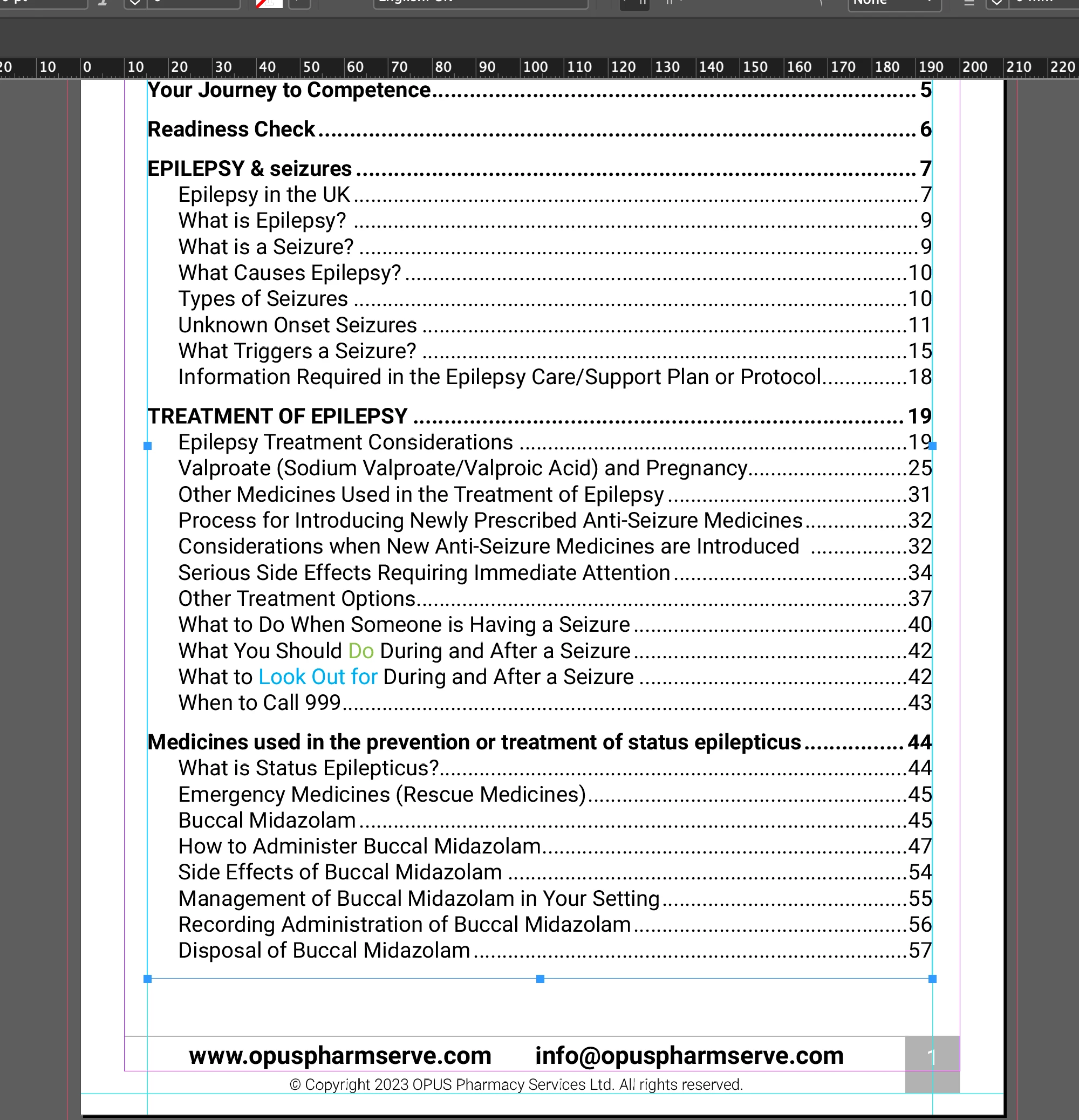
2 headings have a few words that are coloured. these have a character style.

The colour also shows in the in TOC, which is not what i want.


The text should be all black in the TOC.


See page 42 below.
 

This topic is closed to new replies. Start a new post to keep the conversation going.
Correct answer Peter Kahrel

Initially it didn't have a character style on it, and the colour was still showing up in the TOCs.


That means that the colour was added as a local override. In which case even Barb's approach won't work. The only way to get it to work is to add the character style in the text before you generate the TOC (in Barb's book approach) or, if you stick to a single-document approach, to remove the colours from the TOC.

4 replies

Peter Kahrel
Community Expert
Peter KahrelCommunity ExpertCorrect answer
Community Expert
March 20, 2023

Initially it didn't have a character style on it, and the colour was still showing up in the TOCs.


That means that the colour was added as a local override. In which case even Barb's approach won't work. The only way to get it to work is to add the character style in the text before you generate the TOC (in Barb's book approach) or, if you stick to a single-document approach, to remove the colours from the TOC.

Barb Binder
Community Expert
Community Expert
March 20, 2023

Hi @Summayah5FC7:


Alternatively,  you can put the TOC in its own .indd file, and pull the two files together as an InDesign book. This will allow you to redefine the character styles in the separate document to not change the color (or anything) else and they will fade into the background. You cannot do this if the TOC and the source paragraphs are in the same file.


https://helpx.adobe.com/indesign/using/creating-book-files.html


~Barb

~Barb at Rocky Mountain Training
Peter Kahrel
Community Expert
Community Expert
March 20, 2023

InDesign's TOC doesn't cater for the removal of character styles (or footnotes, index markers, inlines, etc. etc.). You have to remove the character styles manually, which is simple enough.

Inspiring
March 20, 2023

Initially it didn't have a character style on it, and the colour was still showing up in the TOCs.

I then created a charater style for it afterwards.

I have taken the character style off but it is still the same.