
SmartGraphicArt
Inspiring
March 9, 2018
Answered

TOC with chapter or section number in place of page number

  • March 9, 2018
  • 2 replies
  • 1204 views

Can't find an answer to my specific problem. The tech manual I'm putting together has a very specific requirement for page numbering and TOC format. The numbering on the pages is different than what it needs to have in the TOC. It's broken up into Work Packages (WP) so I'm setting up each WP as a separate document in the book, so that I can use section and chapter numbering to number the pages as WP-Page Number (Like this: 0005-1, etc). Each WP has to skip the title page of the chapter and start the numbering from the first page in the section, rather than continuing from the previous section. It's making me crazy.
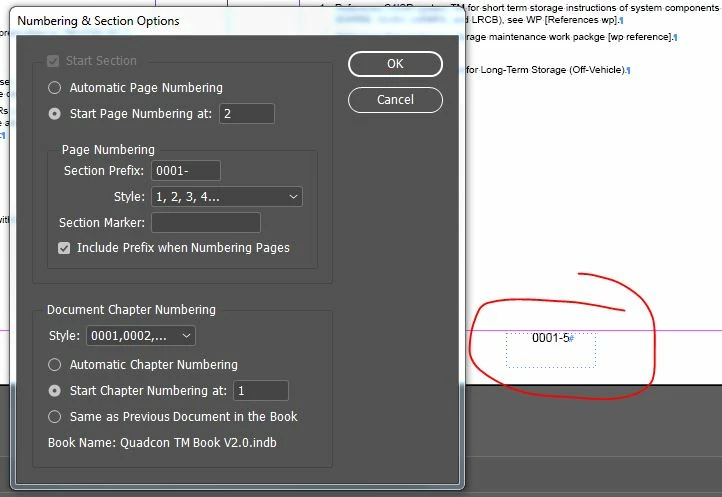
But, the TOC needs to have JUST the WP number, without the page number. The closest I can get it is like this:
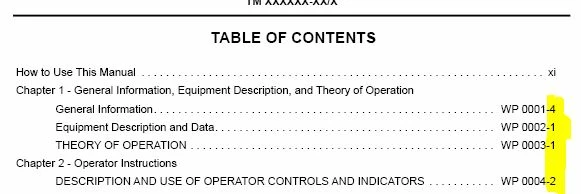
How can I set up the TOC so that it just pulls the WP (Section) number from the first page of each section in place of the Section and Page Number?

    This topic has been closed for replies.
    Correct answer winterm

    There is an amazing facebook group where all the GREP geeks hang out. They will help you: https://www.facebook.com/groups/TreasuresofGrep/

    Honestly, they'll probably answer your question in about 2 minutes.


    No need to bother experts, that’s easy:

    in Find/Change dialog, GREP tab, enter:

    Find what: \d{4}\K-\d+

    Change to: leave blank

    Perform this in TOC text frame (story).

    What this regex do: looks for dash and one or more digits, preceded by four digits, and removes those.

    2 replies

    winterm
    Legend
    March 9, 2018

    You will need to repeat it after each TOC update, sorry. However, you can save query directly in F/C dialog, or, once used, just recall it from Find What dropdown menu. It will take just a second, really.

    SmartGraphicArt
    Inspiring
    March 9, 2018

    I'm adding an instruction block in the slug so the next person on this project will know what to do, since I probably won't be doing it all of the time. Good information, and I'm looking at the GREP tuts on Lynda.com to bone up on the GREP thingy.

    winterm
    Legend
    March 9, 2018

    Great, you won't be sorry. GREP is a really powerful tool. Have fun!

    Document Geek
    Community Expert
    Community Expert
    March 9, 2018

    I think this is a two-step process. First make the TOC, then edit it to do what you need it to.

    There are a couple of things you can do: You can simply make your TOC as usual, and simply apply a GREP style search for text at the end of the paragraph, up to the dash, and make it invisible.

    You could also do a GREP find and replace to do the same thing and actually delete the dash and the digit/s after the dash. That way, what you see on screen will match what appears in the PDF bookmarks (if you are using them).

    SmartGraphicArt
    Inspiring
    March 9, 2018

    Sounds good. Although I have absolutely no idea what a GREP search is. I guess I need to do some more research.

    Document Geek
    Community Expert
    Community Expert
    March 9, 2018

    There is an amazing facebook group where all the GREP geeks hang out. They will help you: https://www.facebook.com/groups/TreasuresofGrep/

    Honestly, they'll probably answer your question in about 2 minutes.