
Legend
December 9, 2021
Answered

too many footnotes apparently lock text

  • December 9, 2021
  • 1 reply
  • 242 views

Hi. Using 17.0.1 on Win 10.

I'm running into a situation where the sheer number of endnotes/footnotes for conversion apparently locks text into overset in a way I can't get at it. (That is, it looks like overset in the Story Editor, but there is no overflow handle on any of the pages that will allow me to release it). I think this is because there are too many footnotes to fit on the page where they need to go. ID crashes as a result.


I have a 574pp book from a client for which I must convert existing ID endnotes to ID footnotes (this is not a Word import situation). There's a built-in function for converting in both directions, I know. The author... well, he went crazy with endnotes. Sometimes he hung 20 or even 30 different endnotes on a single item in the text. (Looks terrible, IHMO.) When I convert these endnotes to footnotes (to facilitate EPUB output -- a long, other story) I reach a point where -- I think -- the footnote conversion process can't fit all the footnotes on the same page as the text they are supporting. Footnotes on the same page is something that ID tries to enforce, although I've seen them flow onto subsequent pages. That, I think is the trigger. Footnote conversion stops and ID crashes. When I re-open ID and try to convert that next incremental single endnote... ID crashes. It converts only so many, and won't budge after that without crashing. (Other files with fewer endnotes have worked just fine.)


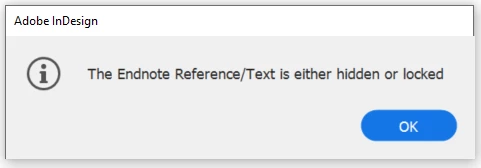
When I highlighted the endnote number of an unconverted endnote and tried to "Go to the endnote reference," I got this dialog:
 

I opened the Story Editor and a number of endnotes and the body copy appear to be in overset. That is, the text is in the Story Editor with a red line to the left:
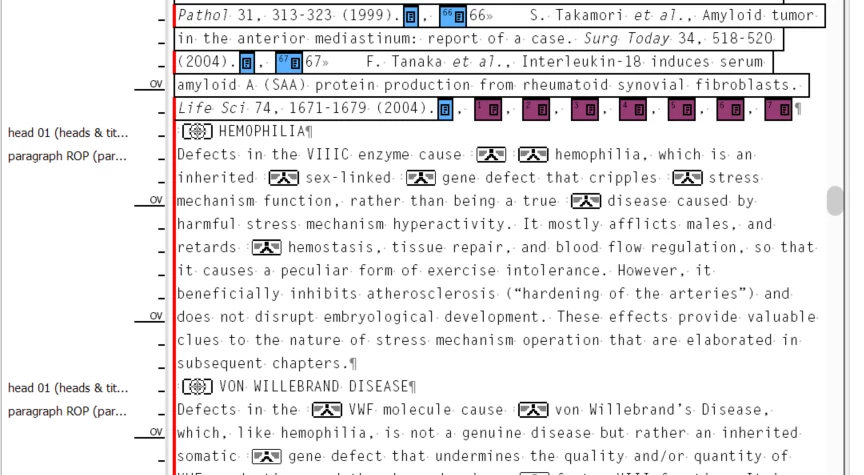


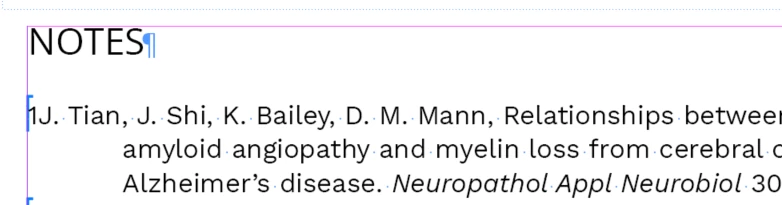
Here is where it gets strange: Nowhere are any of the page outflow handles marked with the red + for overflow. I've looked. That text may indeed be in the overset world as shown in the Story Editor, but I don't seem to be able to access it (except from within Story Editor). I've tried adding pages manually, and that doesn't make any difference. The visible text stops at one point, and the remaining partly converted (or unconverted - that's why they have odd numbers like 1J -- that's created during the halted conversion process by ID) endnotes sit a couple of blank pages away at the end of the chapter:


And if I try to convert any more of them, ID crashes. I've had 30 or so frustrating crashes in the past day (and reported them all), and it's only now I'm figuring out that the crashes may be because the text is in overset -- but I can't seem to get it out of overset.


Any ideas? I may be able to DM one of the afflicted files, but this is from a copyrighted book already in print and I can't just post it for general consumption.


As always, thanks to the community for its unending support.


-j

This topic has been closed for replies.
Correct answer Nedlaw

All righty then: I shall answer my own question.

The problem -- as I suspected -- comes from the author's over-use of endnotes. To whit:


This over-use prevented the "convert endnote to footnote" function from working -- there were too many footnotes for the page to hold at the point of citation. Not a problem with endnotes; big problem with footnotes. This would have been apparent had the footnotes been the original method of citation.


I went into the story editor and elided (pasted into a text box on the pasteboard) the 50 or so excess footnotes, leaving three. This unlocked the text, I was able to place the remaining text on empty pages, and the conversion of the remaining endnotes to footnotes proceeded without crashing ID.


Hey @Adobe: There is an horizon condition in the conversion procedures where too many footnotes attached at the same spot choke the conversion process. Essentially, the automatic (and page-oriented, which does not matter for e-output) layout could not fit both the required number of footnotes and the text citing them on the same page, and "ran home to mama." The software should throw a reasonable error message at this point, rather than crash. ("There are too many footnotes for the page size. Please remove some.") It would have helped in my debugging. Alternatively, the epub output could handle endnotes more gracefully, which would have eliminated the need for me to convert the endnotes to footnotes to begin with (just so they could be put at the end of the chapter later by the epub output process).


Many thanks as always to the community.


-j

1 reply

NedlawAuthorCorrect answer
Legend
December 9, 2021

All righty then: I shall answer my own question.

The problem -- as I suspected -- comes from the author's over-use of endnotes. To whit:


This over-use prevented the "convert endnote to footnote" function from working -- there were too many footnotes for the page to hold at the point of citation. Not a problem with endnotes; big problem with footnotes. This would have been apparent had the footnotes been the original method of citation.


I went into the story editor and elided (pasted into a text box on the pasteboard) the 50 or so excess footnotes, leaving three. This unlocked the text, I was able to place the remaining text on empty pages, and the conversion of the remaining endnotes to footnotes proceeded without crashing ID.


Hey @Adobe: There is an horizon condition in the conversion procedures where too many footnotes attached at the same spot choke the conversion process. Essentially, the automatic (and page-oriented, which does not matter for e-output) layout could not fit both the required number of footnotes and the text citing them on the same page, and "ran home to mama." The software should throw a reasonable error message at this point, rather than crash. ("There are too many footnotes for the page size. Please remove some.") It would have helped in my debugging. Alternatively, the epub output could handle endnotes more gracefully, which would have eliminated the need for me to convert the endnotes to footnotes to begin with (just so they could be put at the end of the chapter later by the epub output process).


Many thanks as always to the community.


-j