

dublove
Legend
June 4, 2025
Answered

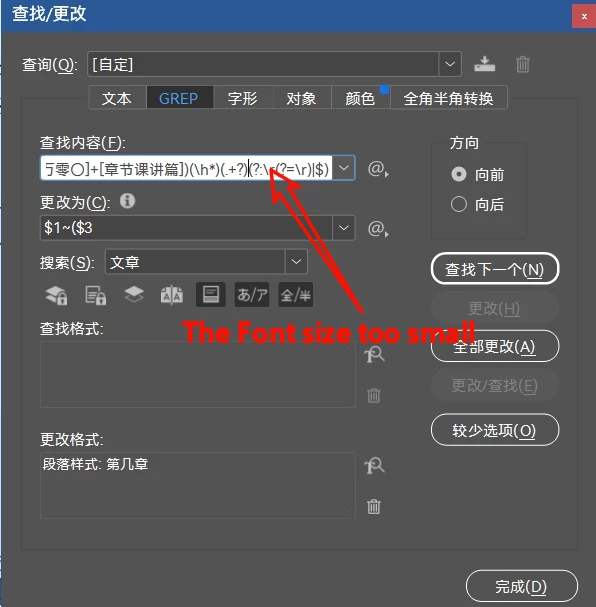
Too Much Pain and Harm: InDesign Find Interface Input Boxes with Too Little Font

  • June 4, 2025
  • 2 replies
  • 395 views

Too Much Pain and Harm: InDesign Find Interface Input Boxes with Too Little Font
I've been testing the regularity for the past two days and realized that too small a font is too painful.
Friends go vote for it. 
Correct answer Laubender

Hi @dublove ,

look into Peter Kahrel's scripts for GREP:


A GREP editor

by Peter Kahrel, last update: 30 June 2019

To say that the Find what field in the Find/Change dialog's GREP tab is a tight place is an understatement. It's not very convenient for entering and editing GREP expressions of more than a dozen characters.

https://creativepro.com/files/kahrel/indesign/grep_editor.html


And even more GREP utilities:

https://creativepro.com/files/kahrel/indesign/grep_matters.html


Regards,
Uwe Laubender
( Adobe Community Expert )

2 replies

LaubenderCommunity ExpertCorrect answer
Community Expert
June 4, 2025

Hi @dublove ,

look into Peter Kahrel's scripts for GREP:


A GREP editor

by Peter Kahrel, last update: 30 June 2019

To say that the Find what field in the Find/Change dialog's GREP tab is a tight place is an understatement. It's not very convenient for entering and editing GREP expressions of more than a dozen characters.

https://creativepro.com/files/kahrel/indesign/grep_editor.html


And even more GREP utilities:

https://creativepro.com/files/kahrel/indesign/grep_matters.html


Regards,
Uwe Laubender
( Adobe Community Expert )

dublove
dubloveAuthor
Legend
June 4, 2025

Thanks, this one works for me too. It's also very small.

Community Expert
June 4, 2025

@dublove said: "… It's also very small."

Hi, hm, note that you can change the height and width of the UI's frame when dragging a corner:

This is my setting for UI scaling ( small ) on a MacBookPro ( 16" monitor ) :


Try a different scaling factor of InDesign's User Interface in the preferences of InDesign.

The text in the head of the ScriptUI window will not scale, but the rest of the UI will:


Regards,
Uwe Laubender
( Adobe Community Expert )


m1b
Community Expert
Community Expert
June 4, 2025

Agreed! Thanks for making the request. I voted.

- Mark

Legend
June 4, 2025

Not an ideal solution.

A script as a palette could be open at the same time as the find / change window. The script would have two editable fields that would mirror the find / change, find what, change to fields. We would need a set and get button for each field.


P.