


Participant
July 24, 2024
Question

Toolbar and constrain proportions not working after InDesign 19.5 update

  • July 24, 2024
  • 4 replies
  • 426 views

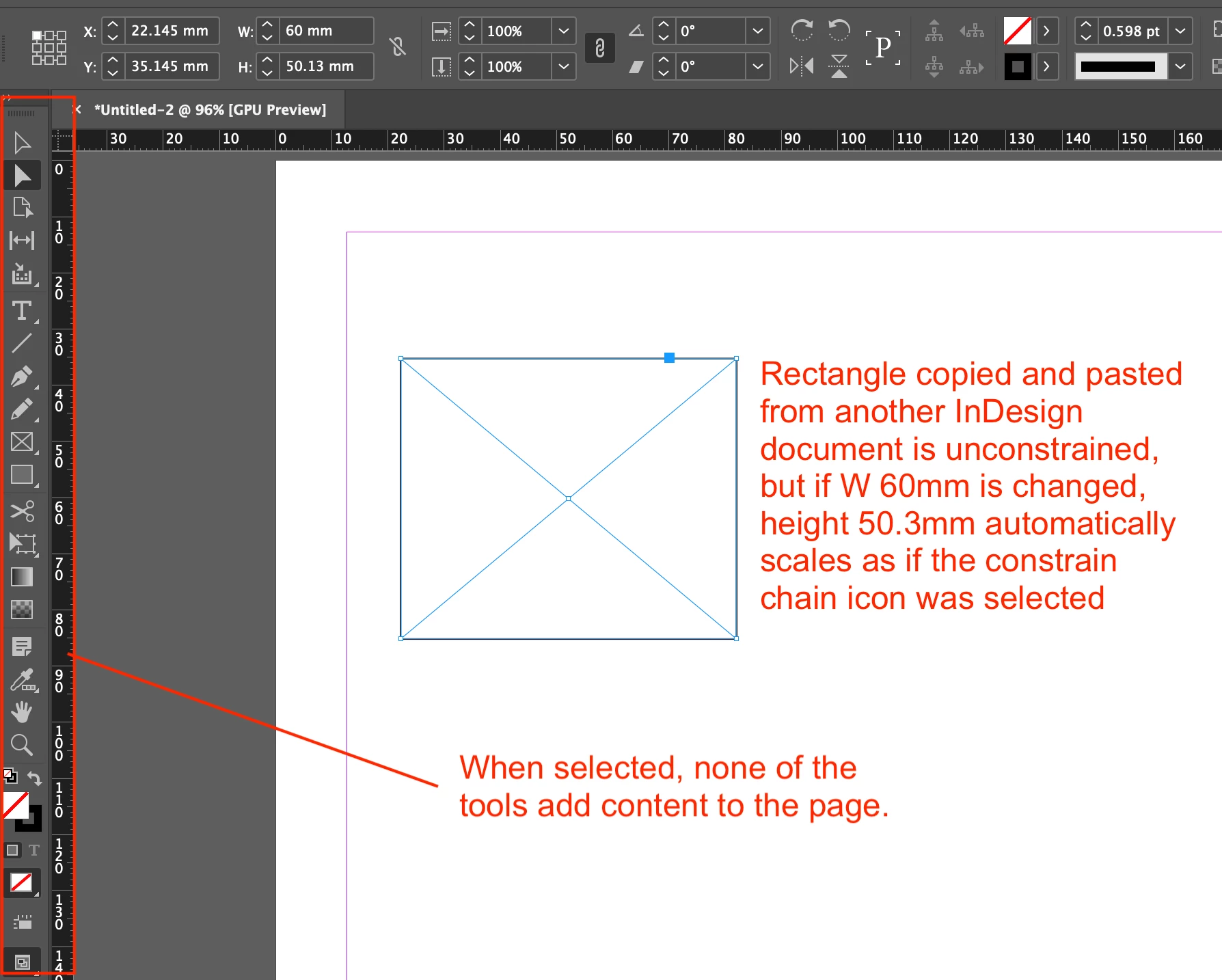
After updating InDesign to version 19.5.0.84 on iMac running OS Sonoma 14.5, the toolbar no longer works. E.g. you can select an option e.g. Rectangle frame tool but cannot add a rectangle to the page. You have to copy and paste an object from a previous InDesign document. And all objects - rectangles, ovals, text automatically constrain proportions proportions, without the constrain icon being selected.


I have:

– tried advanced, essential and other modes (problem persists)

– reset preferences using keyboard shortcuts, as well as InDesign's Preferences > General > Reset Preferences on Quit

– deleted and reinstalled InDesign

– reset preferences again


The issue with any tool that is selected from the toolbar not drawing on, or adding content to a page - Type tool, Pen tool, Rectangle frame tool… and all other tools still persists.


I have ample Ram on the iMac, and when testing the same document  on a different Mac running an older version of InDesign, it is OK, so I assume the issue is related to version 19.5.


Any other options to try resolve this would be great.
This topic has been closed for replies.

4 replies

Mike Witherell
Community Expert
Community Expert
July 27, 2024

Tools cannot operate on a page if the active layer is locked. Did you check your document for a locked layer?

Mike Witherell
Mike Witherell
Community Expert
Community Expert
July 24, 2024
Participant
July 26, 2024

Thanks Mike,


I had previously checked the troubleshooting advice and followed the steps. Additionally have also deleted and decativated any fonts that I was no longer using. Plus have manually deleted Adobe and other older application preferences which the troubleshooting advice was a great help to do.

I think the issue is related to the integrated AI functionality recently added, because all 19 versions I installed to test individually had the same issue.

Fortunately InDesign 18.5.3 is working and I just had to convert newer files to open in this version. So far that seems to be doing the trick, and I have turned off Auto Updates.


I will need to upgrade again at some point but for now this at least means I can get work done.


leo.r
Community Expert
Community Expert
July 26, 2024

Also, try to create a clean new user account in System Settings > Users & Groups and work from there. Will it make a difference?

HARSHIKA_VERMA
Community Manager
Community Manager
July 24, 2024

Hi @marco lombardi,

We are sorry to hear you're experiencing an issue with the 19.5 update. In addition to what our expert has suggested, a few more details would be  super helpful-

  • Please share a screen recording of the issue for better understanding, as we are unable to reproduce the issue.
  • Does that happen with every file or with a specific file?
  • Please also try with a new file.


Let us know if that helps. We'll be happy to assist you further.


Thanks,

Harshika

Participant
July 24, 2024

Hi Harshika,


Here's a screen recording. Before recording, I deleted InDesign, installed earlier versions and each version from 19.4.0.63 to the version this recording was made with 19.0.0.151 all reproduce the same errors.


https://go.screenpal.com/watch/cZiZboVPxp1


– None of the tools are active on a page.
– Objects are constrained when changing a size with constrain not selected
– This is the same on newly created documents and documents that were previously working without any issues.

Hope that helps


Robert at ID-Tasker
Legend
July 24, 2024

I'm not a Mac user so can't give you specifics - but sometimes people suggest to also "clear cache".