Participant
February 27, 2021
Answered

Top of long PDF gets cut off when exporting

  • February 27, 2021
  • 3 replies
  • 1569 views

Hello,

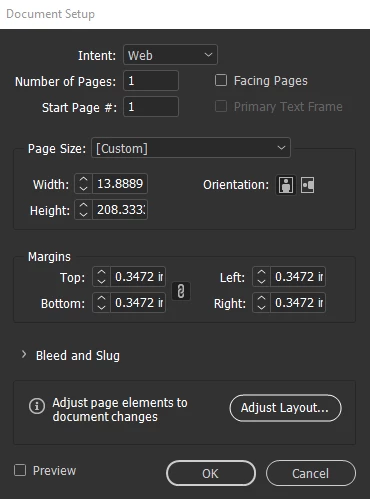
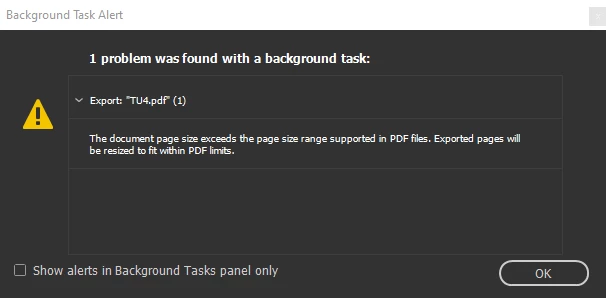
This is the alert that comes up when I try exporting. If there is no workaround to having an abnormally long PDF then I could always cut it in half, but I'd prefer not to. I was wondering if there was a way to keep my file the way it is without having the top portion cut off when exporting. I've attached my document setup if that helps.

Thanks in advance 🙂
This topic has been closed for replies.
Correct answer Barb Binder

What version of InDesign and which PDF preset are you using when you export? Acrobat/Reader has had a 200 inch limit, but I thought I read somewhere that the newer standards lifted that. 

I can't find anything online from Adobe to confirm this, but did find this one article: https://www.cadzation.com/help/pdfpagesize.htm:

In PDF Version 1.6 (Acrobat 7.0) and newer the theoretical PDF page size is 15,000,000"x15,000,000" but in reality most programs do not properly support any sizes above 200"x200".


~Barb

3 replies

Luke Jennings3
Community Expert
Community Expert
March 1, 2021

It's common to work in half size for print work, but I see you are exporting to web. Other options include setting the PDF view option to single page continuous (splitting your file into two pages), exporting to .png or jpeg, or creating your file in Illustrator, where you can save a PDF larger than 200 inches.

Legend
February 27, 2021

Hello,

I don't think there's a workaround for your situation, take a look at the link below.

https://creativepro.com/beware-200-limit-for-pdfs/


Regards,

Mike

BobLevine
Community Expert
Community Expert
February 28, 2021
I was going to go hunting for that. Still comes in handy after all these years.
Barb Binder
Community Expert
Barb BinderCommunity ExpertCorrect answer
Community Expert
February 27, 2021

What version of InDesign and which PDF preset are you using when you export? Acrobat/Reader has had a 200 inch limit, but I thought I read somewhere that the newer standards lifted that. 

I can't find anything online from Adobe to confirm this, but did find this one article: https://www.cadzation.com/help/pdfpagesize.htm:

In PDF Version 1.6 (Acrobat 7.0) and newer the theoretical PDF page size is 15,000,000"x15,000,000" but in reality most programs do not properly support any sizes above 200"x200".


~Barb

~Barb at Rocky Mountain Training