
Tranform Object > Move
Hello Everyone,
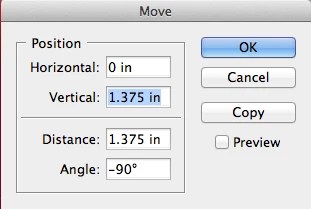
I have a situation where i need to vertically shift all the elements on the page relative to their current location. this would be Up or down based on the current situation. Currently the manual way to complete this part of the task would be to cmd+A > shift+cmd+m > tab > *input the distance manually*. I know scripting should be able to help me out but im not sure where in the indesign scripting i can call the following box, and plug that variable distance in (see screenshot below). I have found a way to acheive the desired result, but its slightly messy and makes for me to "reverse shift" all my graphics back down since they get moved twice by just calling "allPageItems". I was hoping the experts here had some ideas as how to do this without the need for reversing the original shift.
**Quick Edit**
This only has to be done across the current page or spread, i am aware that you cannot select everything in the whole document for manipulation.
***
Here is what i have so far that works, but requires a reverse movement to rest the graphics in their bounding boxes:
var cover = app.activeDocument;
var test = cover.allPageItems;
var myGraphics = cover.allGraphics;
var position = [0, -1.375]; // this is where the Y axis would change with the user input
var reset = [0, 1.375]; //this is the reverse of this number
var trim = cover.documentPreferences.pageHeight;
var units = app.scriptPreferences.measurementUnit = MeasurementUnits.INCHES;
checkHeight(trim);
function globalShift () {
for (i=0; i<test.length; i++)
{
test.move(undefined,position);
}
for (k=0; k<myGraphics.length; k++)
{
myGraphics
}
}
Here is my desired panel to interact with:
Thank you in advance for all replies!


 AdChoices