Kasyan Servetsky
Legend
May 6, 2016
Answered

Transformation matrix – AnchorPoint doesn’t work with horizontal/verticalTranslation

  • May 6, 2016
  • 2 replies
  • 2349 views

Dear forum,

When I try to use an AnchorPoint together with horizontal/verticalTranslation property, it’s ignored. It seems that AnchorPoint.TOP_LEFT_ANCHOR is always used whenever I use a different option: e.g. AnchorPoint.BOTTOM_RIGHT_ANCHOR.

In the example below I tried to use all available anchor points, tried to play with other coordinate spaces, but the result is always the same: as if in UI I set X to 50pt with top-left anchor selected.

main();

function main() {

    var doc = app.activeDocument;

    var obj = doc.rectangles[0];


    var transMatrix = app.transformationMatrices.add({horizontalTranslation: 50});

    obj.transform(CoordinateSpaces.PASTEBOARD_COORDINATES, AnchorPoint.TOP_LEFT_ANCHOR, transMatrix);       

}

However, with all other properties:

clockwiseShearAngle

counterclockwiseRotationAngle

horizontalScaleFactor

verticalScaleFactor

it works as expected

Am I doing something wrong? Am I missing something? Or, is that just a bug?

Regards,
Kasyan

P.S. Forgot to mention: I am on InDesign CC 2014 (2nd release) for Windows.

This topic has been closed for replies.
Correct answer Marc Autret

Hi guys,

Thank you for your feedback!

Probably I wasn’t clear enough about what I’m trying to do.

Here’s the script I’m writing.
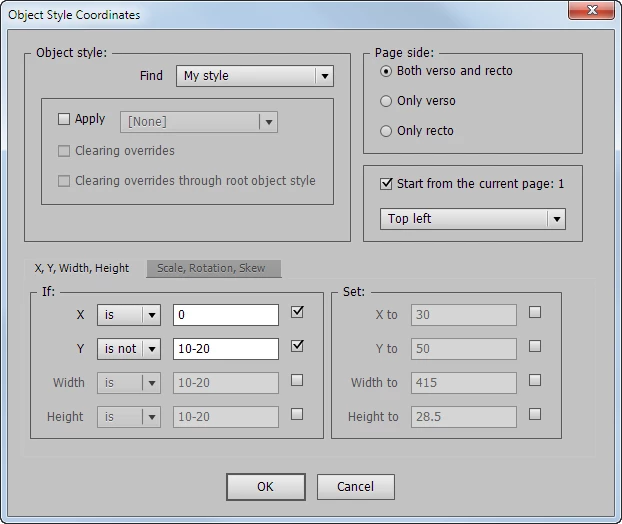
The main idea is to find frames of a certain object style using a number of “conditions” and apply a number of transformations to them.

A condition may be either an exact value or a range of numbers; it can also be positive or negative – is/is not.

For example, in the screenshots above, I want to find frames with “My style” applied whose X position is 0 and Y is not 10-20 and scale them down by 50% both horizontally and vertically using the top-left anchor point.

Now let’s see how I implemented this in code:

function TransformFrame(frame) {

    var transMatrix = null;

    try {

        if (set.cb_widthSet) {

            // Not implemented yet

        }


        if (set.cb_heightSet) {

            // Not implemented yet

        }

        if (set.cb_xSet) { // This doesn't work properly

            transMatrix = CatenateMatrix(transMatrix, "horizontalTranslation", set.xSet);

        }


        if (set.cb_ySet) { // This doesn't work properly

            transMatrix = CatenateMatrix(transMatrix, "verticalTranslation", set.ySet);

        }


        // The following part works as expected

        if (set.cb_xScaleSet) {

            transMatrix = CatenateMatrix(transMatrix, "horizontalScaleFactor", set.xScaleSet / 100);

        }


        if (set.cb_yScaleSet) {

            transMatrix = CatenateMatrix(transMatrix, "verticalScaleFactor", set.yScaleSet / 100);

        }


        if (set.cb_rotationSet) {

            transMatrix = CatenateMatrix(transMatrix, "counterclockwiseRotationAngle", set.rotationSet);

        }


        if (set.cb_skewSet) {

            transMatrix = CatenateMatrix(transMatrix, "clockwiseShearAngle", set.skewSet);

        }


        frame.transform(CoordinateSpaces.PASTEBOARD_COORDINATES, anchorPoint, transMatrix);

    }

    catch(err) {

        $.writeln(err.message + ", line: " + err.line);

    }

}

function CatenateMatrix(transMatrix, property, value) {

    if (transMatrix == null) {

        transMatrix = eval("app.transformationMatrices.add({" + property + ":" + value + "});");

    }

    else {

        transMatrix = transMatrix.catenateMatrix(eval("app.transformationMatrices.add({" + property + ":" + value + "});"));

    }


    return transMatrix;

}

If a check box is on, a new matrix is created for the parameter and is sent to the CatenateMatrix function which either creates a new matrix, if it doesn't exist yet, or catenates it with already existing one. At the end of the TransformFrame function all the transformations are applied in one go.

Here in the code the Set object gets parameters from the dialog box.

set.cb_xSet -- the 'set X' check box is on/off

set.cb_ySet -- the 'set Y' check box is on/off

set.xSet -- the X coordinate where to move the object (only if the 'set X to' check box is on)

set.ySet -- the Y coordinate where to move the object (only if the 'set Y to' check box is on)

and so on.

With horizontalTranslation and verticalTranslation the 2nd 'from' parameter doesn't work: the top-left point is always used. Note: this is a required parameter! And I didn't see that this parameter isn't applicable for hor/ver translation in the reference so I think it's a bug.

In UI if you select a frame and set X, say, to 50pt first using the top-left point and then using the bottom-right point, you'll get totally different results:
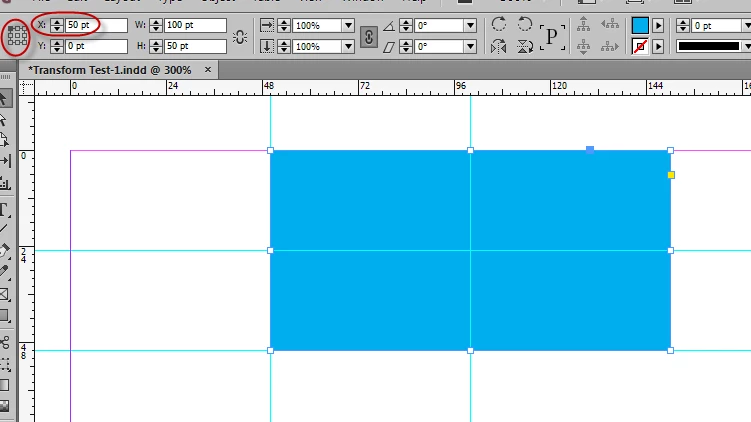
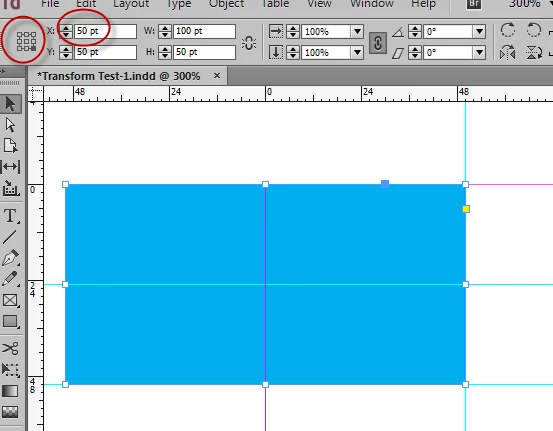
So the script should work in the same way.

Now I see that I have to write a function for moving X, Y and setting Width, Height on my own to handle all the possible 9 anchor points.

Kasyan,

in case this is unclear:

1. If you want to change the proxy points in the UI for any reason, do it with the property transformReferencePoint of the layoutWindow.

2. The values for horizontal and vertical transformation in a transformation matrix are always expressed as points.
Regradless of the measurement systems set for the rulers.

1. I tried this, but it changes the proxy point on the screen only, but transformation is made using top-left point as before (move, transform methods)

2. The script works in points only because my client doesn't use other units.

Regards,
Kasyan


Hi Kasyan,

There would be a lot to say here but I lack time to explain in depth, so just keep in mind that the from parameter of the transform method is nothing but a temporary location which provides the origin of the transformation to be applied. This origin plays an important role in SCALING and ROTATION effects but it has no impact on the TRANSLATION component.

The purpose of myObj.transform(inSpace, fromOrigin, withMatrix, replacingCurrent) is to change the transformation state of myObj. As the initial state, it considers the matrix mapping of myObj relative to inSpace, M, then it computes something like M×T, where T basically represents the desired transformation (withMatrix) but the actual components are internally adjusted to take into account fromOrigin and replacingCurrent. The flags in replacingCurrent allow to specify whether some components must be treated as either new values or operands. Finally, the affine map of myObj is updated accordingly.

It would be wrong to think that the TRANSLATION components reflect the location of the object in the ruler space. When you need to reach a certain location through a translation, you always have to calculate the [tx,ty] parameters as offsets. This is what is done here Move object by "Reference Point" (as mentioned by tpk1982.)

@

Marc

2 replies

tpk1982
Legend
May 7, 2016

Hi Kasyan,

Not sure but this links will helpful for you.

Move object by "Reference Point"

Re: Image size scripting help... 

Community Expert
May 7, 2016

Hi Kasyan,

I don't know exactly what you expect with a horizontal translation.
The whole object will be moved by 50 pt in x-direction. As expected.

Regardless of the anchor point you are choosing.

Uwe

Kasyan Servetsky
Legend
May 8, 2016

@Uwe No, the object is moved to x=50 -- not by 50 pt in x-direction

Here's an example to illustrate what I mean:

1. The starting point -- a rectangle x=0, y=0, w=100, h=50 -- all measurements are in points.

2. Let's scale it by 50% using top-left anchor point.

main();

function main() {

    var doc = app.activeDocument;

    var obj = doc.rectangles[0];


    var transMatrix = app.transformationMatrices.add({horizontalScaleFactor: 0.5});

    obj.transform(CoordinateSpaces.PASTEBOARD_COORDINATES, AnchorPoint.TOP_LEFT_ANCHOR, transMatrix);       

}

The rectangle is scaled down relative to the top-left anchor point.

3. Now I change the anchor point to bottom-right.

obj.transform(CoordinateSpaces.PASTEBOARD_COORDINATES, AnchorPoint.BOTTOM_RIGHT_ANCHOR, transMatrix);

And this time the rectangle is scaled down relative to the bottom-right anchor point.

The change of the anchor point is respected by script.

Now let's play with translation (aka moving).

4. Let's move it horizontally to x = 50 using top-left anchor point.

main();

function main() {

    var doc = app.activeDocument;

    var obj = doc.rectangles[0];


    var transMatrix = app.transformationMatrices.add({horizontalTranslation: 50});

    obj.transform(CoordinateSpaces.PASTEBOARD_COORDINATES, AnchorPoint.TOP_LEFT_ANCHOR, transMatrix);       

}

So far so good: I get the same result as if I did in inDesign manually.

5. Now I change the anchor point to bottom-right.

obj.transform(CoordinateSpaces.PASTEBOARD_COORDINATES, AnchorPoint.BOTTOM_RIGHT_ANCHOR, transMatrix);

However, I get the same result as before for the top-left anchor (the screenshot for step 4 above) no matter whichever anchor point I use. This problem happens only with horizontalTranslation and verticalTranslation.

I expect the result like so:

@tpk1982 I can't use the Marc's function as it is because it moves an object in both directions: X and Y. But I also need to move it only X and only Y. Trying to figure out how to adjust it to my needs but it seems to be beyond my level.

Anyway, thank you both.

Regards,
Kasyan

Trevor:
Legend
May 9, 2016

Hi Kasyan

The translation is relative to the current position of the object and therefore it's irrelevant which point you refer to.

Here's a quick experiment,

Stand with your heals against a wall. Measure 1 meter from the wall, mark that point and line up your heals to that point. Mark the point where your toes end.

Go back to the same wall. This time measure a meter from your toes. Mark that point and line up your toes with that mark. Mark the point where your heals start.

The 2 sets of 2 marks should line up.

I can't understand why you expect them to be different or whats the different between moving feet or a blue rectangle.

Same point that Uwe made above just a bit more verbose.

Regards

Trevor