
Participating Frequently
November 2, 2024
Answered

Transparent Gif Overlay in Parent Page

  • November 2, 2024
  • 5 replies
  • 625 views

Congratulations to me if I can competently describe what I want to do, ha ha.


I have a parent page with a frame to hold an image on the child pages.


I copy an image to the clipboard, create a child page, Cmd + Shift + Click to select the frame from the parent, then right-click and Paste Into to paste my image into the frame. Works perfectly.


I have  a transparent gif that I want to appear over that image on every child page. Is there some way to put that image into the frame in the parent page so that it appears in the frame on the child page above my pasted image?


This is the overlay I want on my parent page:
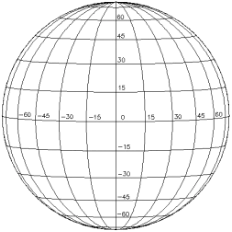


Then I'm going to copy an image like this:
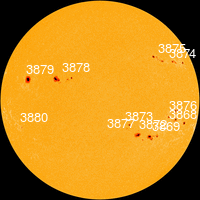


And paste it into my child page so that it shows up like this, under the overlay:
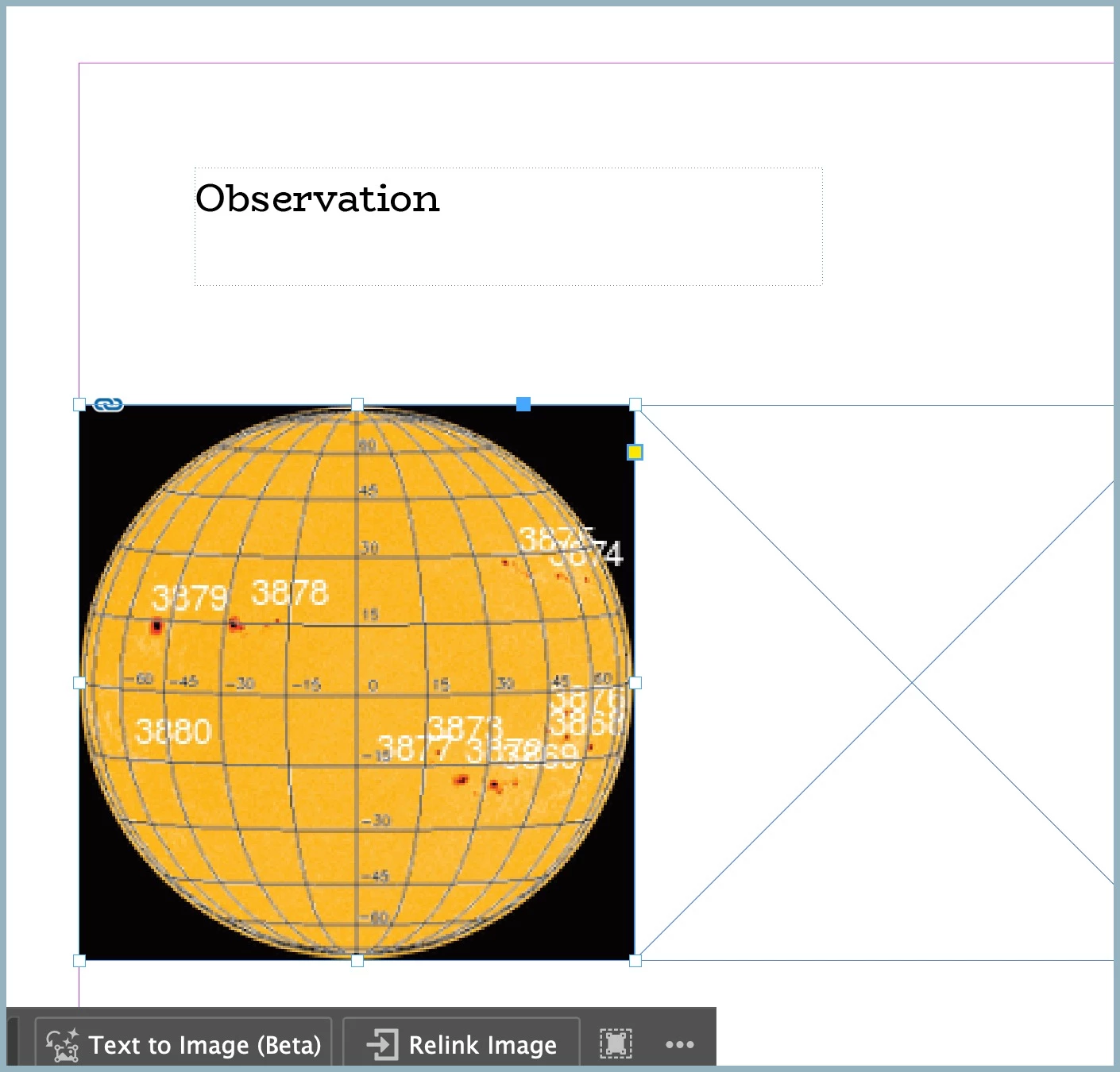


Is there a way to do this? I do want to retain the option of repositioning the frame (or making other changes) on the parent page and have it reposition on all the child pages. So I don't want to do anything that will break that capability.


Thanks so much for your input!

This topic has been closed for replies.
Correct answer Mike Witherell

Sure. Place it on the Parent Page, but on a Layer higher than the empty frame layer. Once the overlay image is in the frame on the parent on the upper layer ... lock the upper layer. Now you can visit the child pages and do what you were already doing.

BTW, always File > Place the saved/named graphic. Don't copy n paste it.

5 replies

Participating Frequently
November 3, 2024

Thank you all for your comments—I'm a smarter InDesign user today. I'm going to redo the overlay and link it in from AI, and will work out a process for saving and linking the images.


Follow-up question about linked images. If I save my InDesign with linked images in the Adobe (CC?) cloud, are the linked images somehow saved there as well?

Willi Adelberger
Community Expert
Community Expert
November 4, 2024

You can package the file, ao all assets are gathered in a common folder and subfolder. Later you can move or archive the whole folder without getting problems.

Willi Adelberger
Community Expert
Community Expert
November 3, 2024

I recommend to avoid gif at any cost to use in InDesign. Istead of a GIF you can use PSD or TIFF as those are also transparent. But in you example the wire kind image i would use an AI or PDF/X-4 file instead. This would increase quality.


Don`t copy and paste, use the place command instead and place a linked (not embedded) image.


Use a layer structure, put the overlay image in a layer above where yo want to use the images on the pages. All pages and parents have the same layers in a document. Objects on a layer above others on the parent will overlay all objects below on pages.

Participating Frequently
November 3, 2024

Thank you Willi. You can read my response to Mike's post to better understand what I'm doing. Would you still recommend linked instead of embedded? I'm going to Google around to try to better understand why this is a better practice (it intuitively seems to be better to have them directly available in some directory rather than embedded I suppose in most cases).


The original I have of that grid overlay is the GIF image. The more I read from the comments and think about it, I may attempt to recreate this in AI...it is a pretty low quality.


Thank you for your input!

Willi Adelberger
Community Expert
Community Expert
November 3, 2024

Embedding images is the main cause for corrupted files. That is why I recommend to link files. 
Recreate the image in Illustrator. You will benefit from a higher quality. 

Robert at ID-Tasker
Legend
November 3, 2024

@GNARBUNKLISH


Why "Paste Into"? 


Participating Frequently
November 3, 2024

Hi Robert,

I'm creating a page a day and copying/pasting images from a website (see my reply to @Mike Witherell  above). I don't need the images for anything else, and copy/paste just intuitively seemed like an obvious workflow. Saving the image first then placing wouldn't be much extra work. Does placing images link them in some way that would require me to keep all of the images (3 per day over at least 50 days)? I think I'd want to embed them so that I end up with a single file that has all the images vs. a file that relies on a directory of images (but I'm sure there are ways to do this). Any comment or advice? I appreciate your input.

Robert at ID-Tasker
Legend
November 3, 2024
quote

Hi Robert,

I'm creating a page a day and copying/pasting images from a website (see my reply to @Mike Witherell  above). I don't need the images for anything else, and copy/paste just intuitively seemed like an obvious workflow. Saving the image first then placing wouldn't be much extra work. Does placing images link them in some way that would require me to keep all of the images (3 per day over at least 50 days)? I think I'd want to embed them so that I end up with a single file that has all the images vs. a file that relies on a directory of images (but I'm sure there are ways to do this). Any comment or advice? I appreciate your input.


By @GNARBUNKLISH


Being "more convenient" doesn't mean it's best - or right - way to do things, unfortunately - please check my other reply.


If you link image - InDesign will only store small preview inside - if you paste - whole image needs to be kept inside.


Not sure what is the size of your INDD file - and how often are you doing Save As with a new name - but try to save your INDD document with a new name - the difference in size of the INDD file on your drive should be siginificant - if you don't do Save As too often and you are working on the same copy of your document.


When you just do Ctrl+S / Save - all the Undo history is saved at the end of your INDD file - when you open your INDD file, InDesign needs to analyse all this history to build latest version of your document.


It also needs to crawl through a lot of stored image data.


James Gifford—NitroPress
Legend
November 2, 2024

Mike beat me to it. Any image on a Parent page will respect the layer structure for all child pages. So if your overlay is on Layer 3 and you place your child images on Layer 2, the overlay will be transparent above any Layer 2 (or Layer 1) content. Anything you change on the Parent page will be reflected on all Child pages you've applied it to.


Just a recommendation, though — I'd use PSD for the transparent object, not the obsolete GIF format, or PNG.

Participating Frequently
November 3, 2024

Hi James,

Thanks for your input. In the end it helped clarify what Mike advised and was very helpful.

So I'm very intrested in why PSD vs. GIF or PNG. GIF and PNG are obsolete (or becoming obsolete)? My source image is a GIF, so I'd either want to redo it (probably in Illustrator) or import it into Photoshop and then save it out as a PSD—would there be an advantage still to doing that?

Willi Adelberger
Community Expert
Community Expert
November 3, 2024

If you create it in Illustrator use the ai file. Convering to PSD is decreasing quality. 

Mike Witherell
Community Expert
Mike WitherellCommunity ExpertCorrect answer
Community Expert
November 2, 2024

Sure. Place it on the Parent Page, but on a Layer higher than the empty frame layer. Once the overlay image is in the frame on the parent on the upper layer ... lock the upper layer. Now you can visit the child pages and do what you were already doing.

BTW, always File > Place the saved/named graphic. Don't copy n paste it.

Mike Witherell
Participating Frequently
November 3, 2024

Thank you. It took me a couple of attempts and re-reading to understand that I needed to create a new layer above the default layer, then place the image in the new layer and lock it. Once I figured that out, it started working perfectly. Should have read all the comments first as @James Gifford—NitroPress made this abundently clear, but no matter. Appreciate all the help!

@Robert at ID-Tasker  asks "why paste into" and you and others recommend Place vs. Paste. 1) because I don't know any better, ha ha; 2) because what I'm trying to do is to create one page per day to record solar observations. The requirement is to record 3 images from a website each day and place them on a page along with my own measurements. So the intuitive workflow would be to create a new page, then visit the website and copy/paste the images onto the page. Each page would look something like this:

In the end I'll add several pages of introductory information, and my lab setup, and some reference information, create a simple cover, and publish everything to a PDF for my assignment, and to a hard-cover format of some sort for my own records. I may even try home-binding this as I've been interested in attempting a book binding project on my own.

That grid overlaying the image of the Sun is what I was trying to get into the parent page (thank you, that seems to work really well).


Thanks everyone for all your help, and I would welcome any additional advice on how to procede with this project.


So copy/paste just saves me a couple of steps. So does that make sense to do in this case, or would you still recommend Place not Paste ? Any other advice would be appreciated as well.

Robert at ID-Tasker
Legend
November 3, 2024
quote

[...]
@Robert at ID-Tasker  asks "why paste into" and you and others recommend Place vs. Paste. 1) because I don't know any better, ha ha; 2) because what I'm trying to do is to create one page per day to record solar observations. The requirement is to record 3 images from a website each day and place them on a page along with my own measurements. So the intuitive workflow would be to create a new page, then visit the website and copy/paste the images onto the page. Each page would look something like this:


[...]


So copy/paste just saves me a couple of steps. So does that make sense to do in this case, or would you still recommend Place not Paste ? Any other advice would be appreciated as well.


By @GNARBUNKLISH


If you paste anything - instead of linking - your INDD file will be much bigger than necessary = can get corrupted.


You should paste your image to Photoshop - or even Paint on Windows - save it and then link it.


Yes, few extra steps - but it might save you a lot of time - and stress - at some point...