
Question
Troubleshooting template numbering system
Hi,
I am trying to fix a broken numbering system on a project template. I didn't make the template.
Currently the leading number "4" (chapter number) is assigned by going to layout > numbering options > starting numbering at 4
The sub-chapters (4.1, 4.2, etc) are updated, but the sub-sub-chapters remain un updated. Furthermore, there is incongruence between what is reported in the table of contents and the actual sub-sub chapter number:
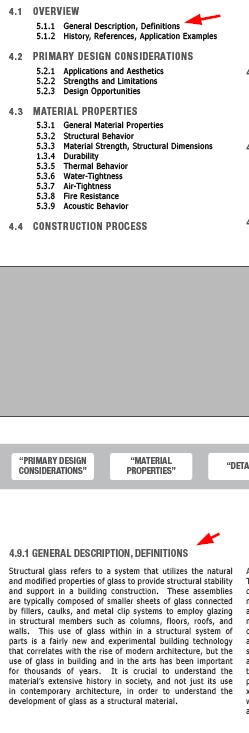
Here is a screen recording with more detail:
https://youtube.com/shorts/gOyrIXpRz6g?feature=share
And I can upload the indesign file if needed.
Thanks for any suggestions for how to resolve this.


 AdChoices