January 22, 2020
Answered

Trying to change color of all tables in a document

  • January 22, 2020
  • 3 replies
  • 750 views

New to JavaScript and scripting, and just wanted some more clarity on how everyItem() method works. I have this code:


var document = app.activeDocument;
var swatches = document.swatches;
var allitems = document.stories.everyItem()
var alltables = allitems.tables.everyItem()
var allcells = alltables.cells;

var currentcell = allcells.firstItem()
var cell;

while (true) {
    cell = currentcell;
    switch (cell.contents) {
        case "Achiever":
        case "Consistency":
        case "Focus":
        case "Arranger":
        case "Deliberative":
        case "Responsibility":
        case "Belief":
        case "Discipline":
        case "Restorative":
            cell.fillColor = swatches.itemByName("Strengths Purple"); 
            break;
            }  
        }
    if (cell === allcells.lastItem()) {
        break;
    }
    currentcell = allcells.nextItem(cell);
}


This works, but when it finds an item that matched what I wanted, it changed the matching cell number in all tables in the document. Upon some digging in ES ToolKit, I found that for some reason the cell objects produced by allcells.nextItem() actually seem to be multiple cell objects? i.e. currentcell.contents returns an array of about 8 items -- the first row of every table in the document. On the next iteration it contains the second row of every table in the document.


I was wondering how to further separate this out so I can iterate over every cell individually. Do I need to call everyItem() once more on currentcell?
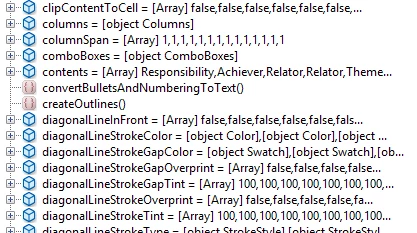


(I also tried a version with a for loop that iterates over the seemingly multiple cells in each cell object, but this version would not assign fill color properly.)


var document = app.activeDocument;
var swatches = document.swatches;
var allitems = document.stories.everyItem()
var alltables = allitems.tables.everyItem()
var allcells = alltables.cells;

var currentcell = allcells.firstItem()
var cell;

while (true) {
    cell = currentcell;
    for (var i = 0; i < cell.contents.length; i++) {
        switch (cell.contents[i]) {
            case "Achiever":
            case "Consistency":
            case "Focus":
            case "Arranger":
            case "Deliberative":
            case "Responsibility":
            case "Belief":
            case "Discipline":
            case "Restorative":
                cell.fillColor[i] = swatches.itemByName("Strengths Purple"); //This simply doesn't work
                break;
            }  
        }
     if (cell === allcells.lastItem()) {
        break;
        }
    currentcell = allcells.nextItem(cell);
}


Thank you! And I know there might be a better way to do this with findWhat, but I'm interested in understanding why this particular problem occurs.


This topic has been closed for replies.
Correct answer Manan Joshi

In order to understand how everyItem works i would encourage you to read the excellent article written by Marc

http://www.indiscripts.com/post/2010/06/on-everyitem-part-1

Coming back to your code, consider an example where you have 2 tables in the document. Then the following code


var alltables = allitems.tables.everyItem()


would return a table object where each property would be an array whose length would be equal to the total no. of tables i.e. 2, any property or method called on allTables would be called on every table, this is a shorthand way of calling these properties by using a loop

Now in the code below


var allcells = alltables.cells;


 cells is called on both the tables and the return is a cells object that again has elements that are arrays. So when you use something like allcells.firstItem() it means that you are targetting first element of every table hence 2 cells would be changed as per our example.

In order to target single cells you would have to resolve this collection and that can be done using the getelements method. So if you change your code to the following


var allcells = alltables.cells.everyItem().getElements()


the allCells would be an array of cell objects which you can then traverse using the traditional for loop and change the cell properties as per you logic.


-Manan

3 replies

Community Expert
January 23, 2020

Hi trainingpractice,

what's your version of InDesign?


Don't know what you think what cell.contents will contain.

Take into account that the value of contents in object cell not necessarily is a string.

cell.contents.length

does not make any sense.

Unless you want to count the length of a string.


What will cell.contents[0] get? In case of a string it will get the first character of that string.

What if the cell is empty? Then contents is a string of length 0. And cell.contents[0] will throw an error.

What if the cell is a graphic cell? Then contents has no property length. Means you are into trouble.


See this sample table from InDesign 2020 where the first cell is a graphic cell, the second one contains text, the third one contains an anchored object and the fourth one contains nothing.


Assumed this is the only table of the only text frame in my active document.

When running a little snippet like below the result is quite different from what you might think.


var cellsArray = app.documents[0].stories[0].tables[0].cells.everyItem().getElements();

for( var n=0; n<cellsArray.length; n++ )
{
	$.writeln( n +" : "+"Contents of: "+cellsArray[n] +" : "+ cellsArray[n].contents );
};

/*
	0 : Contents of: [object Cell] : [object Rectangle]
	1 : Contents of: [object Cell] : Text
	2 : Contents of: [object Cell] : 
	3 : Contents of: [object Cell] : 
*/


Regards,
Uwe Laubender

( ACP )

Manan JoshiCommunity ExpertCorrect answer
Community Expert
January 23, 2020

In order to understand how everyItem works i would encourage you to read the excellent article written by Marc

http://www.indiscripts.com/post/2010/06/on-everyitem-part-1

Coming back to your code, consider an example where you have 2 tables in the document. Then the following code


var alltables = allitems.tables.everyItem()


would return a table object where each property would be an array whose length would be equal to the total no. of tables i.e. 2, any property or method called on allTables would be called on every table, this is a shorthand way of calling these properties by using a loop

Now in the code below


var allcells = alltables.cells;


 cells is called on both the tables and the return is a cells object that again has elements that are arrays. So when you use something like allcells.firstItem() it means that you are targetting first element of every table hence 2 cells would be changed as per our example.

In order to target single cells you would have to resolve this collection and that can be done using the getelements method. So if you change your code to the following


var allcells = alltables.cells.everyItem().getElements()


the allCells would be an array of cell objects which you can then traverse using the traditional for loop and change the cell properties as per you logic.


-Manan

-Manan
January 23, 2020

Thank you so much, this is exactly the explanation I was looking for 🙂

ajabon grinsmith
Community Expert
Community Expert
January 23, 2020
I imagine that the first code doesn't work as expected because of the merged cells.