Participant
May 16, 2023
Answered

Trying to export an epub

  • May 16, 2023
  • 3 replies
  • 307 views

I am trying to export an epub 3 reflowable but I keep getting the message: Error Formatting image '1.png'. The system may be low on memory or disk space. How do I fix this?

 

Correct answer Robert at ID-Tasker
quote

I had the same issue, but found the solution.

Open layers panel and go through each spread, you will see every object in the layer panel.

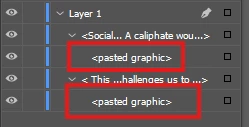
if you notice something like this:

this can be the cause of the error.

try to toggle visibility to see if there is any object. If there is not any object on this layer, delete that and you are good to go.


By @muhammad_2563


This means that the graphic is Anchored / InLined in the text. 


3 replies

Participant
April 5, 2025

I had the same issue, but found the solution.

Open layers panel and go through each spread, you will see every object in the layer panel.

if you notice something like this:

this can be the cause of the error.

try to toggle visibility to see if there is any object. If there is not any object on this layer, delete that and you are good to go.

Robert at ID-Tasker
Robert at ID-TaskerCorrect answer
Legend
April 5, 2025
quote

I had the same issue, but found the solution.

Open layers panel and go through each spread, you will see every object in the layer panel.

if you notice something like this:

this can be the cause of the error.

try to toggle visibility to see if there is any object. If there is not any object on this layer, delete that and you are good to go.


By @muhammad_2563


This means that the graphic is Anchored / InLined in the text. 


James Gifford—NitroPress
Legend
May 16, 2023

Is '1.png' an image in your source file? If so, what size is it? You might open it in Photoshop and resave to ensure it's a valid format/subformat; to be certain, you might save it as an equivalent JPEG. If it's very large (more than 1-2MB), you might reduce it in size to something approximating the export needs.


If none of that applies, explain your document and workflow in a little more detail.