
Participating Frequently
February 1, 2018
Question

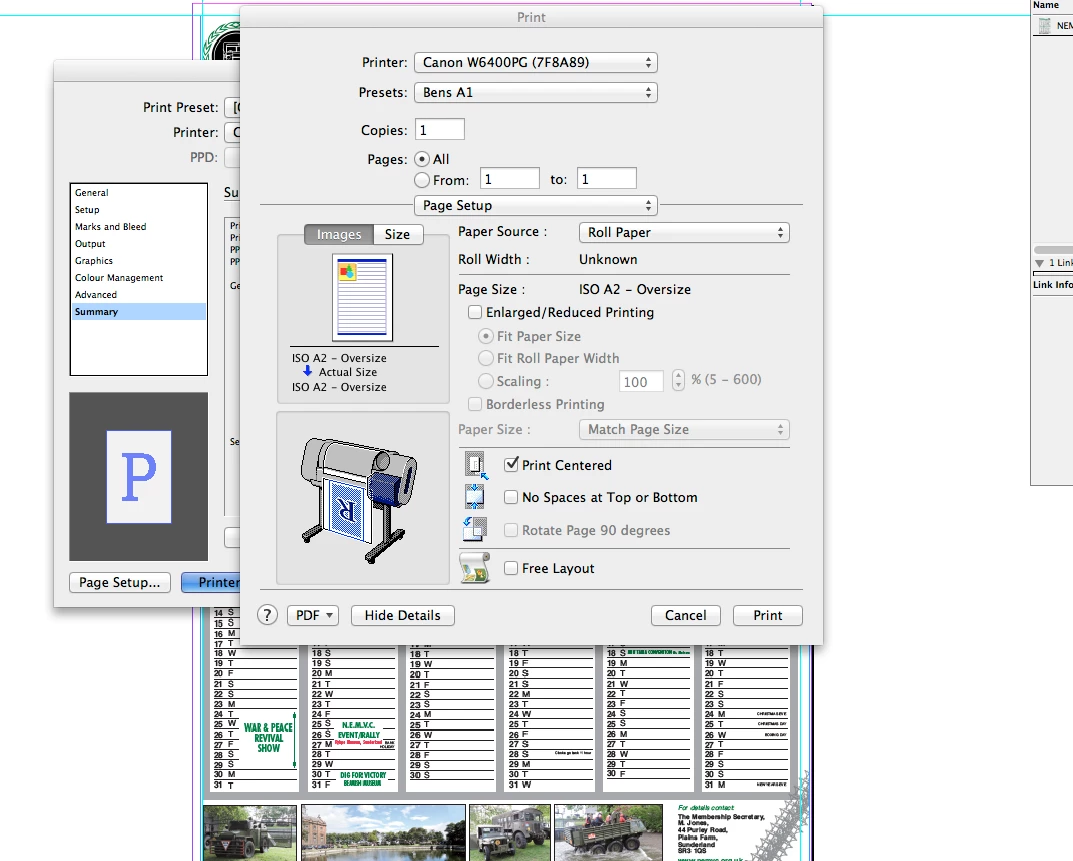
Trying to print from InDesign, Rotate page 90 degree is greyed out?!

  • February 1, 2018
  • 5 replies
  • 1089 views

I printed an A2 year planner this morning and I always rotate the image 90 degree in the print options to save paper and trimming,

However after printing 25 a few hours ago, customer wants another 25 but the rotate 90 degree option in the printer set up has greyed out?!

never changed any other options, and I even left the document open in the background.
This topic has been closed for replies.

5 replies

norgulAuthor
Participating Frequently
February 6, 2018

Just to mention that it's not greyed out any more. lol HAven't changed any settings but after switching mac back on in the morning it was fine again

norgulAuthor
Participating Frequently
February 2, 2018

it worked the first time I did it? which is why i was confused with it. lol

I just made the work landscape for printing purposes. Seemed the easiest thing to do.

Thanks for the replies and help though will keep that in mind next time

norgulAuthor
Participating Frequently
February 2, 2018

rob day
Community Expert
Community Expert
February 2, 2018

Looks like your document's dimensions are 420mm x 594mm and you are setting the paper size to the same dimensions. When you try to rotate the page it no longer fits—maybe that's why your driver software isn't allowing the rotation? You would have to choose or make a custom paper size that's large enough to handle the rotated page:

So here when I center and rotate the page orientation it no longer fits on 16.53" paper

I have to choose a larger Paper Size to accommodate the orientation—here I've made a custom 24"x18" size, so the rotated 23.38" page height fits on the sheet:

norgulAuthor
Participating Frequently
February 1, 2018

no it doesn't unfortunately it misses parts of the image off, and if I scale to fit I have the paper waste trim issue I have to begin with.

It makes no sense as I was able to click the box and print 25 this morning and then it just went greyed out?!?

Sometimes technology has me barking mad. lol

rob day
Community Expert
Community Expert
February 1, 2018

Can you show a capture of the Setup tab?

rob day
Community Expert
Community Expert
February 1, 2018

You handle paper rotation and sizing from the InDesign Print>Setup tab. Your capture is showing the driver's setting— Print>Printer...>Page Setup

norgulAuthor
Participating Frequently
February 1, 2018

The screen shot I have shown is where I always rotate the page and it worked as always this morning and has just become greyed out now!? Which makes no sense

rob day
Community Expert
Community Expert
February 1, 2018

On all of my printers the application Print dialog supersedes the printer's driver when the options are redundant. Does rotating from Print>Setup not work?