
Participating Frequently
February 26, 2025
Question

Turn off auto Hyperlink Character style?

  • February 26, 2025
  • 3 replies
  • 479 views

I moved to a newer computer recently and cannot figure out this problem. I'm currently on InDesign 19.5 (we keep consistent with coworkers so I can't just update without getting others involved.)


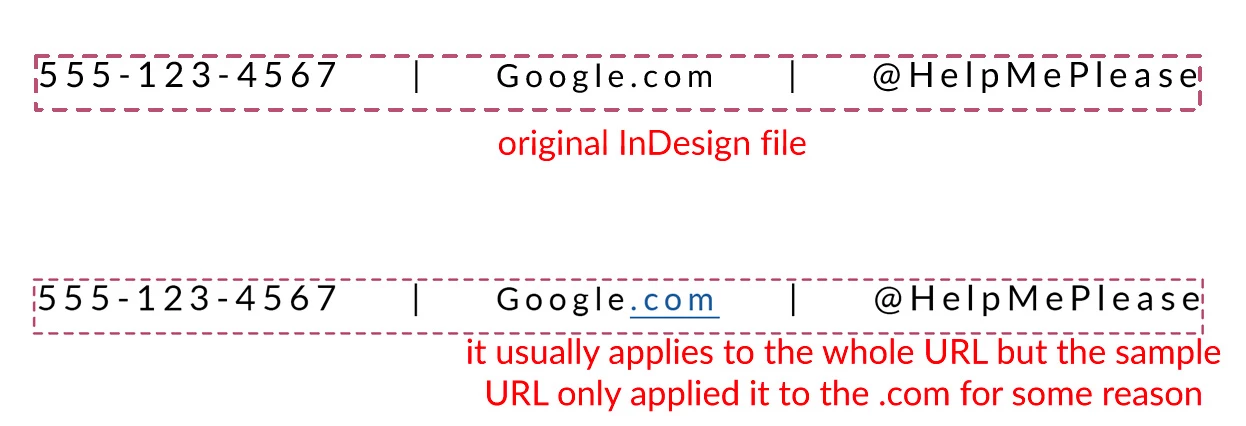
InDesign is auto-applying the "hyperlink" character style to a URL but I do not want it to because it is also a print file. The original copy is coming from another InDesign file that does have a hyperlink associated with the text box, but has NO character styles applied to it. I've tried looking at preferences or the hyperlink panel but nothing comes up on why it's auto applying the character style. Yes I can just change the character style every time but this is coming from a "template" that we use and it's ridiculous to have to manually take off the character style every time! Can anyone help please??


3 replies

Willi Adelberger
Community Expert
Community Expert
February 26, 2025

You can redefine the character style to have no content and have this style in InDesign, when no document is open. This will open any new document with this predefined style.

But I stringly recommens to have one definition in the style: No Language to avoid any hyphenation and changing of the URLs by accident.

Participating Frequently
February 26, 2025

We do need the hyperlink character style for other uses so the character style is there already (with the blue color and underline.) As I mentioned in another comment, I do see this as a benefit if I was pasting hordes of hyperlinks, so I still appreciate any input. Thanks!

Mike Witherell
Community Expert
Community Expert
February 26, 2025

DL,

InDesign will auto-generate a Hyperlink character style, if you don't already have one. So my suggestion would be to have one already in your template file. Remove or change any or all of its attributes as you see fit. That way, when a hyperlink is made, the colors or underline can be to your choosing; including not showing those attributes.

Mike Witherell
James Gifford—NitroPress
Legend
February 26, 2025

That's one solution, and I've exploited it fairly completely in all the EPUB stuff (where it's particularly aggravating). But even that has limits in that it only allows some control over the visuals and formatting, not the auto-magic-application of a hyperlink to the text. I'm not sure invisible links in interactive exports are any better than flashing blue underlined ones.

James Gifford—NitroPress
Legend
February 26, 2025

Not much help, perhaps, but InDesign is aggressive about "managing" hyperlinks. Adding and applying the Hyperlink character style is only one facet of that. Once you start working with links in a doc, ID turns on the "helpful" mode and can be a complete pest about it.


There may be settings or options to reduce or block this behavior, but I can't bring any to mind or find them in reasonable locations in the menus. (Do note that a lot of hyperlink management is buried in the Hyperlink pane's three-line menu.) I just battle them as I go along when the situation arises.

Participating Frequently
February 26, 2025

Thanks for your input! It does help to know that maybe... just MAYBE I'm not the crazy one. (I'm still hoping someone proves me wrong though because InDesign is being super NOT helpful!)

I've tried going into the Hyperlinks panel (with no documents open) to control any presets/preferences but everything is grayed out except for the Sort, Small Panel Rows (unchecked), Auto Update URL Status (unchecked)