
Known Participant
September 15, 2023
Answered

Two Page Numbering Style in the Same Document

  • September 15, 2023
  • 4 replies
  • 1108 views

Hi, I'm currently designing the layout for a portfolio. So I want to create two different page number styles within the same document to distinguish the two parts of the content visually and parallel.


For example, the main body paragraphs use number style 01, 02, 03.... and the minor section uses numbers style i, ii, iii...


The Numbering and Section Options will only allow me to choose one style and then it gets applied throughout the whole document. I'm just wondering if there is another way to make two styles. Or maybe I'll have to add the second type manually by creating a paragraph style using bullet/numbering.


This topic has been closed for replies.
Correct answer Scott Falkner

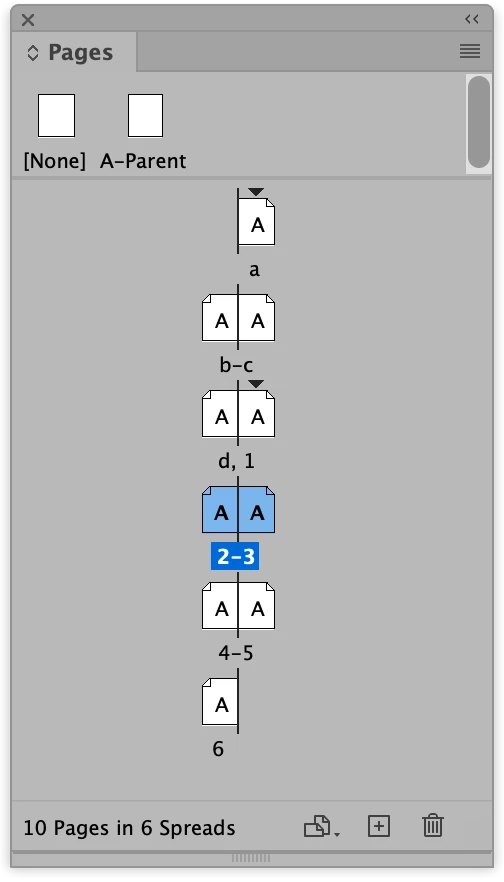
This is confusing. Are you trying to number paragraphs or number pages? Numbering and Section Options is how you define the starting page number of a section and the way the pages are numbered. You can have more than one section in a document, each with a different numering option. Start a new section to change the starting page number and numbering option.

4 replies

Robert at ID-Tasker
Legend
September 16, 2023

@Karen JR


Can you clarify - do you need different numbering styles applied to a different sets of pages - or to the same page?


Karen JRAuthor
Known Participant
September 16, 2023

Hi, sorry for the confusion. I want different numbering styles applied to different sets of pages like the following.

Peter Spier
Community Expert
Community Expert
September 16, 2023

That's entirely doable by setting new section starts at each change point and setting boththe number style and the start number.

Scott Falkner
Community Expert
Scott FalknerCommunity ExpertCorrect answer
Community Expert
September 16, 2023

This is confusing. Are you trying to number paragraphs or number pages? Numbering and Section Options is how you define the starting page number of a section and the way the pages are numbered. You can have more than one section in a document, each with a different numering option. Start a new section to change the starting page number and numbering option.

Community Expert
September 16, 2023

I think @Scott Falkner is showing the correct method here.


Peter Spier
Community Expert
Community Expert
September 15, 2023

I'm confused. Why do numbered paragraphs have anything to do with page numbers? Numbered list paragraph styles are easily defined, and if you need a "section" prefix for the numbers that can be part of the definition as well.

Robert at ID-Tasker
Legend
September 16, 2023

As a workaround for TWO different ways to number pages - normal page numbers using InDesign's mechanism and then single line TF with ParaStyle and a numbering to simulate a different page numbering.


Robert at ID-Tasker
Legend
September 15, 2023
quote

The Numbering and Section Options will only allow me to choose one style and then it gets applied throughout the whole document. I'm just wondering if there is another way to make two styles. Or maybe I'll have to add the second type manually by creating a paragraph style using bullet/numbering.


By @Karen JR


This should be the best / easiest solution.