
AMLyla9Z
Participant
January 2, 2017
Answered

Two Page Spread with photo that stretches across both pages

  • January 2, 2017
  • 4 replies
  • 4313 views

I have very particular bosses. I am doing a two page spread with the photo that runs across both pages. This is for a standard 8.5 X 11 publication with a bleed (11 X 17.25 spread). Some of my publications that I submit to want it in two separate pages and not as a spread. How can I ensure the photo lines up perfectly in the middle on these split page publications when taking in consideration both the trim and bleed in the center? I generally design in PSD but would be open to learning a bit about InDesign as I have the whole Adobe Cloud Suite. Ultimately, I'm sure it will be easier in InDesign...I'm just set in my ways and hard headed. Thank you all in advance for the help.
    This topic has been closed for replies.
    Correct answer rob day

    … Ok!

    So you have spreads with images on left-right pages and you want to "cut" the image in 2!

    Right?

    (^/)


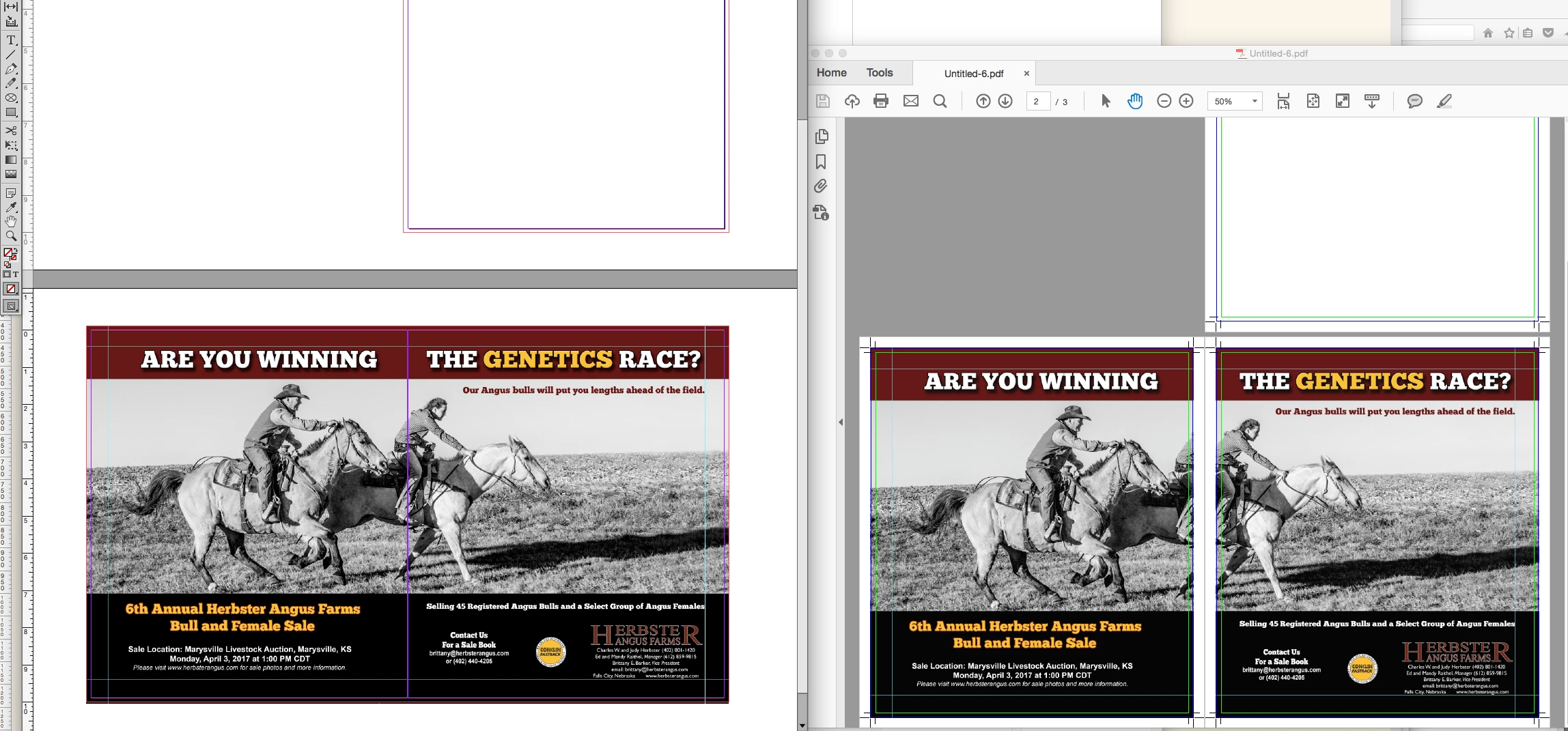
    There's no need to cut or really do anything. Just export the facing pages with or without an inside bleed. Here's PDF/X-4 with an inside bleed—ID on left Acrobat on right:

    4 replies

    Obi-wan Kenobi
    Legend
    January 2, 2017

    Hi,

    Can you make screenshots? Thanks!

    (^/)

    AMLyla9Z
    AMLyla9ZAuthor
    Participant
    January 2, 2017

    Obi-wan Kenobi
    Legend
    January 2, 2017

    … Ok!

    So you have spreads with images on left-right pages and you want to "cut" the image in 2!

    Right?

    (^/)

    rob day
    Community Expert
    Community Expert
    January 2, 2017
    Ultimately, I'm sure it will be easier in InDesign...I'm just set in my ways and hard headed. Thank you all in advance for the help.

    It will be.

    In Photoshop to provide pages with bleeds from a full spread, you would have to manually split the spread, save out two page files, and do it again for any future edits. PS is not a page layout application.

    AMLyla9Z
    AMLyla9ZAuthor
    Participant
    January 2, 2017

    Thank you for the input. I'm also aware that PSD is not a layout program, but it's just the one that I have been using all these years, doing it "manually" every month. I really do need to come over to indesign. Thank you very much for your input and time helping me!

    Willi Adelberger
    Community Expert
    Community Expert
    January 2, 2017
    1. Make the photo in Photoshop and save as PSD.
    2. Make an INDD document with facing pages.
    3. Place the image there.
    4. Export as PDF according the specification of your printer with bleed as single pages.
    vladan saveljic
    Inspiring
    January 2, 2017

    in indesign you could create 2 facing pages 8.5 x 11 and set up bleed

    then place your photo across both pages in the same spread (to the edges of the bleed guides).

    In this way you could have two separate pages or make two page spread