diogoferreira
Inspiring
July 22, 2019
Answered

Two pages first spread

  • July 22, 2019
  • 1 reply
  • 1730 views

Hi,

I wanna create the first spread with two pages (one left and one right page) like this:
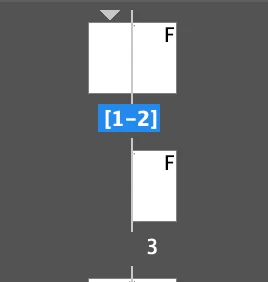
I am trying to do this with the following code:

app.activeDocument.spreads.item(0).allowPageShuffle = false;

var newPage = app.activeDocument.pages.add(LocationOptions.BEFORE, app.activeDocument.pages.firstItem());

But it only creates the pages side by side like this (they stay both on the right side of the spread):
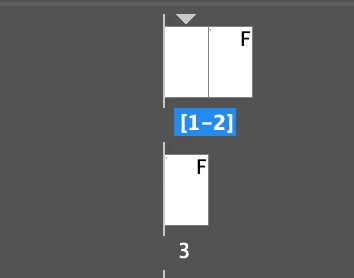
How can I move the page to the other side to archive the result that I am looking for?

Thank you so muck in advance!

Best regards.

This topic has been closed for replies.
Correct answer diogoferreira

I found the answer.

I just added the following line to the code:

newPage.move(LocationOptions.BEFORE, app.activeDocument.pages.firstItem(), BindingOptions.LEFT_ALIGN);

1 reply

diogoferreira
diogoferreiraAuthorCorrect answer
Inspiring
July 22, 2019

I found the answer.

I just added the following line to the code:

newPage.move(LocationOptions.BEFORE, app.activeDocument.pages.firstItem(), BindingOptions.LEFT_ALIGN);

Community Expert
July 23, 2019

Hi,

you will not make friends at the printing company with a page named "1" that is positioned left from the spine.

If your document has a spine, means: facing pages, just set value of startPageNumber of document.documentPreferences to an even number.

Regards,
Uwe

diogoferreira
Inspiring
July 23, 2019

Hi Laubender,

Thank you for reminding me of that.

I just created a section on the new page number 1 and used this:

app.activeDocument.sections[1].continueNumbering = false;          

app.activeDocument.sections[1].pageNumberStart = 1;

Regards.