


Participant
February 26, 2024
Answered

Type on a path tool

  • February 26, 2024
  • 1 reply
  • 642 views

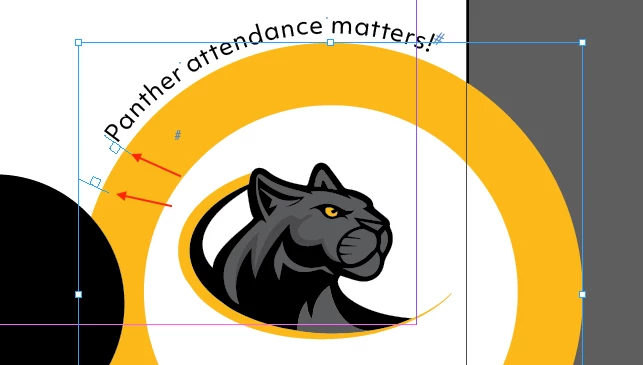
Hello there. I'm struggling to use the type-on-a-path tool. I've attached a picture below for reference. My text is on the path of the larger golden circle, but I would like to move it to the left. Whenever I click one of the white boxes next to the word "Panther," InDesign prompts me to create a new text box. I'm very new to InDesign so any advice is appreciated. Thank you!

This topic has been closed for replies.
Correct answer jmlevy

Don't click on the white squares, but click on the straight part, shown by red arrows and drag them on the left I advise you to start by the bottom one, to have more room for the top one.

1 reply

jmlevy
Community Expert
jmlevyCommunity ExpertCorrect answer
Community Expert
February 26, 2024

Don't click on the white squares, but click on the straight part, shown by red arrows and drag them on the left I advise you to start by the bottom one, to have more room for the top one.

Participant
February 26, 2024

Thank you, sir! Your help is appreciated.