Participant
August 30, 2020
Answered

Typekit

  • August 30, 2020
  • 5 replies
  • 1408 views

I can't find typekit anymore

Anyone know how to access it please?

This topic has been closed for replies.
Correct answer Barb Binder

Hi Jill:


You can still activate from within InDesign. Starting from your screenshot:
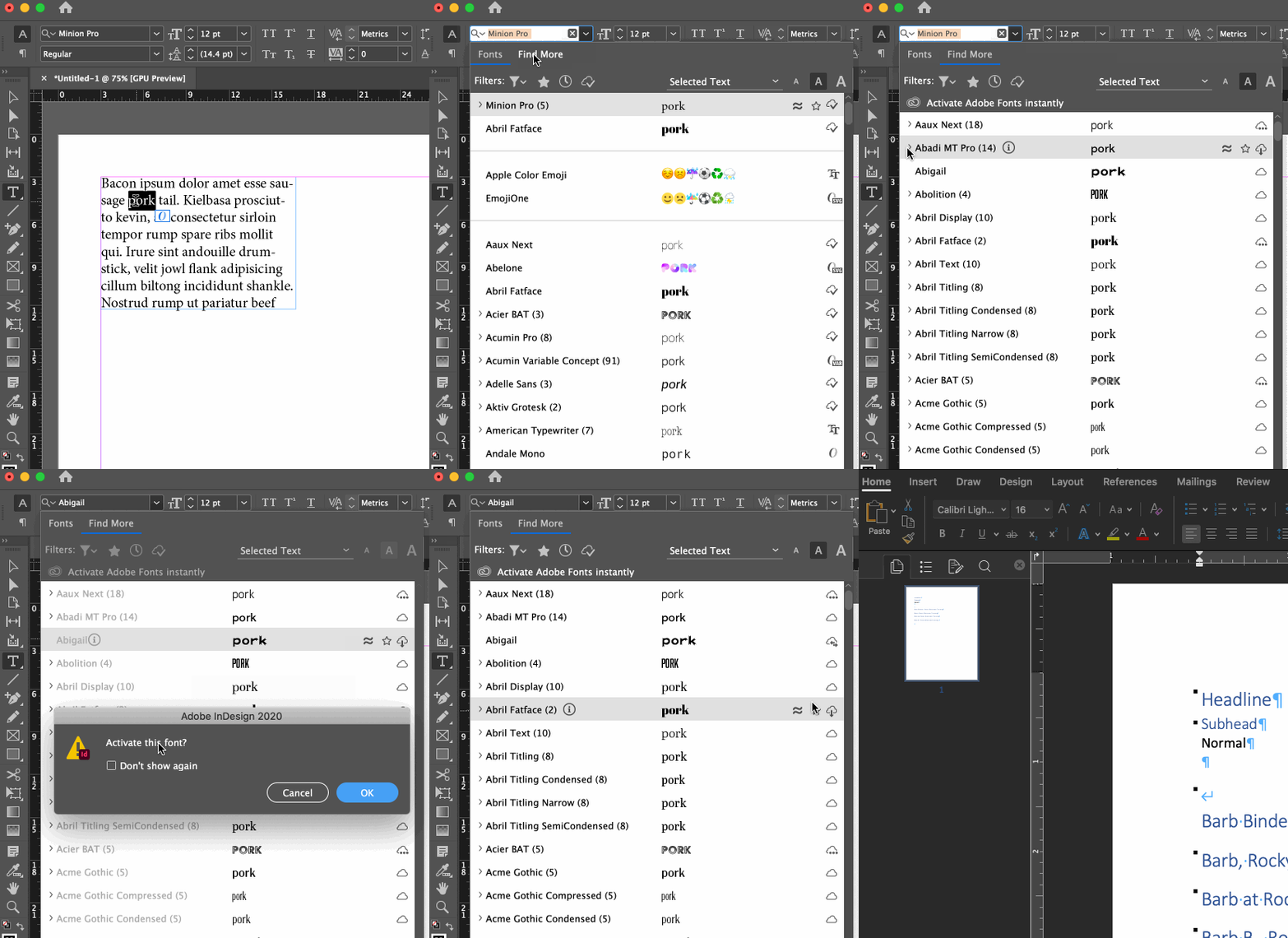


~Barb 

5 replies

Barb Binder
Community Expert
Barb BinderCommunity ExpertCorrect answer
Community Expert
August 30, 2020

Hi Jill:


You can still activate from within InDesign. Starting from your screenshot:


~Barb 

~Barb at Rocky Mountain Training
David Popham
Participating Frequently
August 30, 2020

If you have the Creative Cloud app open, you can also access Adobe Fonts by clicking on the Manage fonts icon in left menu.

JillyDAuthor
Participant
August 30, 2020

Thank you so much everyone for all yor kind help. At least now I know there is a way to find the fonts via the website.  I would prefer if it had been possible to access it directly through InDesignlike before. As you see from this screen shot, I didn't have the 'Fonts: find more ...' option

rob day
Community Expert
Community Expert
August 30, 2020

Also to get the cloud activation and font preview in the Find More view as Barb is showing, check Enable in-menu font previews and Preview Font on Hover in your Type Preferences:


Barb Binder
Community Expert
Community Expert
August 30, 2020

You can also go to fonts.adobe.com, sign in with your Adobe ID. The fonts you activate there will show up in InDesign.


~Barb

~Barb at Rocky Mountain Training
Derek Cross
Community Expert
Community Expert
August 30, 2020

Which version of InDesign and OS?

Does this screen shot help:

Derek Cross
Community Expert
Community Expert
August 30, 2020

It's been renamed Adobe Fonts and you'll find the fonts in the Find More tab.


JillyDAuthor
Participant
August 30, 2020

Thank you but I can't find that?