
Inspiring
March 26, 2026
Question

Unable to add comments in Share For Review - InDesign 21.2

  • March 26, 2026
  • 1 reply
  • 10 views

Share for Review link made - client made edits with specific instructions to select text first on screen then click button to leave the comment for feedback and the feedback is not showing on screen in the backend so there is no way to put a comment with what is on the page.  I checked it myself and it is not showing my edits on the page either… HELP!!
 

1 reply

Eric Dumas
Community Expert
Community Expert
March 27, 2026

I am not sure I understand your question exactly. When I use ‘Share for Review’ it allows clients to add comments on their screen (browser) at specific locations. My clients do not edit the file, they just leave comments. I see the comments in InDesign and I am the one who makes the updates.

Inspiring
March 27, 2026

Hi ​@Eric Dumas 
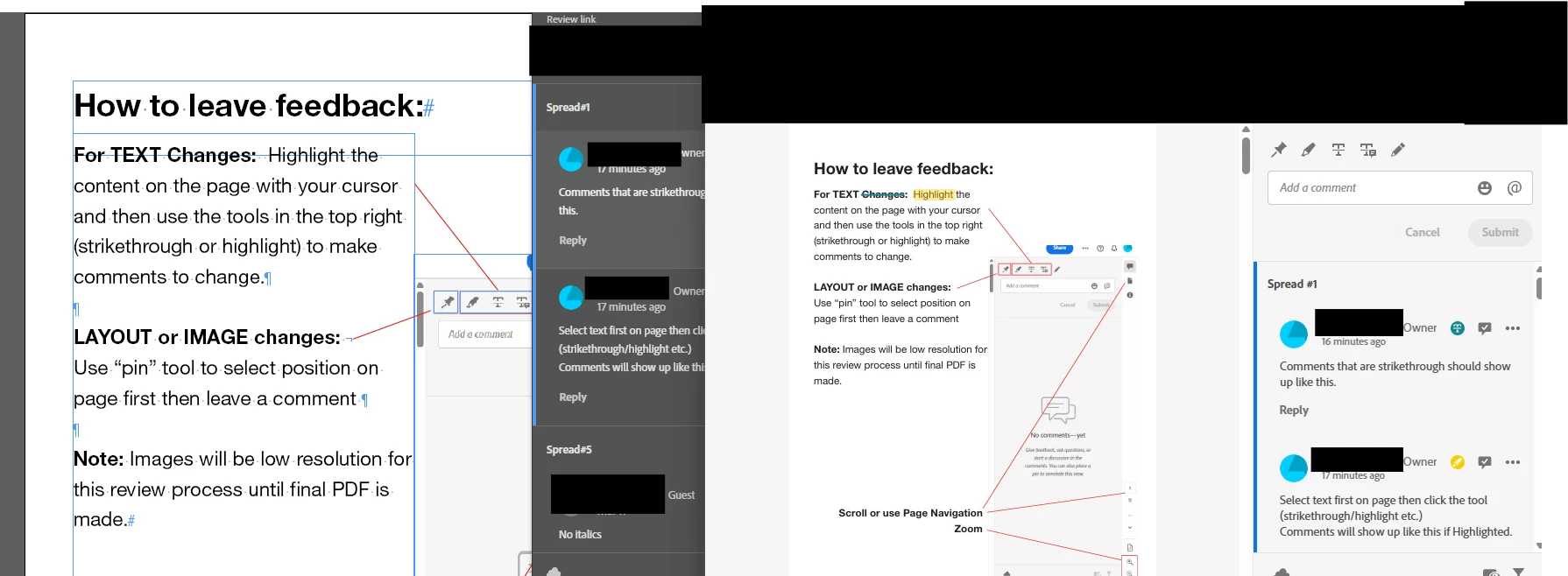
To clarify, nothing is wrong on the external client facing side.  They leave feedback as normal, however, when I go to Indesign to make the edits, the clients comments are not “tagged” to a specific word or paragraph.  So there is no way to know which thing they want edited without guessing.  Usually there is a visual indicator and when you click a comment it will go to that page.  This functionality is corrupt as it used to work no problems until recently.

As you can see on the left side of the screenshot (what I see in my Indesign) it is not striking through or highlighting on the page where the edits need to take place.  I double checked on the client side with my own comments, where I select a word, use the strikethrough tool and leave a comment and it still doesn't work.

Eric Dumas
Community Expert
Community Expert
March 28, 2026

I understand, can you specify the version of your OS and software?

I would recommend to include your bug’s details and feedback to https://indesign.uservoice.com for the dev team to be aware of this.