

dublove
Legend
April 7, 2026
Question

Unable to Apply Underline Styling to Numbered List Markers in InDesign

  • April 7, 2026
  • 3 replies
  • 42 views

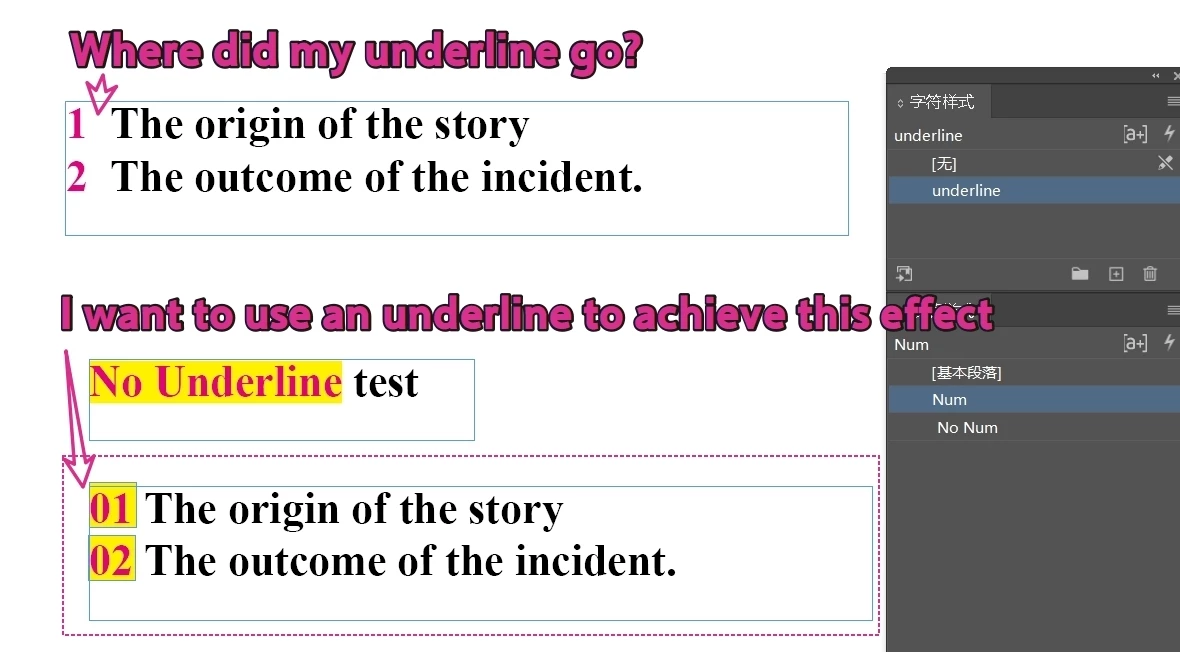
I want to add a colored block below the numbers in a paragraph style, so I thought of using an underline.
I tried it, but it didn't work.
Neither id2026 nor 2024 worked.
Did I do something wrong?
 

    3 replies

    Dave Creamer of IDEAS
    Community Expert
    Community Expert
    April 7, 2026

    You can get that effect using paragraph rules. This is dependent on a couple of things: consistent column width and no more than 99 entries per list. 


    David Creamer: Community Expert (ACI and ACE 1995-2023)
    Bill Silbert
    Community Expert
    Community Expert
    April 7, 2026

    Have you tried doing this using the Paragraph Borders and Shading option which can be found under the Paragraph Panel pull-down menu? The Shading section of this feature provides several options that would make what you’re looking for possible. If you’re unfamiliar with Paragraph Borders and Shading you can check out one of several videos available on the topic on YouTube.


    Community Expert
    April 7, 2026

    Hi ​@Bill Silbert how will it be restricted only to the numbers? Pardon my ignorance I have not played much with these features

    -Manan
    Bill Silbert
    Community Expert
    Community Expert
    April 7, 2026

    With the Borders and Shading you can adjust the right indent in the same way as with Dave Creamer’s suggestion of paragraph rules:

    However, in regards to Dave Creamer’s question, though, there would be an issue with multi-line entries. Paragraph Borders and Shading would only be effective with single line entries.

    Community Expert
    April 7, 2026

    It seems some properties don’t apply to the numbers in the numbered list and underline is one of them

    -Manan