Participant
November 3, 2017
Question

Unable to create Custom Page Size
  • November 3, 2017
  • 4 replies
  • 1850 views

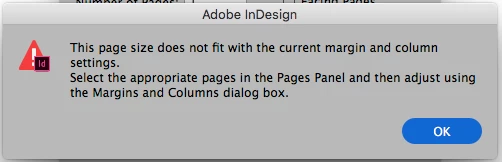
What does this mean?  I'm trying to create a Custom Page Size 10"W x 1.5" H.

Please advise. Thanks.

    This topic has been closed for replies.

    4 replies

    Barb Binder
    Community Expert
    Community Expert
    November 3, 2017

    Can you share a screen shot of the New document dialog box with your desired settings? No problems here—you can see the page in the background.

    ~Barb

    ~Barb at Rocky Mountain Training
    Inspiring
    November 3, 2017

    I recreated the size as a page in a document as well as a new document with no problems. Can you try to recreate the size with a different document or as a new document? Try it on a different computer. Maybe the file is corrupt or the preferences are corrupt.

    happie_97
    Community Expert
    Community Expert
    November 3, 2017

    Hi,

    I tried to replicate your issue.

    Does this happen when you initially set up your new document, or when you are adding additional pages, or when using the page tool?

    jane-e
    Community Expert
    Community Expert
    November 3, 2017

    It means you need to check your margins and columns first.

    1. Are you working in inches?
    2. What are your margins? If they are 1", you can't set a paper size of 1.5"
    3. How many columns do you have?

    Show your Margins and Columns from Layout if you still don't see it!

    Participant
    November 3, 2017

    Working in inches.

    Margins were 1/8 inch.

    1 column.

    Will not let me go smaller that 2.125"

    Thanks.

    jane-e
    Community Expert
    Community Expert
    November 4, 2017

    Weirdly, I just made a small document 1" x 1". (Why InDesign? I wanted the typography, then exported to PNG.)

    I found that if I made the 1" x 1" document, I could then set really huge margins, but if I tried to create it with huge margins, it failed.

    So try this and report back if it works: set your margins to zero, create your small document, then change your margins in Layout > Margins and Columns.