
Participant
March 12, 2025
Answered

Unable to Relink or Remove Missing Links in InDesign

  • March 12, 2025
  • 3 replies
  • 460 views

Hi everyone,

Has anyone ever encountered an issue in InDesign where a link appears as missing or needs updating, but there's no way to fix it? I can't delete it or relink it—it stays stuck with the error.

Even clicking on "Go to Link" doesn’t work, nor does trying to relink it with another file.

Any ideas on how to solve this?

Thanks!
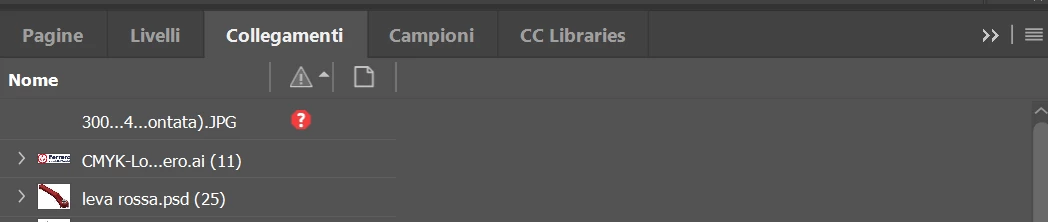


<Title renamed by MOD>

Correct answer Peter Spier

Try exporting to .idml, open that and resave as a new .indd.

3 replies

Community Expert
March 12, 2025

If the IDML route does not fix it as per @Peter Spier and @Abhishek Rao 

Try use File>Package and see if that resolves it 


If that doesn't work there's suggestions in this thread also

https://community.adobe.com/t5/indesign-discussions/how-to-remove-broken-links-from-indesign-s-links-panel/td-p/8192891


There's a simple Applescript as the correct answer from @rob day that seeminly removes broken links


Let us know how you get on.

Peter Spier
Community Expert
Peter SpierCommunity ExpertCorrect answer
Community Expert
March 12, 2025

Try exporting to .idml, open that and resave as a new .indd.

Participant
March 12, 2025

Thenk you! 

Abhishek Rao
Community Manager
Community Manager
March 12, 2025

Hi @Euro30367959x5dj,  


Thanks for reaching out. Could you confirm which version of InDesign you're using and the details of your OS? Also, where are your InDesign file and linked files saved - locally on the system drive, on an external drive, on a remote network, or in the cloud?  

As a test, try creating a new InDesign file and linking the affected file there and let me know if it makes any difference. Also, save your current file as IDML (File > Save As > InDesign Markup Language) and then reopen it to see if that resolves the issue. Let me know how it goes. 


^

Abhishek

Participant
March 12, 2025

Thenk you! It works!