
Answered
Unable to select Radio Buttons While creating a Plugin
Hi,
When I try to create a new plugin, I am unable to select the radio button. The code I have used can be found below
GroupPanelWidget
		(
			// CControlView properties
			kInvalidWidgetID, // widget ID
			kPMRsrcID_None, // PMRsrc ID
			kBindNone, // frame binding5,295,345,362
			Frame(5,450,345,535) //  left, top, right, bottom
			kTrue, // visible
			kTrue, // enabled
			// GroupPanelAttributes properties
			kAutoFitPageStaticTextWidgetID, // header widget ID
			{
							StaticTextWidget
				(
					// CControlView properties
					kAutoFitPageStaticTextWidgetID, // widget ID
					kSysStaticTextPMRsrcId, // PMRsrc ID
					kBindNone, // frame binding
					Frame(15,-3,90,7) //  left, top, right, bottom
					kTrue, // visible
					kTrue, // enabled
					// StaticTextAttributes properties
					kAlignLeft, // Alignment
					kDontEllipsize,kTrue, // Ellipsize style
					// CTextControlData properties
					"AutoFit Page:", // control label
					// AssociatedWidgetAttributes properties
					kInvalidWidgetID, // associated widget ID
				),
			StaticTextWidget
				(
					kAutoFitPageStaticTextWidgetID,								// WidgetId (default=0)
					kSysStaticTextPMRsrcId,		// RsrcId
					kBindNone,						// Frame binding
					5, 10, 148, 35,					// Frame: left, top, right, bottom.
					kTrue, kTrue,					// Visible, Enabled
					kAlignLeft, kEllipsizeEnd,kTrue,		// Alignment, ellipsize style
					"AutoFit page if Table overflows :",		// Initial text.
					kSetTableSplitWidgetID								// No associated widget
				),
				ClusterPanelWidget
				(
				// CControlView properties
				kAutoFitPageStaticTextWidgetID, // widget ID
				kPMRsrcID_None, // PMRsrc ID
				kBindNone, // frame binding
				Frame(130, 20, 370, 65) //  left, top, right, bottom
				kTrue, // visible
				kTrue, // enabled
				// CTextControlData properties
				"", // control label
				{
					RadioButtonWidget
					(

						kSplitTableYesRadioWidgetID, // widget ID
						kSysRadioButtonPMRsrcId, // PMRsrc ID
						kBindNone, // frame binding
						Frame(12, 0, 110, 65) //  left, top, right, bottom
						kTrue, // visible
						kTrue, // enabled
						// CTextControlData properties
						"Yes" // control label
					),

					RadioButtonWidget
					(

						kSplitTableNoRadioWidgetID, // widget ID
						kSysRadioButtonPMRsrcId, // PMRsrc ID
						kBindNone, // frame binding
						Frame(115, 0, 200, 65) //  left, top, right, bottom
						kTrue, // visible
						kTrue, // enabled
						// CTextControlData properties
						"No", // control label
					),

				}
				),

			}
			),
As part of creating a plugin, I have also declared the Widget IDs
DECLARE_PMID(kWidgetIDSpace, kAutoFitPageStaticTextWidgetID, kInCatQuickCatalogPrefix + 209)
DECLARE_PMID(kWidgetIDSpace, kSplitTableYesRadioWidgetID, kInCatQuickCatalogPrefix + 210)
DECLARE_PMID(kWidgetIDSpace, kSplitTableNoRadioWidgetID, kInCatQuickCatalogPrefix + 211)
DECLARE_PMID(kWidgetIDSpace, kSetTableSplitWidgetID, kInCatQuickCatalogPrefix + 212)
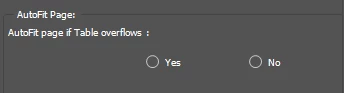
Please guide me on this


 AdChoices