



graphics_4075
Inspiring
June 22, 2026
Question

Unable to stack panels at the bottom of workspace

  • June 22, 2026
  • 3 replies
  • 87 views

InDesign 21.4.1 on Mac Studio M1 Ultra Tahoe 26.5.1.


Pretty simple and annoying bug. I am unable to stack/group panels on my workspace. This only pertains to the bottom 1-2 for some reason. You are able to place more panels below 


I would confidently assume this is a reproducible bug. This has been present for the past few versions but I am just now reporting it. The workspace panel is one of the most important features for InDesign workflow and this is the second (albeit, not as annoying) bug I found that I didn’t even need to try to find… 
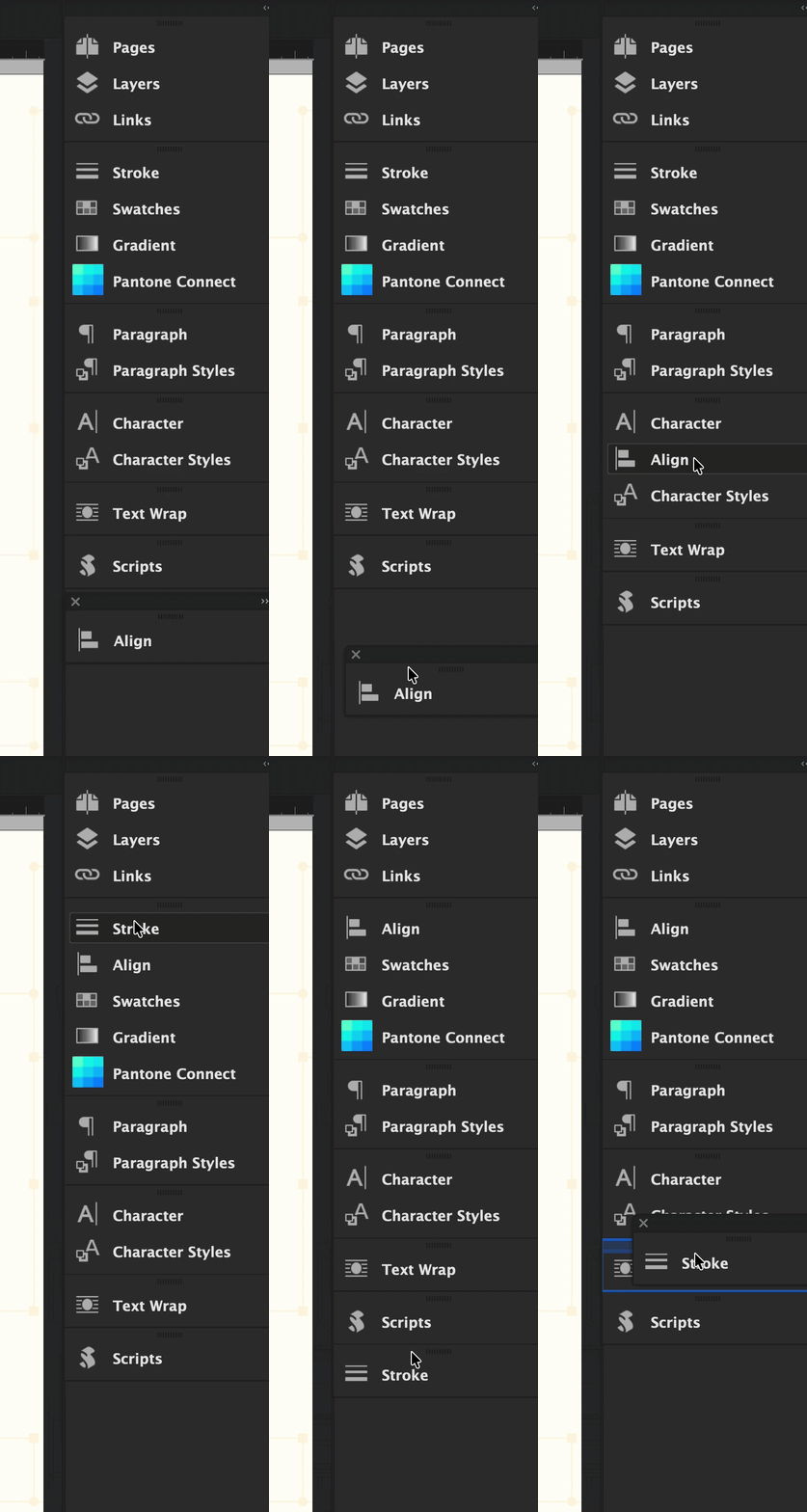


From the gif you can see it seems like the bottom 2 groups cannot be stacked. It doesn’t seem like it matters what panel you grab.

    3 replies

    Dave Creamer of IDEAS
    Community Expert
    Community Expert
    June 24, 2026

    You could drag it just above Scripts, then move Scripts up one level.

    David Creamer: Community Expert (ACI and ACE 1995-2023)
    Mike Witherell
    Community Expert
    Community Expert
    June 23, 2026

    Probably you will need to do a Reset of InDesign using the 3rd method that involves deleting the InDesign cache files and thereafter restarting.

    Mike Witherell
    graphics_4075
    Inspiring
    June 23, 2026

    Hey Mike,


    Thanks for the guide, serious props to you for writing/updating that for the community.


    I will try a full reset using your outlined method at the end of my work day and update. Will also check on my personal laptop when I am home to see if this is replicable. 

    Cheers
    Abhishek Rao
    Community Manager
    Community Manager
    June 23, 2026

    Hi ​@graphics_4075,


    Thanks for reporting this, and sorry to hear you're running into the issue.

    I tested this on macOS Tahoe with InDesign 21.4.1 and was unable to reproduce the behavior. I was able to stack and group panels at the bottom of the workspace as expected. Could you please confirm whether you're using a custom workspace or one of the default InDesign workspaces?

    As a first step, I'd recommend backing up your current workspace settings. You can do this by copying the following folder to your Desktop:

    ‘~/Library/Preferences/Adobe InDesign/Version 21.0/en_US’

    Once backed up, try resetting the affected workspace via Window > Workspace > Reset [Workspace Name] and see if the behavior changes:
    [https://helpx.adobe.com/indesign/desktop/get-started/settings-and-preferences/create-and-manage-workspaces.html]

    If the issue persists after resetting the workspace, please try manually resetting your InDesign preferences and test again:
    [https://helpx.adobe.com/indesign/using/setting-preferences.html]


    Please let me know how it goes after trying these steps, and we'll continue investigating if needed.

    Best,
    Abhishek
     

    graphics_4075
    Inspiring
    June 23, 2026

    Hi Abhishek,


    Thanks for your reply, I’m surprised to hear you’re unable to recreate this. I have experienced this on my MacBook Pro as well.


    I was using a custom workspace but just tested in a default workspace ([Advanced]) and am still experiencing this issue. This doesn’t seem to be a workspace issue for me, rather an issue with grouping itself within the workspaces.. I can recreate it on any prebuilt or custom space. 


    When you tested this did you have 2 displays active? Perhaps that can be a factor here. 


    Resetting workspaces did not fix this issue, and I want to point out that the bug where resetting a custom workspace adds certain panels to it is still present. The reset button does not function correctly for me. 


    I will keep experimenting a bit. Perhaps I’ll find a third workspace bug! Wouldn’t that be fun. 🙂


    See here: 


    Still happening after workspace + preference reset


    Cheers
    nik.m
    Community Manager
    Community Manager
    June 24, 2026

    Hi ​@graphics_4075, I just test this again on my M1 Max MacBook Pro running macOS 26.5.1 and InDesign 21.4.1, with a Thunderbolt display attached to it and then 2 displays (one Thunderbolt and another using HDMI), but was not able to replicate this. 

    There might be a condition that needs to be satisfied for this behavior that we are not able to identify right now.  

    Lastly, could you please test the issue in safe mode to isolate any third-party interferences as well? Ref: https://support.apple.com/en-in/guide/mac-help/mh21245/mac


    Please try the suggested steps and let us know how it goes. Meanwhile, we'll continue investigating this on our end and will share any updates as soon as we have more information. 

    Thanks, 

    Nikunj