mohsenmzh
Participant
March 19, 2018
Answered

Underline a text with both English and Farsi words

  • March 19, 2018
  • 1 reply
  • 1001 views

Hi

I'm trying to put an English word between a Persian(Farsi) text.

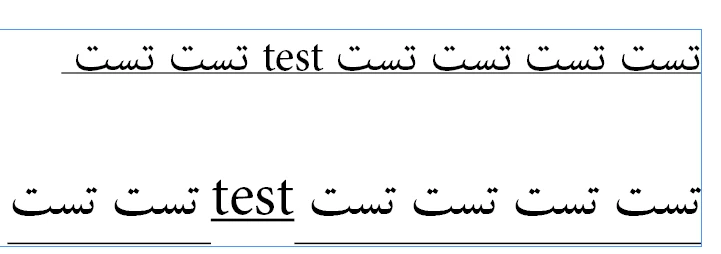
I have set the text direction to RTL and the mixed text is fine. but when I try to underline the whole text, the line below the English word is upper from the main line(underline). Using Adobe Arabic Font makes it fine but other fonts seems to have problem with that case.

I attached an image with two texts using different fonts. First one is Arabic Font(which is fine), and the other one is not.

Is there any trick to fix this?

P.S: I can try "baseline shift" to shift the English word down but it will look weird and mismatched.

Thanks in advance,

Mohsen
This topic has been closed for replies.
Correct answer Zaid Al Hilali

This issue shows on nearly all fonts when both Arabic/Farsi and English are mixed. My suggestion to avoid this issue is to set your own custom underline and save it as Character Style.

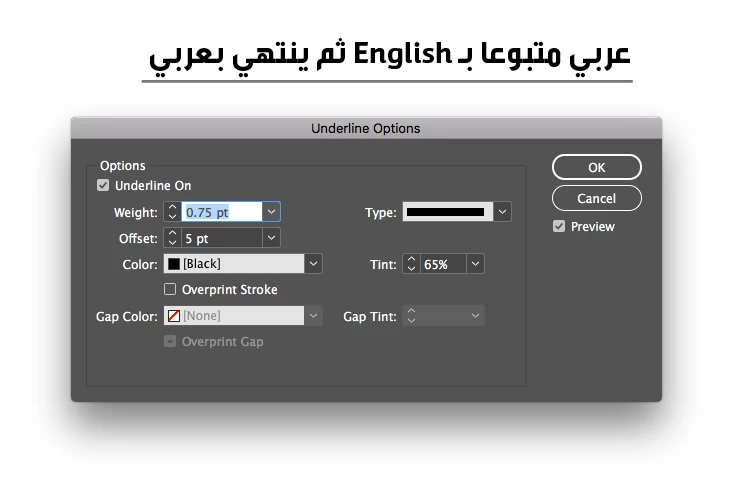
To do this, hold alt key on the keyboard and click on the Underline button

This will open Underline Option window, have the "Preview" check box on, change weight and other settings if necessary, but importantly is to change offset amount  to suit your text weight for both Arabic/Farsi and English, don't leave it as "Auto".

1 reply

Zaid Al Hilali
Community Expert
Zaid Al HilaliCommunity ExpertCorrect answer
Community Expert
March 19, 2018

This issue shows on nearly all fonts when both Arabic/Farsi and English are mixed. My suggestion to avoid this issue is to set your own custom underline and save it as Character Style.

To do this, hold alt key on the keyboard and click on the Underline button

This will open Underline Option window, have the "Preview" check box on, change weight and other settings if necessary, but importantly is to change offset amount  to suit your text weight for both Arabic/Farsi and English, don't leave it as "Auto".

mohsenmzh
mohsenmzhAuthor
Participant
March 19, 2018

Thank you very much.

I didn't know about this option. I just followed your instructions and everything went right.

Zaid Al Hilali
Community Expert
Community Expert
March 19, 2018

You're welcome.