jimkahnw
Known Participant
September 9, 2021
Question

Unexpected screen draw

  • September 9, 2021
  • 3 replies
  • 351 views

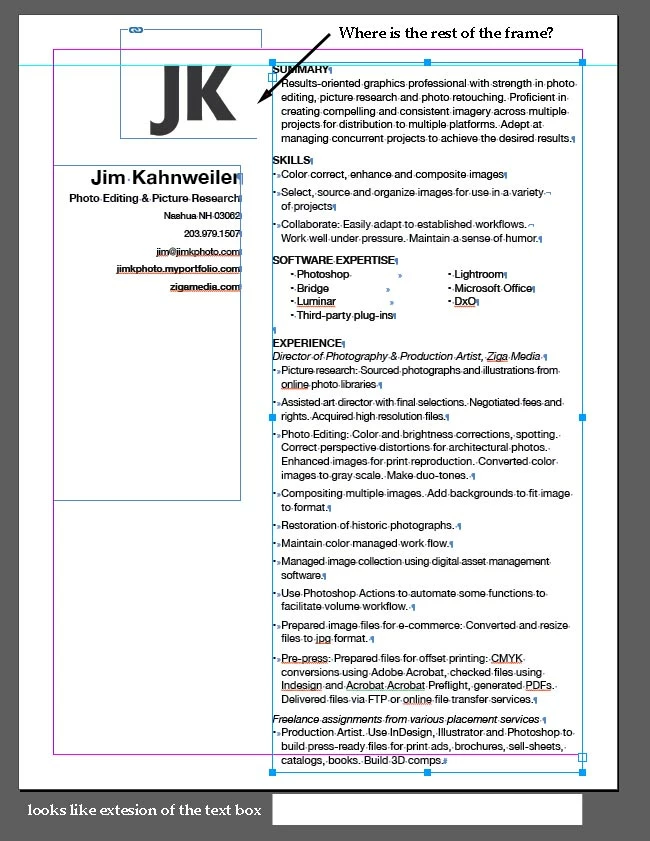
I have a strange screen draw: see attached.

How do I make it normal? Thanks. Jim
This topic has been closed for replies.

3 replies

Community Expert
September 10, 2021

Hi Jim,

if the text in the big text frame has paragraph shading applied with color [Paper] and the frame is in stacking order above the little frame then I'd say this is what we can expect.


From my German InDesign where the first paragraph of the big text frame has paragraph shading applied. On the left 20% of [Black], on the right it's just [Paper]:


So see into paragraph shading. Scroll down to section "Create a shade (or color) behind a paragraph":

https://helpx.adobe.com/indesign/using/formatting-paragraphs.html


EDIT:

Also check for paragraph border in the section "Create a paragraph border".

It could also be a combination of paragraph border and paragraph shading where [Paper] is applied.


Regards,
Uwe Laubender

( ACP )

Ashutosh_Mishra
Inspiring
September 10, 2021

Hi Jim,


Sorry to hear about your experience. Do you see this behavior with this specific file only? Is your OS & GPU driver updated to the latest version?

Does suggestion given by @jmlevy help?

This information would help us assist you accordingly. Looking forward to your response.


Regards,

Ashutosh

jimkahnw
jimkahnwAuthor
Known Participant
September 9, 2021

Here's another screen grab, with the text frames moved to the paste board, revealing the unexpected backgrounds to the frames.


jmlevy
Community Expert
Community Expert
September 10, 2021

If you are on a Mac, go to preferences and turn off GPU performances.