

CjBischoff
Participating Frequently
January 30, 2023
Answered

Unknown Text Ornament

  • January 30, 2023
  • 1 reply
  • 346 views

Greetings, 


I'm currently updating a catalog created by a user no longer employed at my company. I'm trying to figure out how they created the line below the text as seen in my screenshot, both the white line and the green line. It is part of the text boxes and disappears when I delete the text. If I lengthen the text box, the line follows the length. Any ideas?

Thanks much

This topic has been closed for replies.
Correct answer James Gifford—NitroPress

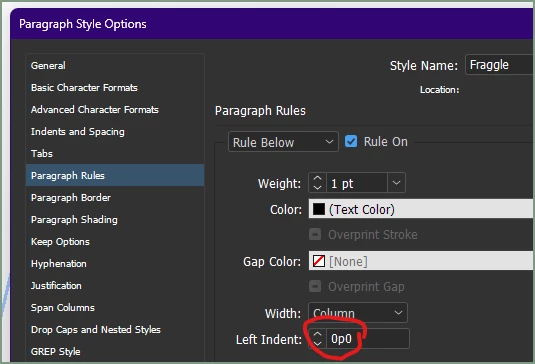
It is most likely Rule Below, possibly with an inset value:


1 reply

James Gifford—NitroPress
Legend
January 30, 2023

It is most likely Rule Below, possibly with an inset value:


CjBischoff
Participating Frequently
January 31, 2023

Thank you James. I never would have found that.

James Gifford—NitroPress
Legend
January 31, 2023

Just for reference, there are three things a line or rule like this might be. Actually, four:


  • Underline — ID has fairly configurable text underline (as well as overline and strikethrough) that could produce the effect you've shown.
  • Rule Below (and Above) — very configurable rule below and above.
  • Border — almost as configurable as Rule, but with some other characteristics. Any border can be turned off, leaving over/under, side/side or just a top or bottom border.
  • Table — a table cell could be used to produce a background or border, but that's a bit of a hack and should be avoided with the above options available.


The first three are all in Paragraph Styles.


But yeah, it can take some searching in the forest to find any/all of those!