Untag specific table cells
I've tagged several tables in InDesign to export them to XML. I'd like to untag the top row of cells (circled in red, currently tagged as "header"), while retaining all the interior cells (currently tagged as "Cell"). I want this because when I re-import the XML, the text wrapping in the header cells disappears.
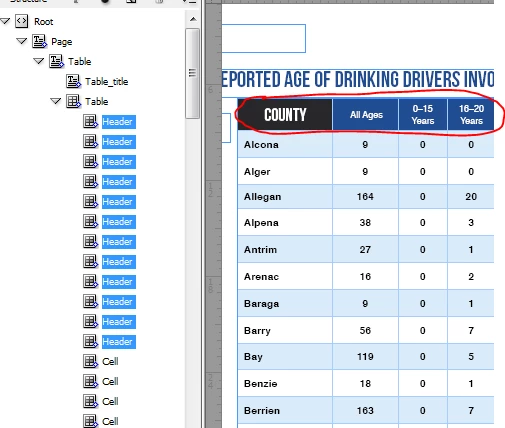
Is there a way to untag *just* the Header cells, while leaving the Table and the Cell tags in place? When I try to untag them manually, it untags the whole table. I'd like to do it manually but I'm told I probably need a script to do it. I am thinking something along the lines of:
function mySnippet(){
var myDocument = app.activeDocument;
var root = app.activeDocument.xmlElements[0];
var pages = root.evaluateXPathExpression('//Page');
for (i=0; i<pages.length; i++)
{
header = i.evaluateXPathExpression('Page/Table/Header');
// if the tag is 'header' and not cell:
header.untag();
}
}
But I'm very new to JavaScript so I don't know what I'm doing at all when it comes to this stuff.
 AdChoices