Participant
January 22, 2018
Answered

Unusual 2 dots invisible character ?

  • January 22, 2018
  • 4 replies
  • 5875 views

In CC2018 Indesign, I've noticed a character that SEEMED new to me. Two dots at the beginning of a block, before the letters.

Huuuu ? Please enlighten me. See example below. When I copy . paste it in Find/replace, it reads : ^ followed by a vertical bar, on an uppercase i. Can't find what it is, or where it comes from.


Correct answer Steve Werner

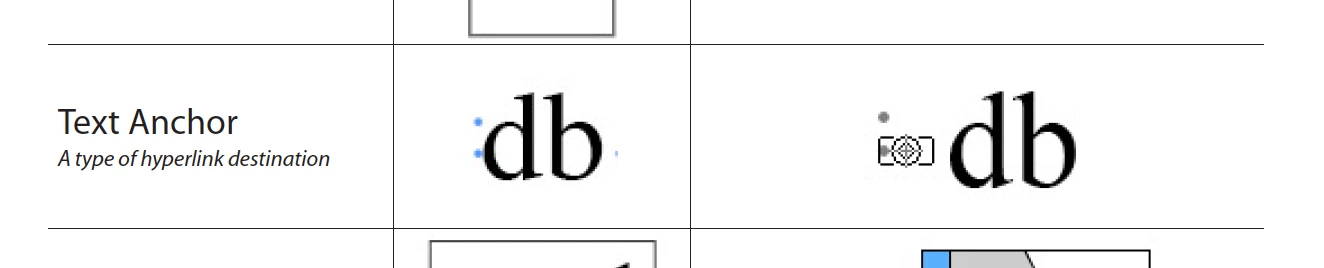
I think it's a Text Anchor (type of hyperlink destination).

See this illustration from the InDesign Secrets Guide to Special Characters. On the right is what it looks like in the Story Editor.

4 replies

Community Expert
September 21, 2021

Hi together,

this special character can be found with Text Find.

The find pattern is:

<FEFF>

 One should be careful to remove it, because <FEFF> has various purposes.


So a "Remove All" will also destroy index markers and could remove characters next to Note objects. The case with Note objects is especially intersting, because it depends on the position of a Note object if removing <FEFF> will remove a character:


Yet another purpose for that <FEFF> special character:

PDF Review: An accepted comment that will remove text will leave an <FEFF> special character.

Text Find/Change can remove that as well.


Regards,
Uwe Laubender

( ACP )

Brad @ Roaring Mouse
Community Expert
Community Expert
September 20, 2021

Ignore my post. typed in in the wrong thread!

Barb Binder
Community Expert
Community Expert
January 22, 2018

In case you aren't familiar with anchors, Peter, you can define a text anchor as a destination on a hyperlink. If you don't need it, you can  delete it, but if you aren't sure, just ignore it. It doesn't print.

~Barb


~Barb at Rocky Mountain Training
Participant
January 22, 2018

Thanks to all

vladan saveljic
Inspiring
January 22, 2018

You can eliminate all of this special characters with find change

Find:

<feff>

Change:

Leave empty

Steve Werner
Community Expert
Steve WernerCommunity ExpertCorrect answer
Community Expert
January 22, 2018

I think it's a Text Anchor (type of hyperlink destination).

See this illustration from the InDesign Secrets Guide to Special Characters. On the right is what it looks like in the Story Editor.