
Inspiring
April 17, 2023
Answered

Update from 18.0 to 18.1 removed the ability to embed fonts in a pdf

  • April 17, 2023
  • 4 replies
  • 2268 views

My computer will not embed fonts into a pdf when using version 18.1 or 18.2.  If I roll back to 18.0 the fonts embed again.  No other settings or presets changed.   Did Adobe remove the ability to embed fonts in 18.1?

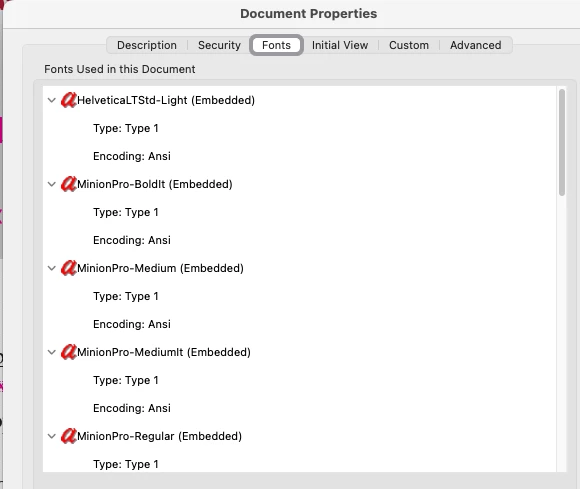
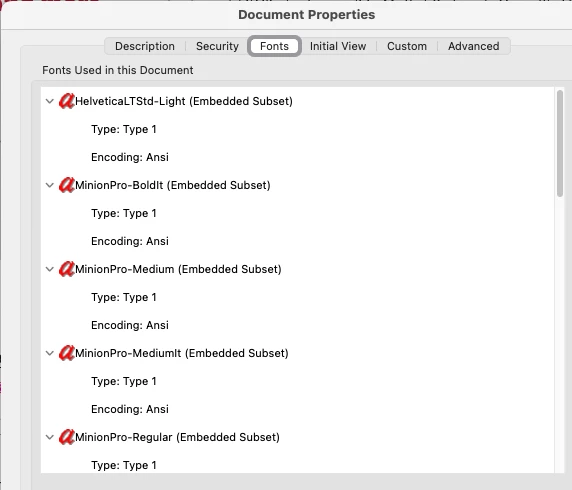
I attached pdf info of the same pdf generated with 18.0 vs 18.1.
This topic has been closed for replies.
Correct answer John28214615w8up

That's a very good point.


Updating to 18.2.1 appears to have fixed this issue.  Not sure why, but it is working now and fonts are fully embedding.   Our pdfs are only 2 pages (front/back of a letter) so the file size isn't an issue.   The fonts need to be fully embedded so that our programmers can data merge into variable fields.  All characters for the font need to be accesible in order for the data to populate those variable fields.   Everyone is within the same company and we do have licensing for the fonts.  

4 replies

Barb Binder
Community Expert
Community Expert
April 17, 2023

Hi @John28214615w8up:


Embedding means a full copy of the entire character set of a font is stored in the PDF. Embedded subset means only those characters that are actually used in the layout are embedded in the PDF. Do both PDFs look OK?


On a separate note, Adobe announced the end of Type 1 font support in January, 2021, giving us close to two years to swap out our old Type 1 fonts for the more modern OpenType fonts. See :https://helpx.adobe.com/fonts/kb/postscript-type-1-fonts-end-of-support.html. This is effective at 18.2. Until you are ready to deal with this, don't upgrade to 18.2.


~Barb

~Barb at Rocky Mountain Training
Inspiring
April 18, 2023

Everything in the pdf looks fine and they print fine.   Our creative team generates the pdfs and passes them onto programmers working with software called GMC Inspire.   The pdfs have variable fields that get data merged from within the GMC software.   GMC needs to have the fonts fully embedded in the pdfs to function correctly, otherwise the programmers need to load the fonts onto their machines for every job.   Also dealing with a MAC to PC workflow.   We eliminated all of the postscript fonts from our systems, but I don't think all Type-1 were removed.  

Legend
April 18, 2023

Ok, so the files are still embedded. Just not fully embedded. So they will display and print fine. If you want t to take this problem first be sure to say you want t "FULLY embedded". 
However... Subset fonts are recommended, for decades now, and Indesign may have changed to do the right thing. Editing without having the licensed font is something actively discouraged and blocked, so just make sure to purchase the same fonts for your entire team. 

Legend
April 17, 2023

Both screenshots shown embedded fonts. It says so. 

Peter Spier
Community Expert
Community Expert
April 17, 2023

Adobe ended support for Type 1 fonts with version 18.1

Inspiring
April 18, 2023

Almost all of our fonts are listed as OpenType - PS in our font software Connect Fonts.   Are none of these OpenType - PS fonts supported anymore?   Looks like the Adobe Fonts are also listed as OpenType - PS.

Peter Spier
Community Expert
Community Expert
April 18, 2023

Sorry, I was pretty disracted this morning and didn't really look closely enough at the screen captures. Those are, indeed, OpenType fonts (with postscript outlines) and are fully supported.

As Aandi noted below, the fonts are embedded, but they are being subsetted contrary to your settings. I think that's probably a bug and should be reported. I beleive this is still the correct link to do that: https://www.adobe.com/products/wishform.html

Participating Frequently
April 17, 2023

Same issue here