
Participant
Nov 24, 2026 8:52 AM UTC
Question

Update Table of Contents - removing items from my list and reording numbers different from the original content list

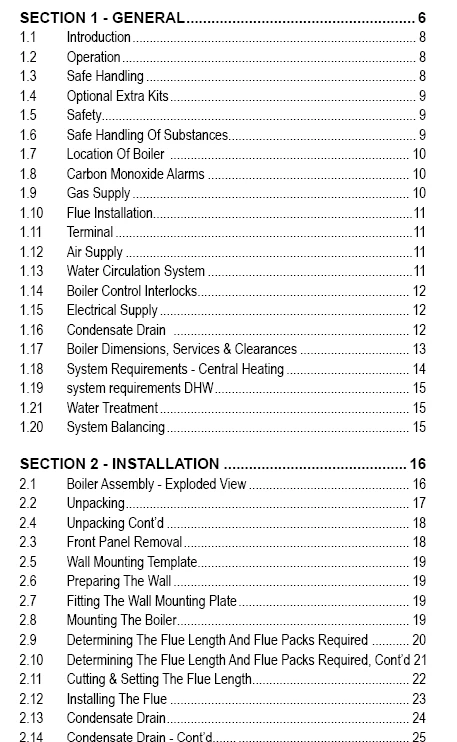
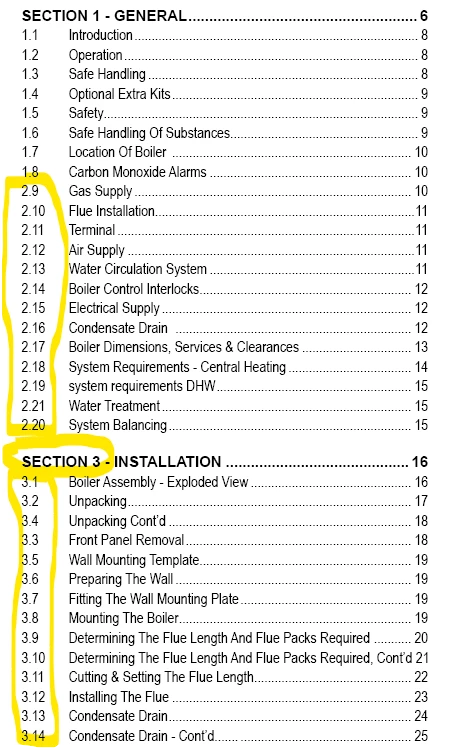
I have created a TOC style and generated it.  Then when i have done some updates to the document and selected “Update Table of Contents” it completely removes some contents lists and randomly puts things in different orders with different page numbers.   I have no clue what is going on.   Also note that I havnt even updated the contents lists in the book, its more that I have udated the document.  so why is the content lists doing this?


NEW GENERATED TOC::::


NEW UPDATED TOC:::
 

    3 replies

    BobLevine
    Community Expert
    Community Expert
    Nov 24, 2026 12:01 PM UTC

    What version of InDesign? Has this worked in the past? Did you upgrade to InDesign 2027?

    Translate
    Participant
    Nov 24, 2026 12:09 PM UTC

    I believe this is due to a bug on the latest update.  I have just found this out this morning.  See the adobe link below.


    https://indesign.uservoice.com/forums/601180-adobe-indesign-bugs/suggestions/51910570-indesign-2027-bug-section-numbering-incorrect-wh


    Translate
    BobLevine
    Community Expert
    Community Expert
    Nov 24, 2026 1:04 PM UTC

    That’s what I thought and why I asked. It’s never a great idea to move a large project to a new version. Can you roll it back to InDesign 2026?

    Translate