Legend
April 27, 2018
Answered

Updating Modified link - shortcut?

  • April 27, 2018
  • 2 replies
  • 1464 views

Hello,

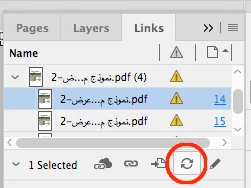
Does anyone have a quicker way of modifying updated link errors?

I've looked around the panel, the error panel and bar double-clicking each one individually i can't seem to work it out.

I'd even go to Keyboard Shortcuts > Panel Options > Links: Update All and it didn't fix this issue (I assume this is meant for something else?)

Any help is appreciated! (*Please ignore the text and missing link errors!) 

    This topic has been closed for replies.
    Correct answer manal shanableh

    Click the update button on links panel, with Alt/Option click to update all links.

    2 replies

    manal shanableh
    manal shanablehCorrect answer
    Legend
    April 27, 2018

    Click the update button on links panel, with Alt/Option click to update all links.

    Legend
    April 27, 2018

    Thank you for all the responses,

    I'd just tried your suggestion and still came back with the above error, so i'd decided to update the 5 missing links and retried.

    Surprise, surprise; it worked and updated all modified links.

    So, that's one for future references; make sure all your links are not missing before trying to update!

    Many thanks, guys. I was seriously 30 minutes away from double-clicking each of them!!!

    amaarora
    Inspiring
    April 27, 2018

    Hi,

    Did you check what happens when you use the panel burger menu.

    -Aman

    Legend
    April 27, 2018

    Yes, this is the Keyboard shortcut I had created, but I did your process just to be sure;

    Then

    Which I assume has to do with the 5 missing link, which is fine but I still get the 100+ Modified link needing to be double-clicked.

    Thanks for the quick response.