Urgent help needed with Table Processing script
Hello, I am totally new to scripting in Indesign. I found a script in the Indesign Exchange for processing tables with table/cell/paragraph styles posted by LeeShort on 12 April 2011. The link for the script is http://www.adobe.com/cfusion/exchange/index.cfm?event=extensionDetail&loc=en_us&extid=2419524
It says it is for CS4 but I use CS5.5 on WIN 7, not sure if this is the cause for the errors. I'm having trouble getting the script to work and am starting to get quite anxious as I have 1851 tables to format. I've downloaded and read the indesign scripting tutorials and javascript guide so I understand the basics, but I'm really lost once I look at this script.
The first error I received was a syntax one:
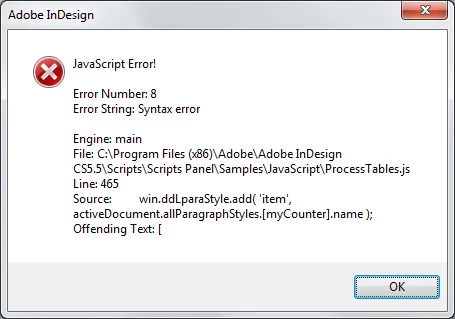
I removed the offending text from this and the three similar errors that followed. I resaved a new .jsx file called ProcessTablesCG.jsx and then ran the script again.
I ran the new script and received the following error:
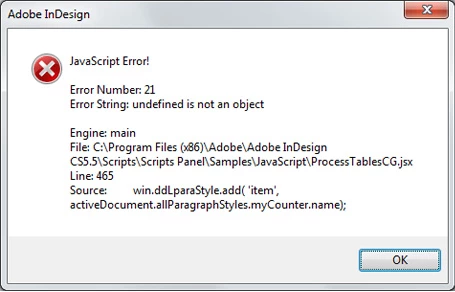
From the screen shot of the original script posted by LeeShort, I am expecting a dialog box to open where I would enter the style names and parameters etc, however I can't get the script to produce this. The tables I need to format are identical in row and column count, with the same requirements for table/cell/para/char style formatting, so I want the script to apply to every table in the doc that matches that criteria. Here is a screen shot of a table with styles applied and the unformatted table after it has been imported from word and a script has been run to set the column widths.
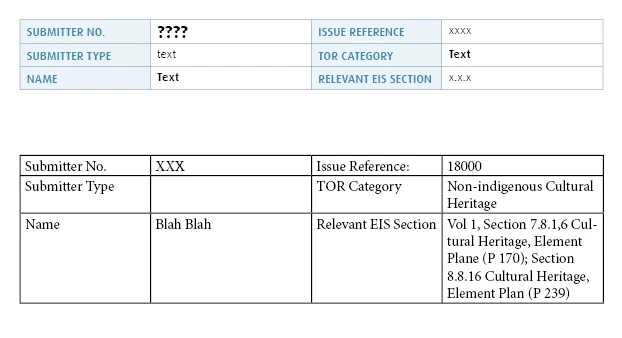
This will probably be obvious to those of you who understand JS but I'm at the point of tears of frustration with the pressure of over 1800 tables to format and about 2500 pages of text, with less than 10 days to do it. I need these scripts to work!!
To the beautiful souls that offer assistance ... thank you kindly in advance for your help 
 AdChoices