
davideb29497517
Participant
April 28, 2020
Answered

Use of ExtendScript Toolkit CS6

  • April 28, 2020
  • 6 replies
  • 5865 views

Hi, with the update of the Catalina operating system, it is no longer possible for me to use a script generated with ExtendScript Toolkit CS6.
The script was used to create new files indd from a single multi-page file, as many as the pages of the original file. The new files each contained one of the pages contained in the source file, e.g. if the starting file had 5 pages, 5 files were created of which the first contained page 1 of 5, the second page 2 of 5 and so on. The 5 files were then, always with the same script, renamed by inserting in the script the 5 names for each destination file.
Can anyone help me by indicating if there is another tool that now replaces ExtendScript Toolkit CS6 to be able to launch a script with the same functions?
Thanks for your help.
Correct answer Jeremy bowmangraphics

Jeremy, now i am out of ideas. I had used the same installer to install it on my MAC OS Mojave and it worked just fine. Do you think something on your MAC is corrupting the download? Can you try downloading it on some other machine and then transfer it on your MAC, or maybe clone the repo on your MAC using git and then try rather than using HTML download


-Manan


Hi Manan,


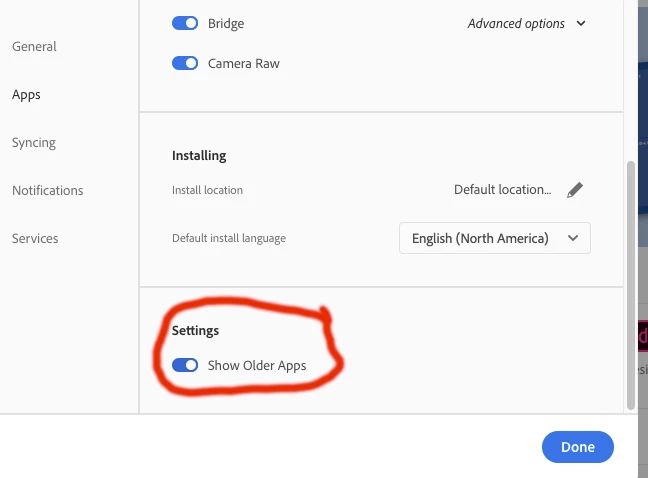
I have it! I was making a silly mistake. I should have flipped the slider in Settings in the Creative Cloud app to "show older apps". Once I did that, ESTK appeared and I downloaded and installed it in the usual way (see screenshot below).


Many thanks again to everyone for all your help, and I hope I haven't wasted too much of your time! — Jeremy


6 replies

Community Expert
May 6, 2020

Hi Jeremy,

great! But still, you have to debug the installed ESTK if you want to use it successfully.


Regards,
Uwe Laubender

( ACP )


Community Expert
May 6, 2020

Hi Jeremy,

Try the following link from the official Adobe Github account

https://github.com/Adobe-CEP/CEP-Resources/tree/master/ExtendScript-Toolkit


-Manan

-Manan
Jeremy bowmangraphics
Inspiring
May 6, 2020

Hi Manan,


Unfortunately, I get the following error message when I try to install that:


By the way, I greatly appreciate all the help everyone here is giving me. Thanks to all!

Community Expert
May 6, 2020

Jeremy, now i am out of ideas. I had used the same installer to install it on my MAC OS Mojave and it worked just fine. Do you think something on your MAC is corrupting the download? Can you try downloading it on some other machine and then transfer it on your MAC, or maybe clone the repo on your MAC using git and then try rather than using HTML download


-Manan

-Manan
Community Expert
May 6, 2020

Hi Jeremy,

the ExtendScript Toolkit app is still available for download. And it still should work with OS X Mojave.

Important: It will work only after you did some bug fixing on the tool itself.

This is necessary because of a bug that is Mac OS X specific and hit all versions of the ESTK ( CS6 and CC ) as far as I can see. On all OS X versions where the ESTK can run.


Here a download link for an istaller of the latest version of the ESTK for Mac OS X:

https://prodesigntools.com/adobe-cc-direct-download-links.html


Below a guide for bug fixing the ESTK after it is installed:

https://medium.com/adobetech/workaround-for-extendscript-toolkit-debugger-error-1116-f067f81f96c6


FWIW: You may need to assign suffixes like *.jsx and *.jsxbin to the ESTK App through your Mac OS X Finder tools.

Cannot tell this because I do all my work on Windows for a while now…


Regards,
Uwe Laubender

( ACP )

Jeremy bowmangraphics
Inspiring
May 6, 2020

Hi Uwe,


That sounds great, thanks, but unfortunately when I click on the link for the Mac OS version of the ESTK, I get an "access denied" message. Any ideas about how to get round that?


Jeremy

Community Expert
May 6, 2020

Sorry Jeremy,

I had to make clear that you have to read the "Note: Very Important Instructions" above the list of download links and do as adviced there point by point. You have to leave a cookie at a special site so that the Adobe server that hosts the downloader can identify you as a person with a valid Adobe ID.


Regards,
Uwe Laubender

( ACP )

Peter Kahrel
Community Expert
Community Expert
April 29, 2020

You (and many others) confuse ExtendScript and the ExtendScript Toolkit (ESTK). The Toolkit is a script editor/debugger, but it's a 32-bits application and they're no longer supported in Catalina. ExtendScript is a script language that works fine in Catalina. As Malcolm and Manan mention: to run a acript, run it from InDesign's Scripts panel. To edit a script, use a plain text editor or, if you want to do some interactive debugging, use the ESTK plug-in in VS code.

P.

Jeremy bowmangraphics
Inspiring
May 6, 2020

I just did a clean install of Mojave in the hope of using the ExtendScript Toolkit again, but as far as I can see, it's no longer available. When I right-click a script in the InDesign Scripts Panel, and choose "Edit Script", nothing at all happens! Any suggestions as to the least bad alternatives? If I edit my scripts using BBEdit (say), can I get InDesign to launch it when I choose "Edit Script"?

BarlaeDC
Community Expert
Community Expert
May 6, 2020

Hi,


As stated above the ExtendScript TOOLKIT is a 32bit application and is therefore (pretty much) End of lived, the replacement is to use visual studio with the extendscript extension installed. (see link below)


https://marketplace.visualstudio.com/items?itemName=Adobe.extendscript-debug


Regards

Malcolm

Community Expert
April 28, 2020

If you just need to execute the script then Extendscript or its alternative is not required. You can execute it from the scripts panel. See the following link

https://indesignsecrets.com/how-to-install-scripts-in-indesign.php


-Manan

-Manan
BarlaeDC
Community Expert
Community Expert
April 28, 2020

Hi,


Visual studio code with the extendscript add-on is now the recommended method - https://marketplace.visualstudio.com/items?itemName=Adobe.extendscript-debug


regards


Malcolm