
Using a template to make a resume, text isn't appearing as the templates does.
Hi, I'm a big time newbie to InDesign so forgive me. I've done some searching online but I couldn't figure out how to do exactly what I'm trying to.
I downloaded a resume template from Adobe Stock and I'm replacing the text with my own but there seems to be a change in the padding of the text boxes whenever I try to insert my own text. Here's a before and after:
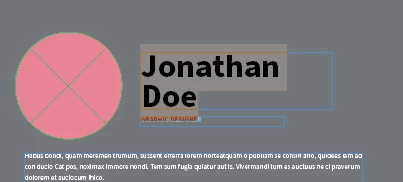
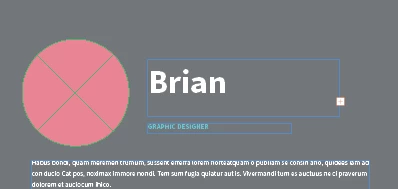
You can see there's a substantial addition of space when you compare my "B" to his "J".
I'm not deleting the old text, just typing over it, so I wouldn't think formatting would be changed. Because of this, my name on the headline doesn't show my last name unless I make the text box larger which messes up the clean look of the document. I've looked in text box properties and the margins and padding are at 0 with no way to make it negative (which makes sense) so I don't know where this extra space is coming from.
Any help is greatly appreciated! I'm trying to get my first IT job soon and want to have more than a LinkedIn printout. 🙂


 AdChoices