



Using GREP for tracking in tables
Hi,
I have a catalogue with >5000 item numbers. Each item number has between 6 and 14 characters (mostly numbers but sometimes also letters).
For better reading, the item numbers are written in blocks of 2 with a space in between.
Problem: If you copy the item number from a PDF, for example, the spaces will of course also be copied.
So it would be a much better way to change the tracking (is this the correct term? in German it is called "Laufweite") of every 2nd character by using GREP Styles instead of using the spaces.
But there are 2 problems:
1) I want to get every 2nd character from the left to the right (character 2, 4, 6, and so on) no matter how many characters the item number has.
With this I get every 2nd character from right to left (I found it in the internet, I'm not good at regex):
\w(?=\w{2}\b)|\w(?=(\w{2}){2,}\b)
e.g.:
12 34 56
1 23 45 67
But i want to have:
12 34 56
12 34 56 7
2) The GREP Style only works in text frames but not in tables/cells.
Every item number is written in a seperate cell. It kinda looks like this:
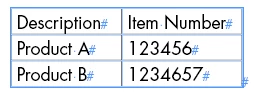
The cells with the item number have the same paragraph style like the text frame.
Can anyone help me solve the problems, please? Whereby the second problem is the bigger problem.
The catalouge will be created every year with a PIM. The PIM creates everything by using templates and fills it with content. It also optimizes the column width. So it should work with GREP Styles, I think. Find and replace would be not an option beacuse the optimisation of the columns width won't work anymore.
Many thanks in advance!
 AdChoices