bellevue scott
Inspiring
October 31, 2024
Answered

Using ImagestoCSV104.jsx

  • October 31, 2024
  • 3 replies
  • 1454 views

For years now I've used this script to create photo albums, but lately have been having problems with it on two of my three computers. Here's how it works. 


Run the script - point it to a directory and it will create a csv file with a list of images in that directory. But the images are out of order in the csv file, so I open it in Open office, sort the rows A-Z, save and close. Then go to the data merge menu in ID, select that csv file as the data source, and ID will create a page for each image, giving me a photo album that I then save as a PDF or ebook. 


Problem is, I'm starting to get this error, and can't figure it out. The Data Merge stops, and I get an error sayiing "data missing or some rows are empty". But on one computer it still works. No idea why that one works and the others don't. But I need to find a solution. 


Does anyone else use this? Any ideas on what's causing that error? ID 2024 and ID 2025 give the same error. 
This topic has been closed for replies.
Correct answer bellevue scott

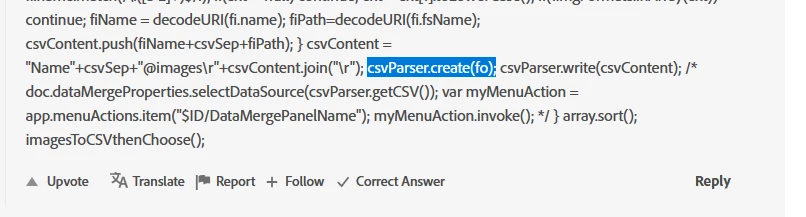
Before marked part:


csvContent.sort();


So you should have something like this:


csvContent = "Name"+csvSep+"@images\r"+csvContent.join("\r"); csvContent.sort(); csvParser.create(fo);


Robert

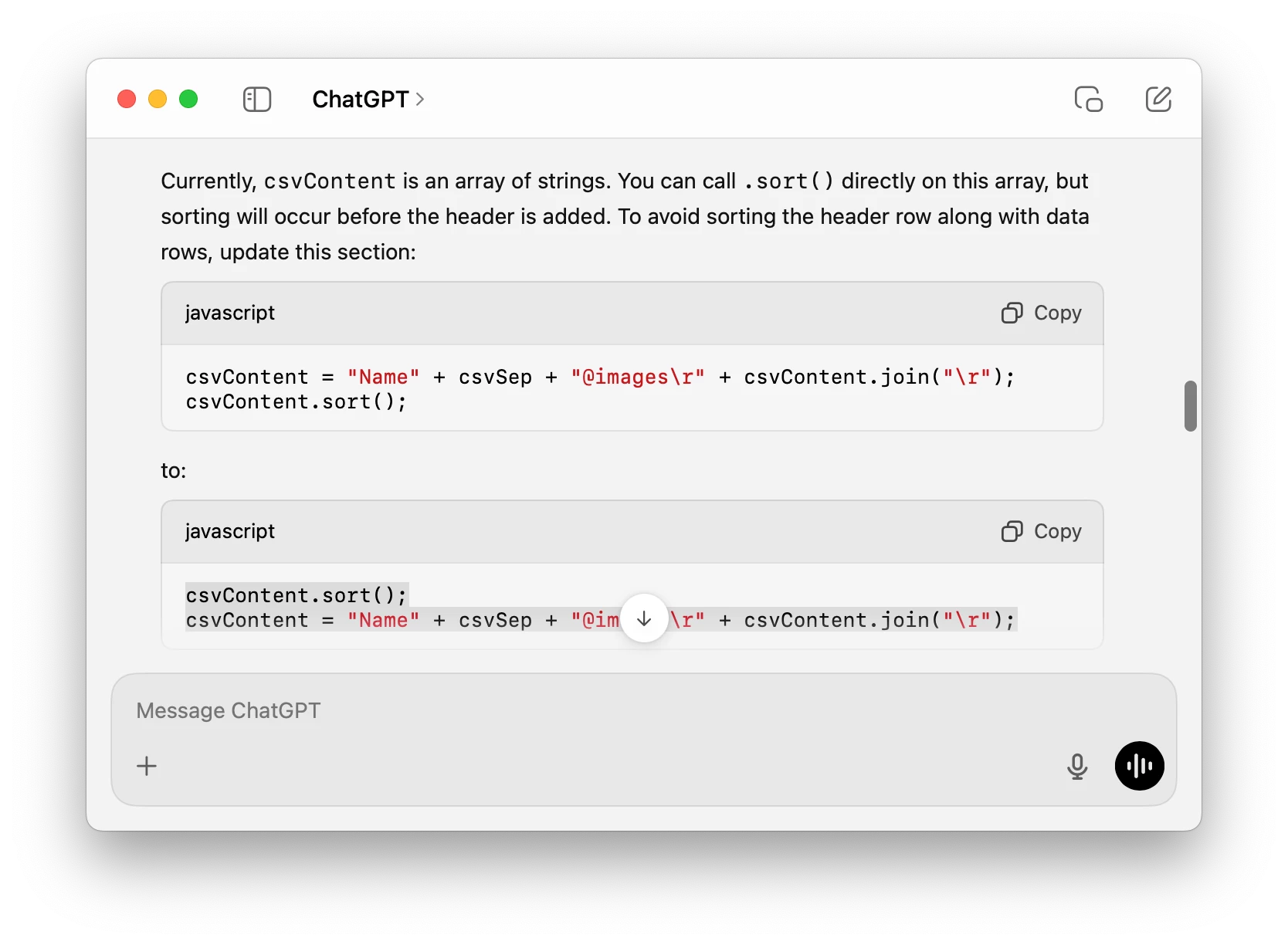
thanks very much. You were close but I kept getting a javascript error. So I ran it through ChatGPT and it gave me the correct answer, and now I get a csv file that's already sorted. 


3 replies

bellevue scott
Inspiring
November 1, 2024

Posting as a top level comment. Here's what I've found.

Upgraded one of my Macs to Sequoia 15.1 and In Design to 2025 (ver 20.0) problem still persisted. 


What I ultimately found was that the version of Open Office was the culprit. I have found that version 4.1.14 works with this script. Mac's numbers program does not. I don't know if a paid version of Office 365 would work or not. 


This step is important, because otherwise the images are not imported in order. For this to work, you run the script, which creates a csv file. You open that file, and sort it, and then go to the data merge window in In Design, select the csv file and do the data merge, and your images will get imported in the correct order. 


I had forgotten about about the ImageCatalo.jsx script that's included with InDesign, and I had forgotten why it doesn't work. It reformats the pages, which is a problem, but more importantly, it imports the images in a random order. This is where creating the csv file and sorting it comes in. I need these images to get imported in the correct order, and ImagestoCSV104.jsx does this. 


The versions of Open Office that didn't work were 4.1.3. And again, I don't know if MS Office will sort the file without adding whatever was causing the errors, but OpenOffice 4.1.14 does appear to work. 

Robert at ID-Tasker
Legend
November 1, 2024

@bellevue scott 


Glad you found the culprit - pretty much what I've suggested yesterday.


Also, I'm sure you don't have to do this workaround with Open Office to sort things - it can be done in JavaScript. 


array.sort();
bellevue scott
Inspiring
November 2, 2024

Where might I put that array.sort(); ?


Array.prototype.inArray = function(obj){ var arrMax = this.length-1; for(var i=arrMax; i>=0; i--){ if(this[i]===obj){ return true; } } return false; } var csvParser = (function(){ var csvFile; return{ create:function(fo){ csvFile=File(fo+"/"+fo.name+".csv"); }, write:function(csvContent){ csvFile.open('w'); csvFile.encoding="UTF-8"; csvFile.write(csvContent); csvFile.close(); }, execute:function(){ csvFile.execute(); }, getCSV:function(){ return csvFile; } } })(); function imagesToCSVthenChoose(){ var doc, fo, fis, fiMax, fi, fiName, fiPath, imgFormats=["eps","jpg","tif","psd","pdf","png","ai","bmp","jpeg"], imgFormatMax = imgFormats.length-1, imgOk = [], csvContent = [], ext, csvLine=[], csvSep=","; if(app.documents.length==0){ alert("No documents open !"); return } doc=app.activeDocument; fo = Folder.selectDialog("Please choose a folder with images"); if(!fo) return fis = fo.getFiles(); fiMax=fis.length; for(var i=0; i<fiMax; i++){ fi=fis[i]; ext = fi.name.match(/\.([a-z]+)$/i); if(ext==null) continue; ext = ext[1].toLowerCase(); if(!imgFormats.inArray(ext)) continue; fiName = decodeURI(fi.name); fiPath=decodeURI(fi.fsName); csvContent.push(fiName+csvSep+fiPath); } csvContent = "Name"+csvSep+"@images\r"+csvContent.join("\r"); csvParser.create(fo); csvParser.write(csvContent); /* doc.dataMergeProperties.selectDataSource(csvParser.getCSV()); var myMenuAction = app.menuActions.item("$ID/DataMergePanelName"); myMenuAction.invoke(); */ } array.sort(); imagesToCSVthenChoose();

Robert at ID-Tasker
Legend
October 31, 2024

@bellevue scott


Have you tried included ImageCatalog script?


bellevue scott
Inspiring
November 1, 2024

No but I'm willing. Is that part of ID already?

Robert at ID-Tasker
Legend
November 1, 2024
quote

No but I'm willing. Is that part of ID already?


By @bellevue scott


Yes, it's included for free with InDesign. 


Mike Witherell
Community Expert
Community Expert
October 31, 2024

Tell us about your different computers. What OS on each? What version of ID on each?

Mike Witherell
bellevue scott
Inspiring
October 31, 2024

The computer on which it works is a Mac Studio Pro running Ventura 13.4.x and running now ID 2025 (just updated it moments ago), and even on the new ID, it works. On one of the machines where it does not work, it is a Mac Pro laptop M1, running ID 2024. On another machine where it doesn't work, I'm using Windows 10 and ID 2024. 


That's what I can't figure out. On the laptop, for example, when I try and run the Data Merge, I get the error, but on the Mac Studio Pro, with the same OS, Same OS version, same ID version and same Open office, I get the error. On a windows machine I also get the same error. 


The error occurs when I sort the data. If I don't sort the data in Open Office, I can run data merge and it's fine, but of course it's out of order. I know it's odd. I can't see what's causing it to think there's an empty data on two machines but not the other. 

Robert at ID-Tasker
Legend
October 31, 2024

@bellevue scott


Then it looks like something is wrong with Open Office - not InDesign?