


Participant
June 5, 2018
Answered

Using "Indent to Here" in InDesign on the second line of a bullet deletes the text after. How can I fix this?

  • June 5, 2018
  • 4 replies
  • 15614 views

Hello,

I'm using a MAC and the Indent to Here shortcut ( Command + \ ) in InDesign does not indent the text, it deletes everything after. I just did an update and it's still having this issue. What can I do to fix this? Thanks in advance!
This topic has been closed for replies.
Correct answer Bill Silbert

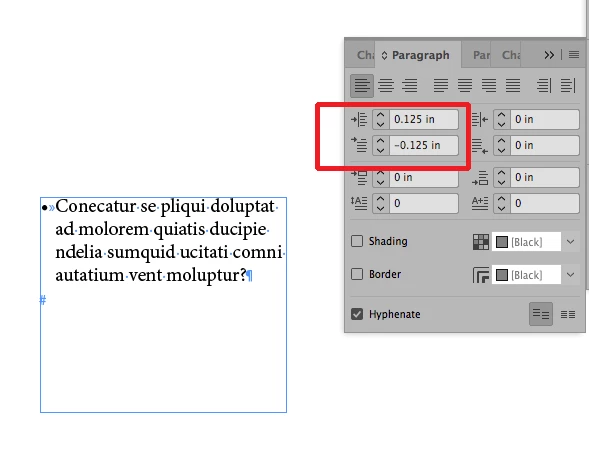
Setting up a bullet paragraph should never be done with the indent to here character. To maintain an accurate indent—especially if using multiple paragraphs—the left indent and the negative first line indent should always be set in either the paragraph panel (see screen shot) or through similar fields within the Bulleted and Numbered List function (found under the Type Menu). A tab should be set after the bullet which will automatically assume the left indent. With either method the indent can be made into a paragraph style (Bullets and Numbering is a section within the New Paragraph Style dialog).  

4 replies

Bill Silbert
Community Expert
Bill SilbertCommunity ExpertCorrect answer
Community Expert
June 5, 2018

Setting up a bullet paragraph should never be done with the indent to here character. To maintain an accurate indent—especially if using multiple paragraphs—the left indent and the negative first line indent should always be set in either the paragraph panel (see screen shot) or through similar fields within the Bulleted and Numbered List function (found under the Type Menu). A tab should be set after the bullet which will automatically assume the left indent. With either method the indent can be made into a paragraph style (Bullets and Numbering is a section within the New Paragraph Style dialog).  

Known Participant
January 14, 2021

Can you just answer the question? I use this a lot when I am cranking out something quickly and find it very useful. I believe it is a preferences thing. Try trashing the prefs and restarting Indesign.

eguillemette-pinestatet
Participant
August 2, 2021

Use tab to get the indent to where you want it, then type Ctrl+\ to make all the lines below it line up.

Willi Adelberger
Community Expert
Community Expert
June 5, 2018

Don't use intend here, create appropiate paragraph styles and use the bullet function.

John Mensinger
Community Expert
Community Expert
June 5, 2018

^Right. You're misusing the feature.

vinny38
Legend
June 5, 2018

"Using "Indent to Here" on the second line of a bullet...

Second line? I guess this is why your text is in excess (not deleted ^^)...

Insert it at the beginning of your paragraph (or even better, use indents)

See what's happening:

cinziamarotta
Participating Frequently
June 5, 2018

Hi,

could you please post a screenshot? May be the column is too small to content the text...