Inspiring
October 11, 2023
Answered

Using javascript (via applescript) to setup a preflight profile in indesign

  • October 11, 2023
  • 2 replies
  • 2190 views

I have managed to work out how to create preflight profile in indesign with a set name, but am really struggling with how to set the actual preflight settings (missing links etc)...


tell application "Adobe InDesign 2023"
do script "
     var profileName = 'Preflight Profile Name';
     var newProfile = app.preflightProfiles.add({
     name: profileName,});
" language javascript
end tell


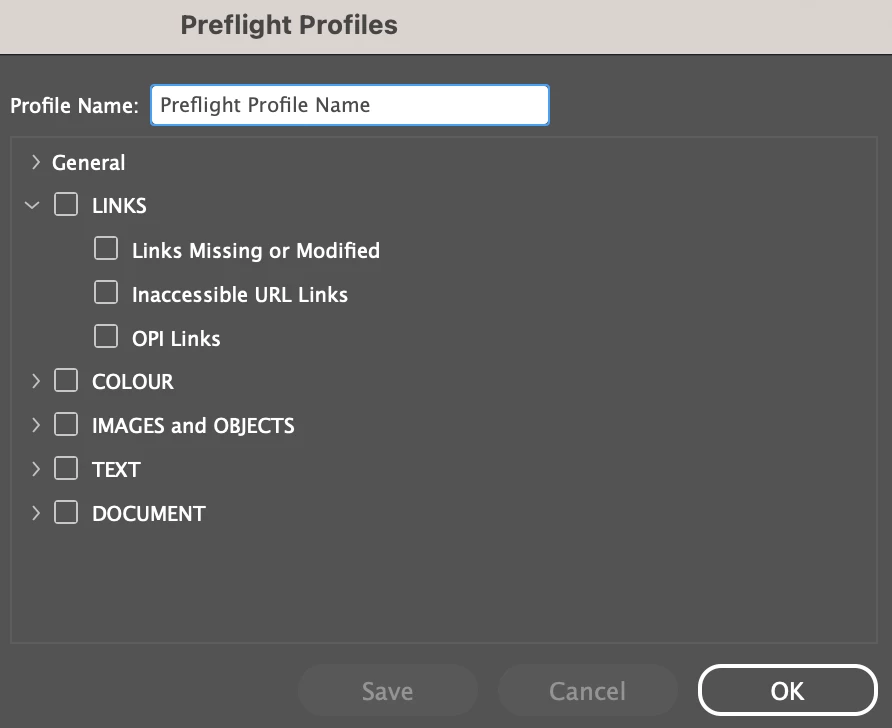
I want to be able to have control of all preflight settings outlined in the screen below (including drop downs) using javascript, is this possible and is there any documentation outlining all of these settings?


Cheers,

Sam


Correct answer rob day

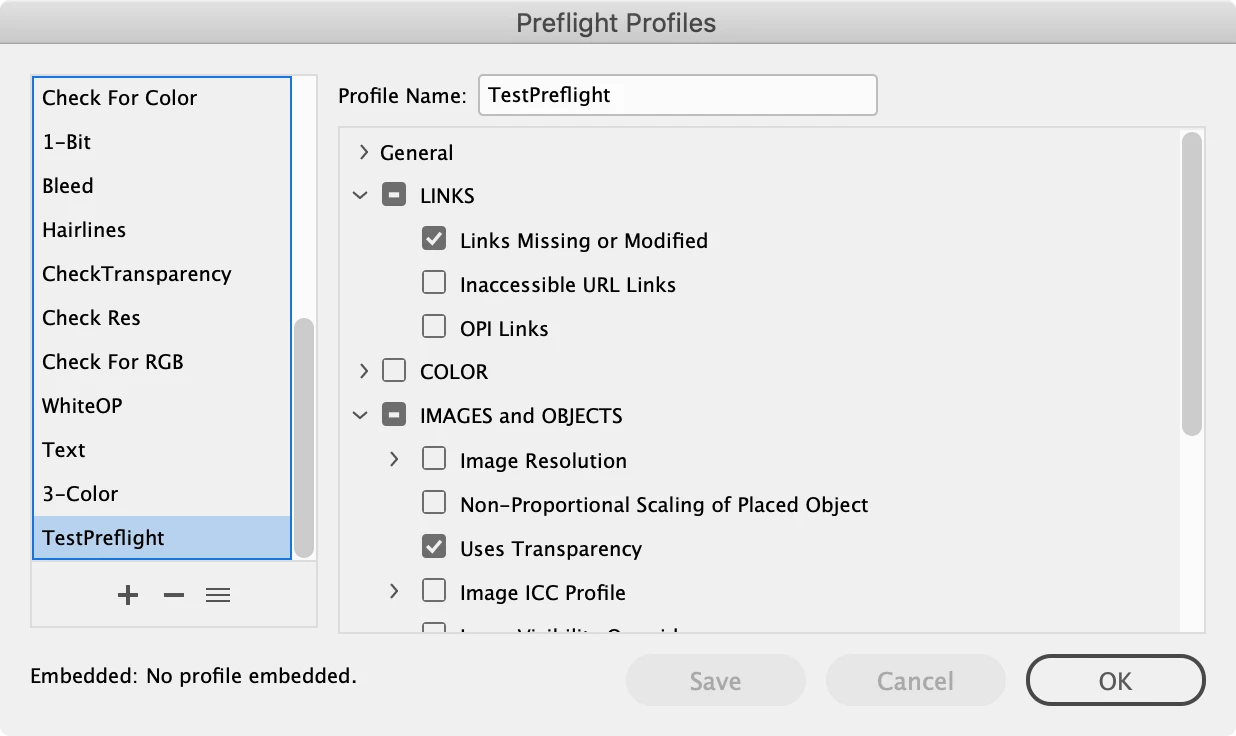
Hi @SpaghettiSam , You’ve added a preflight profile, but you also have to add the rules you want to use and set their flags. Here‘s a JS example, where I’ve added two functions for creating the profile and its rules:


//Make a new Preflight Profile
var pf = makePreflight("TestPreflight");

//add rules to the profile, 2nd parameter is the rule constant string
var tr = makeRule(pf, "ADBE_TransparencyUsage")
tr.flag = PreflightRuleFlag.returnAsError;
var ml = makeRule(pf, "ADBE_MissingModifiedGraphics")
ml.flag = PreflightRuleFlag.returnAsError;


/**
* Makes a new Preflight 
* @ param preflight name 
* @ return the new preflight 
*/
function makePreflight(n){
    if (app.preflightProfiles.itemByName(n).isValid) {
        return app.preflightProfiles.itemByName(n);
    } else {
        return app.preflightProfiles.add({name:n});
    }
}

/**
* Makes a new Preflight Rule 
* @ param preflight name 
* @ param the preflight rule constant name 
* @ return the new preflight rule
*/
function makeRule(pf, n){
    if (pf.preflightProfileRules.itemByName(n).isValid) {
        return pf.preflightProfileRules.itemByName(n);
    } else {
        return pf.preflightProfileRules.add(n);
    }
}


Here’s a list of the rule name constants:

ADBE_BlankPages
ADBE_BleedSlug
ADBE_BleedTrimHazard
ADBE_CMYPlates
ADBE_Colorspace
ADBE_ConditionIndicators
ADBE_CrossReferences
ADBE_FontUsage
ADBE_HiddenPageItem
ADBE_ImageColorManagement
ADBE_ImageResolution
ADBE_InaccessibleUrlLinks
ADBE_InteractiveContent
ADBE_LayerVisibility
ADBE_MissingFonts
ADBE_MissingGlyph
ADBE_MissingModifiedGraphics
ADBE_MultiPageSizes
ADBE_OPI
ADBE_Overprint
ADBE_OversetText
ADBE_PageCount
ADBE_PageSizeOrientation
ADBE_Registration
ADBE_ScaledGraphics
ADBE_ScaledType
ADBE_SmallText
ADBE_SpanColumns
ADBE_SpellCheck
ADBE_SpotColorSetup
ADBE_StrokeRequirements
ADBE_TextOverrides
ADBE_TrackedChange
ADBE_TransparencyBlending
ADBE_TransparencyUsage
ADBE_UnresolvedCaption
ADBE_WhiteOverprint

 

2 replies

Legend
October 14, 2023

Why do you use Javascript when you can stay in AppleScript?

tell application id "com.adobe.indesign"
	make new preflight profile with properties {name:"Spaghetti"}
end tell


Inspiring
October 16, 2023

@Dirk Becker I find that Javascript is more robust than Applescript when setting up settings within the Adobe suite. There are certain instances where the only way to manipulate particular settings within Applescript is by using GUI scripting, which I don't really like doing... the more processes I can run hidden, the better! Also, any excuse to use Javascript is also a good excuse for me to understand it better. 

rob day
Community Expert
Community Expert
October 16, 2023

What are you doing in AppleScript before or after you call the do script that you can't do with JS? Are you writing tells to other Mac applications?

rob day
Community Expert
rob dayCommunity ExpertCorrect answer
Community Expert
October 11, 2023

Hi @SpaghettiSam , You’ve added a preflight profile, but you also have to add the rules you want to use and set their flags. Here‘s a JS example, where I’ve added two functions for creating the profile and its rules:


//Make a new Preflight Profile
var pf = makePreflight("TestPreflight");

//add rules to the profile, 2nd parameter is the rule constant string
var tr = makeRule(pf, "ADBE_TransparencyUsage")
tr.flag = PreflightRuleFlag.returnAsError;
var ml = makeRule(pf, "ADBE_MissingModifiedGraphics")
ml.flag = PreflightRuleFlag.returnAsError;


/**
* Makes a new Preflight 
* @ param preflight name 
* @ return the new preflight 
*/
function makePreflight(n){
    if (app.preflightProfiles.itemByName(n).isValid) {
        return app.preflightProfiles.itemByName(n);
    } else {
        return app.preflightProfiles.add({name:n});
    }
}

/**
* Makes a new Preflight Rule 
* @ param preflight name 
* @ param the preflight rule constant name 
* @ return the new preflight rule
*/
function makeRule(pf, n){
    if (pf.preflightProfileRules.itemByName(n).isValid) {
        return pf.preflightProfileRules.itemByName(n);
    } else {
        return pf.preflightProfileRules.add(n);
    }
}


Here’s a list of the rule name constants:

ADBE_BlankPages
ADBE_BleedSlug
ADBE_BleedTrimHazard
ADBE_CMYPlates
ADBE_Colorspace
ADBE_ConditionIndicators
ADBE_CrossReferences
ADBE_FontUsage
ADBE_HiddenPageItem
ADBE_ImageColorManagement
ADBE_ImageResolution
ADBE_InaccessibleUrlLinks
ADBE_InteractiveContent
ADBE_LayerVisibility
ADBE_MissingFonts
ADBE_MissingGlyph
ADBE_MissingModifiedGraphics
ADBE_MultiPageSizes
ADBE_OPI
ADBE_Overprint
ADBE_OversetText
ADBE_PageCount
ADBE_PageSizeOrientation
ADBE_Registration
ADBE_ScaledGraphics
ADBE_ScaledType
ADBE_SmallText
ADBE_SpanColumns
ADBE_SpellCheck
ADBE_SpotColorSetup
ADBE_StrokeRequirements
ADBE_TextOverrides
ADBE_TrackedChange
ADBE_TransparencyBlending
ADBE_TransparencyUsage
ADBE_UnresolvedCaption
ADBE_WhiteOverprint


Inspiring
October 11, 2023

@rob day Many thanks, this has got me rolling again! If the profile already exists I've wrapped the javascript in a try/on error exception, which will ultimately ignore the request and move on with the rest of the script. Thanks again!

rob day
Community Expert
Community Expert
October 11, 2023

If the profile already exists I've wrapped the javascript


FWIW, that’s what the makePreflight(n) and makeRule(pf, n) functions do—if there’s already a profile with the provided name it uses it, otherwise it makes one. You don’t need the try statement.