
Inspiring
June 15, 2025
Answered

Using Place in InDesign (Mac Sequoia), the files are ordered by last opened - How to change it?

  • June 15, 2025
  • 2 replies
  • 219 views

When I click on Place to add an image to an InDesign doc, the files appear in order of last opened and I have not found how to change that. Anyone have a solution?

Thanks in advance!
Correct answer Barb Binder

Hi @Catherine284762306smk:


It sounds like you're referring to the order that the files appear in the Place dialog box? 


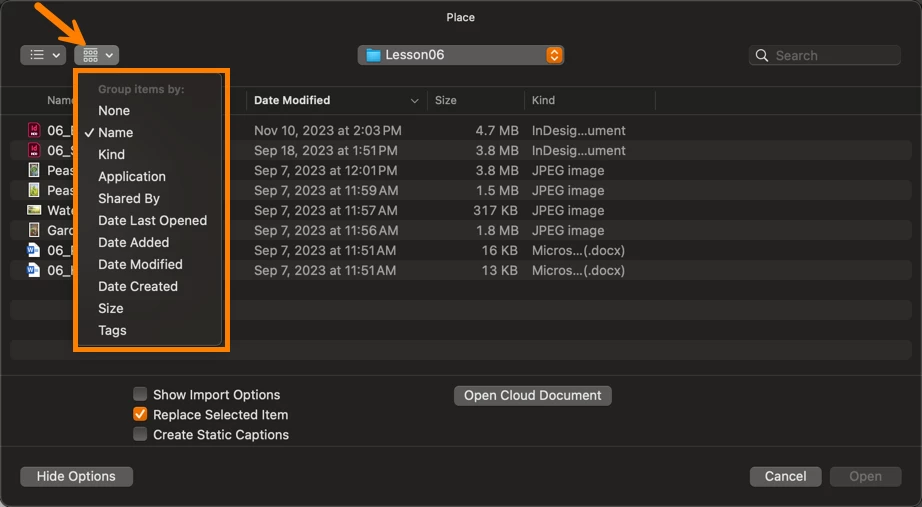
There are two menus at the top left: one controls how the files are displayed, the second controls the order.

mac0S 15.5


~Barb


2 replies

Barb Binder
Community Expert
Community Expert
June 15, 2025

Haha. We all have those moments!


~Barb 

~Barb at Rocky Mountain Training
Barb Binder
Community Expert
Barb BinderCommunity ExpertCorrect answer
Community Expert
June 15, 2025

Hi @Catherine284762306smk:


It sounds like you're referring to the order that the files appear in the Place dialog box? 


There are two menus at the top left: one controls how the files are displayed, the second controls the order.

mac0S 15.5


~Barb


~Barb at Rocky Mountain Training
Inspiring
June 15, 2025

Hi - I had a Duh moment when I saw your answer. I simply did not think about about that. Sometimes the brain is not fully engaged. Thanks very much! Problem solved. Much appreciated!