Participant
June 14, 2022
Answered

Using script to open InDesign file and update table data from an excel document

  • June 14, 2022
  • 2 replies
  • 446 views

Hello,


My company makes data reports that are often replicated a couple hundred times. I've created a document that has table data attached to an excel file and can be updated through the links panel. My question is, is there a way to update the data in the tables just by running a script, pointing to the excel file within the same folder?


There are more complicated actions that need to be completed in the file, but this would be a great starting point!


Thank you in advance!
This topic has been closed for replies.
Correct answer Kasyan Servetsky

I wrote a function that reads the data from Excel and returns them in InDesign as an array of strings.
I didn’t see your files, but off the top of my head, a possible approach could be like so:
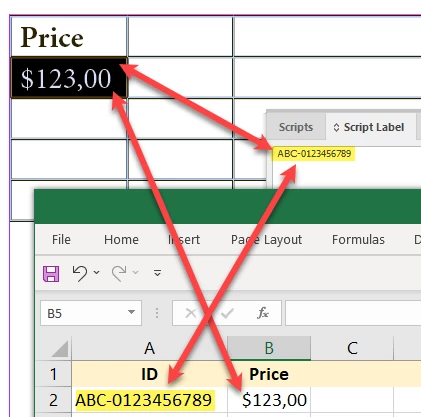
If your table structure matches the spreadsheet, it’s quite easy: you may simply replicate the data in InDesign. For example, row 2 in column 1 in InDesign matches cell B2 in Excel.

Otherwise, you have to explicitly indicate the relationship between the cells in InDesign and Excel.
For instance, in Excel, you may have a ‘key’ field, say, a unique ID. In InDesign, you label cells with corresponding IDs so the script would know where to put the data.

2 replies

Kasyan Servetsky
Kasyan ServetskyCorrect answer
Legend
June 17, 2022

I wrote a function that reads the data from Excel and returns them in InDesign as an array of strings.
I didn’t see your files, but off the top of my head, a possible approach could be like so:
If your table structure matches the spreadsheet, it’s quite easy: you may simply replicate the data in InDesign. For example, row 2 in column 1 in InDesign matches cell B2 in Excel.

Otherwise, you have to explicitly indicate the relationship between the cells in InDesign and Excel.
For instance, in Excel, you may have a ‘key’ field, say, a unique ID. In InDesign, you label cells with corresponding IDs so the script would know where to put the data.

Mike Witherell
Community Expert
Community Expert
June 16, 2022

Edit > Place and Link might give you the ability to update the main table and it would update in all the other documents that have a Place 'n' Link of that Table.

Another approach: build the table InDesign document and place it into a page in the other documents. A placed InDesign file acts as if it were an image.

Mike Witherell