
Inspiring
June 27, 2025
Answered

Variable data in InDesign-

  • June 27, 2025
  • 1 reply
  • 177 views

I have a price sheet that I built in InDesign.  I want to pull data from an excel spreadsheet.

However, I want to pull specific  cells into my single page in InDesign AND still have them linked to the spreadsheet.

That way when the prices change I can open the InDesign page and jusr reflow the data.

So far.  It's been a bust.

I can pull specific cells into InDesign, but they are no longer linked to the spread sheet, so I we update the spreadsheet, it does not propagate to the InDesign file. Or, I can't just re-link the data.


How do I do this and have the data remain linked?
Correct answer jmlevy

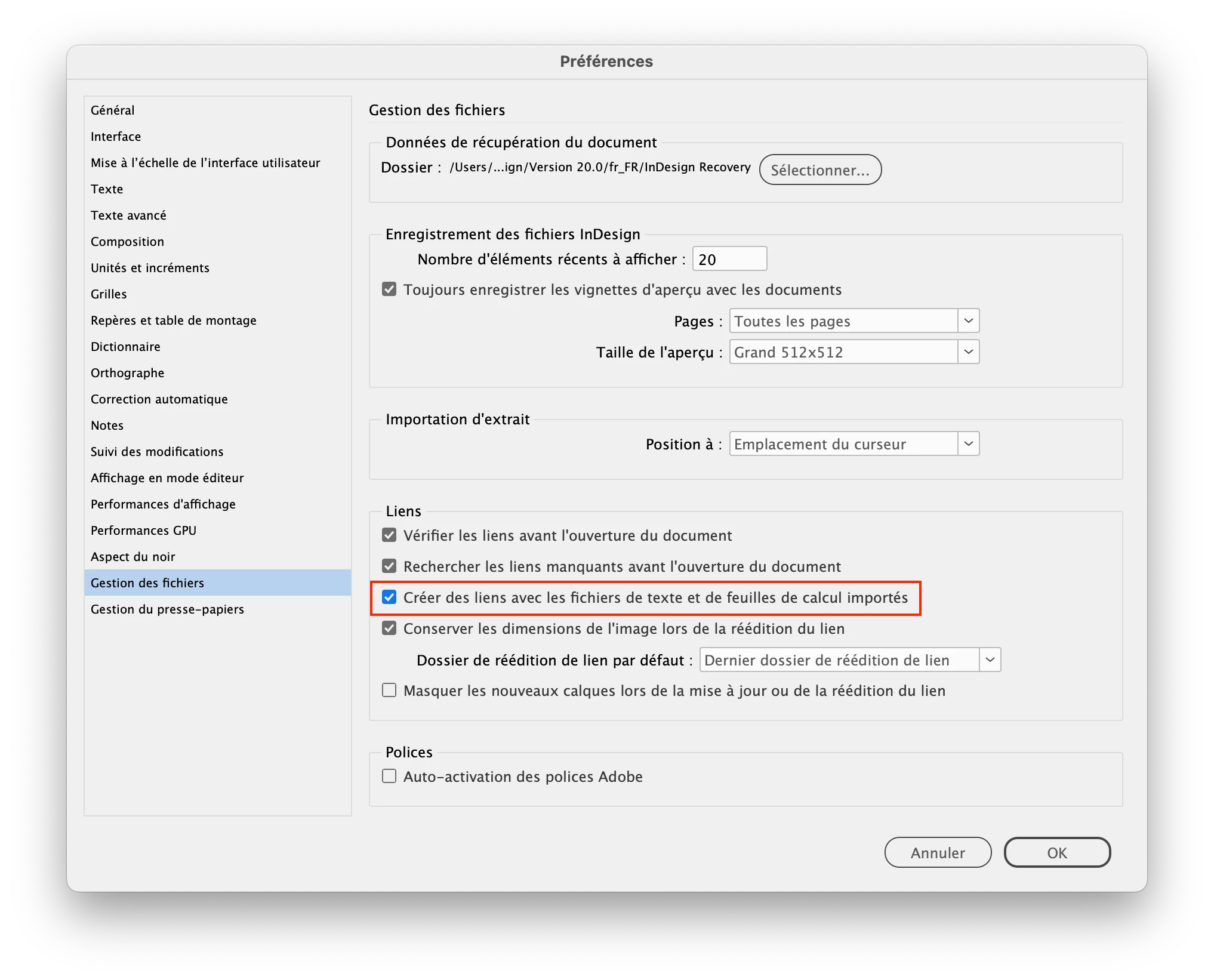
This option must be ticked in the InDesign preferences.

But be aware  that updating the data will erase any typographic and color enrichments to the table cells that you may have made.

1 reply

jmlevy
Community Expert
jmlevyCommunity ExpertCorrect answer
Community Expert
June 27, 2025

This option must be ticked in the InDesign preferences.

But be aware  that updating the data will erase any typographic and color enrichments to the table cells that you may have made.

Case0535Author
Inspiring
June 27, 2025

So, it's doable and I am just an idiot...  that tracks.   ;op

Thanks-