
Inspiring
Jul 29, 2025 10:44 AM UTC
Answered

Vector charts exported from InDesign look pixelated in Acrobat (Windows)

I’m building charts in Illustrator (100% vector, no effects, no transparency, no filters, no spot colors, Im' working in RGB in Illustrator) and placing them into InDesign 20.3.1 on macOS Ventura. I export to Interactive PDF (RGB). On my Mac in Acrobat and in Dropbox’s inline preview, everything is crisp. Two clients on Windows + Acrobat see (apparently) the same charts as pixelated, as if Acrobat is showing a low‑res proxy (similar to InDesign’s “Typical” Display Performance setting). When I import the same PDF into Illustrator, all elements are still vector paths.


We’ve used this workflow for ~8 years without issues; the previous project 2 months ago (earlier InDesign version) was fine. I can't get a sign off on this project until we settle this issue. The only thing that changed is that I updated Indesign and I'm slow to update, so I was working with early 2024 versions previously.


Has anyone run into this issue? I need to export this as an Interactive pdf to preserve all the hyperlinks.

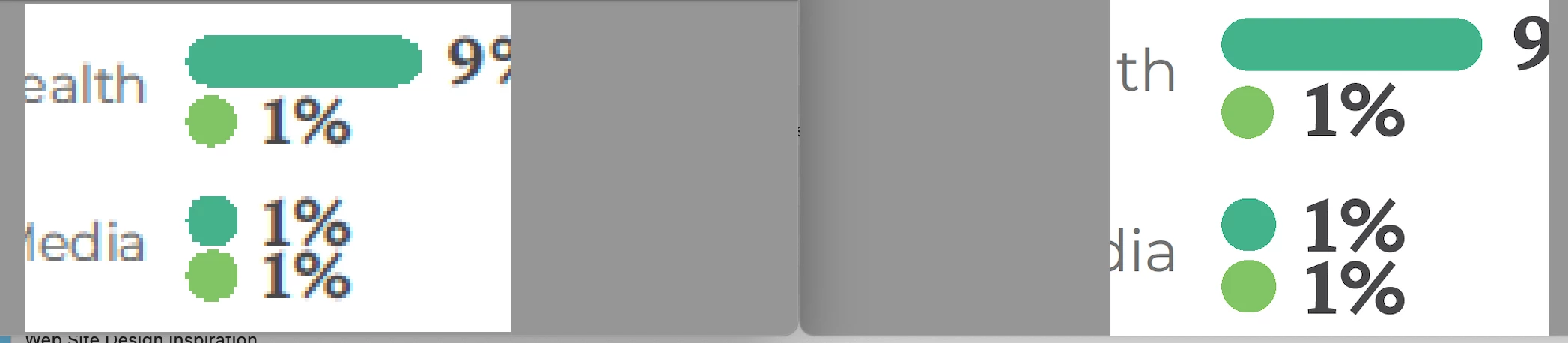
Side-by-side screenshots attached show my view vs. theirs at similar zoom levels. (Cross-posted in Acrobat forum.)
 

venus_kCorrect answer
Inspiring
Jul 30, 2025 8:55 PM UTC

Here is an update:

I fixed this issue after consulting ChatGPT for troubleshooting. What fixed it was one of these two things:
1) Updating InDesign to the newest version
2) Outlining all the strokes in the placed Adobe Illustrator file. The bar charts I made were comprised of thick strokes with rounded ends. 

It turns out it was some very specific rendering issue between the Illustrator AI  → placed in my specific version of InDesign → output to Interactive PDF → viewed on client’s specific version of Windows Adobe Acrobat (not Reader).

The previous project, with similar charts built from heavy strokes, was done on an earlier version of InDesign did not turn up with these rendering issues. I sent the client 2 revisions of the current project and both versions had the same rendering error on the same charts.

14 replies

venus_kAuthorCorrect answer
Inspiring
Jul 30, 2025 8:55 PM UTC

Here is an update:

I fixed this issue after consulting ChatGPT for troubleshooting. What fixed it was one of these two things:
1) Updating InDesign to the newest version
2) Outlining all the strokes in the placed Adobe Illustrator file. The bar charts I made were comprised of thick strokes with rounded ends. 

It turns out it was some very specific rendering issue between the Illustrator AI  → placed in my specific version of InDesign → output to Interactive PDF → viewed on client’s specific version of Windows Adobe Acrobat (not Reader).

The previous project, with similar charts built from heavy strokes, was done on an earlier version of InDesign did not turn up with these rendering issues. I sent the client 2 revisions of the current project and both versions had the same rendering error on the same charts.

Translate
leo.r
Community Expert
Community Expert
Jul 30, 2025 7:48 PM UTC
quote

I need to export this as an Interactive pdf to preserve all the hyperlinks.


By @venus_k


While this probably isn't related to the issue you experience, you can preserve hyperlinks in the normal (Print) PDF, too:


Translate
Dave Creamer of IDEAS
Community Expert
Community Expert
Jul 29, 2025 2:50 PM UTC

Check to see if the Acrobat Smooth Line Art preference is off. 

Translate
David Creamer: Community Expert (ACI and ACE 1995-2023)
venus_kAuthor
Inspiring
Jul 29, 2025 3:36 PM UTC

Thanks. I will ask them to check that, I am familar with that issue. But in the past that has not caused type to also be pixelated. And I also haven't had that particular issue in a decade or more. But I'm not going to rule that out.

Translate
Willi Adelberger
Community Expert
Community Expert
Jul 29, 2025 1:02 PM UTC

What file type was used to place them in InDesign 

Translate
venus_kAuthor
Inspiring
Jul 29, 2025 1:07 PM UTC

AI file from Adobe Illustrator. I worked in RGB and output to RGB.

Translate
Willi Adelberger
Community Expert
Community Expert
Jul 29, 2025 2:16 PM UTC

Did you use any effects?

Translate
venus_kAuthor
Inspiring
Jul 29, 2025 12:50 PM UTC

Additional info: I had the thought that maybe the vector graphics affected are ones that are on the same page as a raster graphic – but I checked the client's comments and that is not the case. Fully vector pages (only type and vector graphics as page content) are also affected. And both the type done in Illustrator and the vector artwork is appearing low-res or pixelated.

Translate
BobLevine
Community Expert
Community Expert
Jul 29, 2025 11:33 AM UTC

Can you post the PDF here? Can you confirm how these PDFs are being viewed by the client?

Translate
venus_kAuthor
Inspiring
Jul 29, 2025 12:34 PM UTC

Due to my contract, I can't post the PDF online until the project is pubicly released (a conundrum). I asked for the client's permission to send it privately to Adobe.

Translate
BobLevine
Community Expert
Community Expert
Jul 29, 2025 12:56 PM UTC

I'm on Windows 11. If you'd like to share the file with me privately, I'll take a look. Otherwise, I'm afraid I'm all out of ideas.

Translate
Mike Witherell
Community Expert
Community Expert
Jul 29, 2025 11:27 AM UTC

Likely the problem is with the 2 clients who have "Windows + Acrobat". Are they certain that they are viewing the PDF in Acrobat Pro (installed as an app on their computer)?

Translate
Mike Witherell
venus_kAuthor
Inspiring
Jul 29, 2025 12:42 PM UTC

I have asked them if they have Acrobat Pro or Reader. The strange part is that when the view the report on Dropbox, via Dropbox's inline PDF viewer, it looks fine. I may have to ask them to use a non-Adobe PDF viewer as a workaround to get the document approved.

The issue is that this is a publicly-released report that will be viewed online. The whole reason for my Illustrator-vector-to-InDesign workflow is to produce graphics that are crisp no matter how the viewers are viewing the PDF – and to also maintain all the hyperlinks in the PDF. I've done hundreds of reports for the client's org, all of which have been placed online, and no one has ever reported seeing pixelated chart graphics.

Translate