
ShynnSup
Inspiring
August 11, 2020
Answered

Version 4 ICC Profiles were converted to version 2 ICC Profiles

  • August 11, 2020
  • 2 replies
  • 25172 views

Hi all,


I keep getting this annoying message when PDF exporting.

Yes, I know they are a couple of threads with the same issue.

Yes, I have images in RGB space, that is why I get the alert.

Yes, my PDF exports fine.


I have set Indesign's settings:

  • RGB space to sRGB.

  • Transparency Blend Space to Document RGB.


I even started a whole new document and chose 'Web' instead of 'Print'.


https://community.adobe.com/t5/indesign/icc-profile-error/m-p/5355324?page=1#M19716

Did as suggested here and no alert. But:

I want to export for Web. Indesign should not be doing any conversion by default! How can I solve this without having to change the PDF stantard? 
 

Correct answer rob day

I want to export for Web.


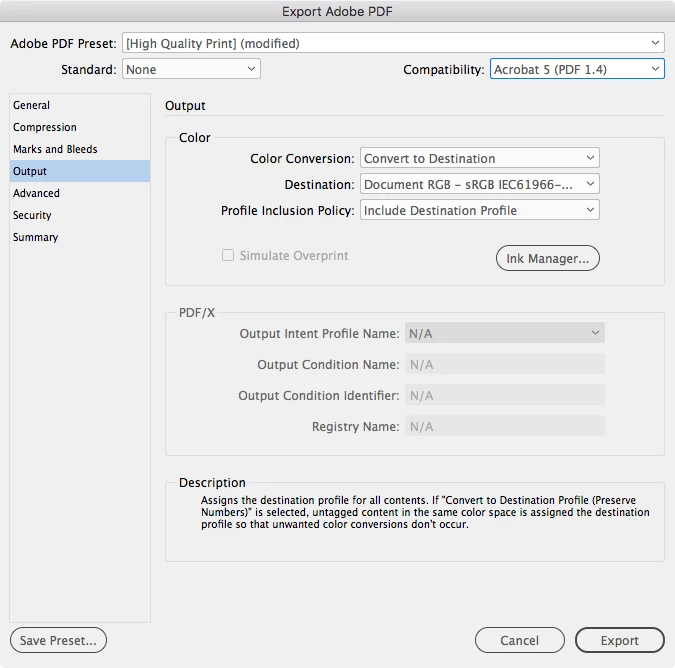
Also, if this is for web you’ll want all of the color to be converted to sRGB, so rather than use No Conversion, set your Output tab to this—with the Destination set to sRGB it doesn’t matter if you mix color spaces in the document everything will get converted to sRGB in the final PDF. This does not throw the profile version warning:


2 replies

rob day
Community Expert
rob dayCommunity ExpertCorrect answer
Community Expert
August 11, 2020

I want to export for Web.


Also, if this is for web you’ll want all of the color to be converted to sRGB, so rather than use No Conversion, set your Output tab to this—with the Destination set to sRGB it doesn’t matter if you mix color spaces in the document everything will get converted to sRGB in the final PDF. This does not throw the profile version warning:


Participant
March 20, 2021

This suggestion is helped. Tnx

rob day
Community Expert
Community Expert
August 11, 2020

Can you show us a screen capture of the Output tab of your Export settings?

ShynnSup
ShynnSupAuthor
Inspiring
August 11, 2020

They are the default.


General:


Output:


rob day
Community Expert
Community Expert
August 11, 2020

Does the document have any placed files with embedded profiles? I can replicate what you are seeing by placing an image with an embedded version 4 profile—Coated GRACol2013 in this case:


AcrobatPro’s Object Inspector shows the image’s embedded profile as Modified