
Inspiring
October 25, 2018
Answered

Vertical Justification.... where's it gone?

  • October 25, 2018
  • 1 reply
  • 767 views

Hi,

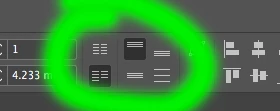
This feature seems to have been removed? At least I can't find it. (See screenshot with green highlight)

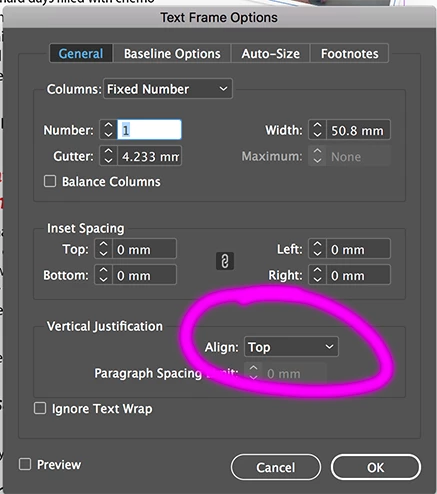
I used it quite regularly and now it's an extra few clicks to find it buried in the attached - (see pink highlight)
    This topic has been closed for replies.
    Correct answer Steve Werner

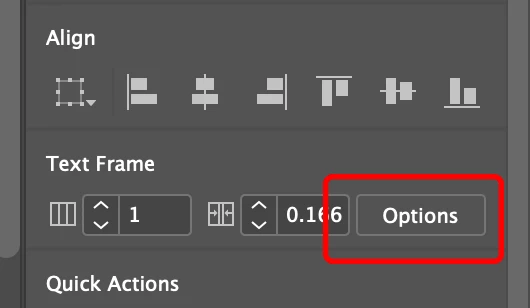
    On the Properties panel, scroll down to Text Frame, the click on the Options button. It opens the Text Frame Options dialog, where you can choose Vertical Justification.

    1 reply

    Steve Werner
    Community Expert
    Community Expert
    October 25, 2018

    Same place as it always is: Object > Text Frame Options.  Whether is shows in your Control panel (the skinny panel at the top of your window) depends on whether you're turned the feature on and whether, depending on your monitor resolution, there is room for it. Select the text frame, then choose Customize ("gear" icon) at the far right of your Control panel.

    If there's not enough room to display, turn off some of the option(s) above it.

    Participant
    October 25, 2018

    That's fine for the top control panel, but in the new properties panel there is no shortcut

    Steve Werner
    Community Expert
    Steve WernerCommunity ExpertCorrect answer
    Community Expert
    October 25, 2018

    On the Properties panel, scroll down to Text Frame, the click on the Options button. It opens the Text Frame Options dialog, where you can choose Vertical Justification.