
Participant
May 14, 2024
Answered

Vertical lines in printed image

  • May 14, 2024
  • 4 replies
  • 783 views

I'm trying to print a document that includes an image on an office printer/copier. The image (a photo, scanned and included below for reference) looks OK when rendered on-screen, but when I print it, vertical lines appear across the subject's face:
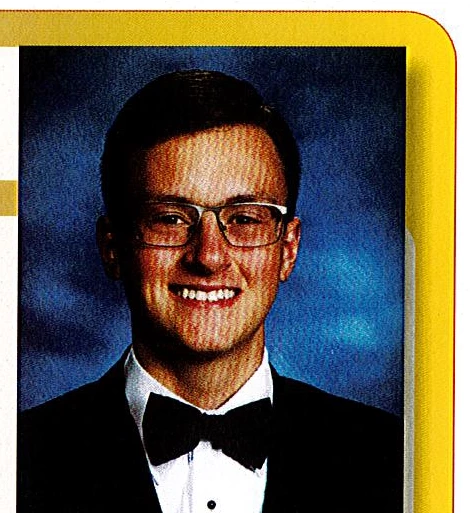
Any ideas on how to solve this issue?

Thanks!

This topic has been closed for replies.
Correct answer Scott Falkner

I find a bit of Median (Filter > Noise > Median) done on each channel helps.

4 replies

Participant
May 22, 2024

Thanks so much, everyone! I was able to get another photo that worked better, but these tips will help immensely if (and likely when) this issue arises in the future.

Brad @ Roaring Mouse
Community Expert
Community Expert
May 14, 2024

I suspect the same. If this photo was scanned from a printed piece, it will have a bit of the printed halftone dot pattern in the scan, and when you print this, the halftone patter of your printer conflicts with it. To minimize it, try smooth out the original scan ("descreen") by opening it in Phostoshop and applying a couple of filters. I'd start with Filter > Noise > Median, starting with a low number and increase it until you see the dot pattern disappear. You can also try Blur. Either way, there's a balance between when the filter helps you out and when it starts to affect the clarity of the photo, so you need to try a few settings and find a happy medium. Then, try and print it again.

Note: the moire effect changes between printers, so even if you find a good setting for your own, it may be completely different on another printer.


Scott Falkner
Community Expert
Scott FalknerCommunity ExpertCorrect answer
Community Expert
May 15, 2024

I find a bit of Median (Filter > Noise > Median) done on each channel helps.

Peter Spier
Community Expert
Community Expert
May 14, 2024

I agree it looks like a moire problem. You can sometimes correct that by rotating the image slightly in the frame.

Derek Cross
Community Expert
Community Expert
May 14, 2024

 It looks like a moiré effect caused by conflicting screen patterns.