


Participant
Sep 15, 2025 12:54 PM UTC
Answered

Vertical text not spacing evenly

I've enabled the Japanese version so I could type vertically and the page numbers get unevenly spaced between certain numbers .
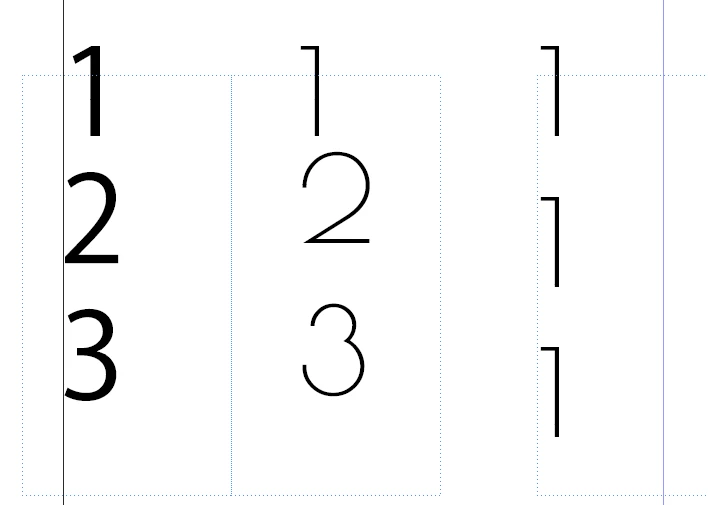


All three boxes have the same formatting, except the first is a Japanese font. The issue seems to be that the "1" in my font of choice (second two boxes) is spaced differently than other numbers. Is there a way to get all of these to space evenly automatically? None of the tracking, kerning, leading, line height etc. options seem to remedy this. 

-_._5342Correct answer
Participant
Sep 16, 2025 11:30 AM UTC

This issue is that the paragraph was set to Adobe Paragraph Composer and not Adobe Japanese Paragraph Composer.

5 replies

Joel Cherney
Community Expert
Community Expert
Sep 15, 2025 5:02 PM UTC

I actually can't reproduce that at all, oddly enough. Are you using tatechuyoko? I'm guessing not - as it doesn't matter what font I pick or what numeral style I use, my 1s line up correctly:


Ehh, on second thought, perhaps the Arial Narrow and Proxima Nova examples are pushed a little bit to far to the right, I think. But if you've turned tatechuyoko on, it'll basically behave as if it is centered, which seems to be closer to what you'd want. Additionally, your preferred font seems to have a very short serif/ear/what would you call that stroke, anyways? so I imagine it'd render closer to the centerline than any of the examples I picked out. 

Translate
-_._5342AuthorCorrect answer
Participant
Sep 16, 2025 11:30 AM UTC

This issue is that the paragraph was set to Adobe Paragraph Composer and not Adobe Japanese Paragraph Composer.

Translate
Barb Binder
Community Expert
Community Expert
Sep 15, 2025 3:08 PM UTC

I've enabled the Japanese version so I could type vertically

Are you working in a Japanese-language document, or do you just need some vertical text?


~Barb

Translate
~Barb at Rocky Mountain Training
-_._5342Author
Participant
Sep 16, 2025 7:29 AM UTC

Just needed the vertical text. Wasn't getting the results I wanted from the English version's Text to Path Tool, and was hoping switching versions would fix that. Did not...

Translate
-_._5342Author
Participant
Sep 15, 2025 2:12 PM UTC

I believe the issue is that this font does not have the correct vertical kerning (if any) and would need to be edited in third-party software. 

Translate