Participant
September 25, 2018
Answered

Very inexperienced asking for help.

  • September 25, 2018
  • 3 replies
  • 459 views

I use InDesign too infrequently to have become knowledgeable and a measure of my lack of experience is that although I have a licence for CS5 I still find CS2 to be easier to use and it does all I need. I know I should upgrade, study etc but I'm too old to want to do this any more. So I'm here asking for any enlightenment that you might be kind enough to offer.

Something seems to have changed in the way ID works for me and I've reset the preferences which had no effect.

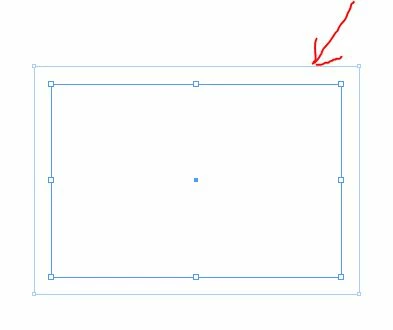
If I create a Frame, it appears with another "frame" around it and I don't know what it's called or what it's used for. To me it's a nuisance

and I found that if I click the button "Clear overrides" it is removed and I can simply use the frame.

I'm fairly sure this didn't happen in months gone by, so may I ask:

Is there a setting which would change this behaviour? and, if you have time and patience,

What is it and what am I doing wrong or missing?

Please keep the explanation in simple terms that a novice will understand  - thanks.
David

    This topic has been closed for replies.
    Correct answer Jongware

    OK I think the light might be coming on. If I create a new document then the frame is produced without the outer "thingy", so am I right in thinking that the default for text wrap is help within the document properties? If so, can I change that default setting in said document, or is it too difficult.

    Thanks again for patient and friendly responses.

    David


    You can set global preferences (for new documents) by closing all documents and then change it.

    What you have now is a document-specific setting. With that document open, make sure nothing is selected at all, then change the text wrap to how you want it. That should do it.

    3 replies

    Jongware
    Community Expert
    Community Expert
    September 25, 2018

    Don't worry! This is text wrap.

    Select the frame and disable it by clicking the red circled button.

    You probably selected this once to "see what it does" and forgot that selecting just about any option with nothing selected sets it as the default for new objects. Do the same thing again to disable this (i.e., set the default back to non-wrapping).

    Participant
    September 25, 2018

    Thanks. I've certainly forgotten:

    "forgot that selecting just about any option with nothing selected sets it as the default for new objects."

    I've been having trouble of late with text disappearing when over an object and I've found clues all pointing to text wrap (never had this trouble before).

    I opened ID, no document open and clicked on the "No text wrap" button in the palette.

    Closed, shut down , reopened ID, drew a text frame and the palette defaults as below. Sorry, I'm still missing something.

    vladan saveljic
    Inspiring
    September 25, 2018

    text wrap

    with no document open set 0 value or tick the first icon on the left (no text wrap)

    Geоrge
    Legend
    September 25, 2018

    Don't worry! This is inset spacing.

    Remember, never say you can't do something in InDesign, it's always just a question of finding the right workaround to get the job done. © David Blatner
    Participant
    September 25, 2018

    Thanks, George, but the spacing shows as zero here:

    Participant
    September 25, 2018

    OK I think the light might be coming on. If I create a new document then the frame is produced without the outer "thingy", so am I right in thinking that the default for text wrap is help within the document properties? If so, can I change that default setting in said document, or is it too difficult.

    Thanks again for patient and friendly responses.

    David